Registry Internals: How Docker Hub Stores Your Bits
How Docker Hub and private registries actually work — the content-addressable storage model, layer deduplication, and what happens when you push or pull.
#The Last Piece
Every docker pull ends at a registry. Every docker push begins with one. We've treated the registry as a black box for most of this course — a place where images live. In this final lesson, we open the box.
It turns out there's no magic. A registry is an HTTP server with a well-defined API, backed by a flat directory of files named after their SHA-256 hashes. Understanding how it works completes the picture — and it directly explains behaviors you've seen throughout this course: why pulling a shared base image is instant the second time, why pushing a new layer takes time but pushing the same layer again doesn't, why an image tag can change but a digest never will.
#The OCI Distribution Spec
The registry API is standardised as the OCI Distribution Spec (formerly the Docker Registry HTTP API V2). Any registry that implements it — Docker Hub, Amazon ECR, Google Artifact Registry, GitHub Container Registry, a self-hosted Harbor instance, the minimal registry:2 image — speaks the same HTTP protocol. The Docker daemon doesn't know or care which registry it's talking to.
The spec defines a small set of endpoints. Let's interact with all of them directly.
Start a local registry:
docker run -d -p 5000:5000 --name registry --restart always registry:2#Ping: Check Registry Compatibility
curl -s http://localhost:5000/v2/{}An empty JSON object and a 200 OK. This is the registry handshake — it confirms the server speaks the V2 API. If the registry requires authentication, this endpoint returns 401 Unauthorized with a WWW-Authenticate header describing how to get a token. Docker Hub does this; our local registry doesn't.
#Push an Image
docker pull alpine:3.20
docker tag alpine:3.20 localhost:5000/alpine:3.20
docker push localhost:5000/alpine:3.20The push refers to repository [localhost:5000/alpine]
d4fc045c9e3a: Pushed
3.20: digest: sha256:1ae23480... size: 528#List Tags
curl -s http://localhost:5000/v2/alpine/tags/list | python3 -m json.tool{
"name": "alpine",
"tags": [
"3.20"
]
}#Fetch the Manifest
curl -s \
  -H "Accept: application/vnd.oci.image.manifest.v1+json" \
http://localhost:5000/v2/alpine/manifests/3.20 | python3 -m json.tool{
"schemaVersion": 2,
"mediaType": "application/vnd.oci.image.manifest.v1+json",
"config": {
"mediaType": "application/vnd.oci.image.config.v1+json",
"digest": "sha256:a3ed95ca...",
"size": 1472
},
"layers": [
{
"mediaType": "application/vnd.oci.image.layer.v1.tar+gzip",
"digest": "sha256:d4fc045c...",
"size": 3408729
}
]
}This is the exact JSON structure from lesson 22 — now you're fetching it raw from a live registry. The digest fields are SHA-256 hashes of the blobs stored on the server.
#Fetch a Blob Directly
curl -s http://localhost:5000/v2/alpine/blobs/sha256:a3ed95ca... | python3 -m json.tool{
"architecture": "amd64",
"os": "linux",
"config": {
"Env": ["PATH=/usr/local/sbin:/usr/local/bin:/usr/sbin:/usr/bin:/sbin:/bin"],
"Cmd": ["/bin/sh"],
"WorkingDir": ""
},
"rootfs": {
"type": "layers",
"diff_ids": ["sha256:d4fc045c..."]
}
}The config blob — the same one docker image inspect shows you. The registry serves it over plain HTTP as a content-addressed file.
#The Push Protocol: Every Request
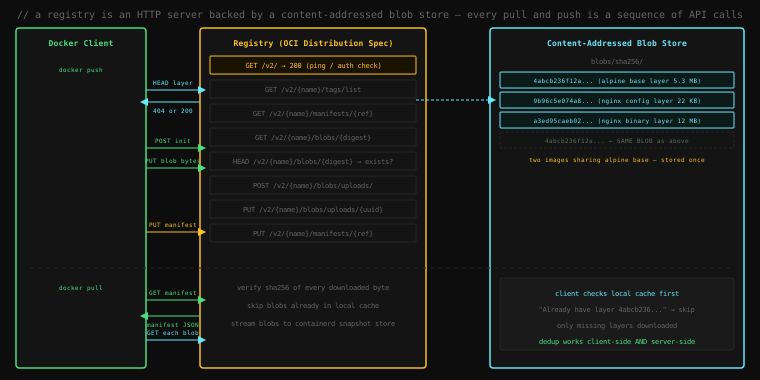
When you run docker push, the daemon doesn't upload the entire image in one shot. It's a precise sequence of operations designed around content addressing. Let's trace it.
#Step 1: For Each Layer — Does the Registry Already Have It?
HEAD /v2/{name}/blobs/{digest}Before uploading a single byte, the daemon sends a HEAD request for each layer digest. The registry replies 200 OK if it has the blob, 404 Not Found if it doesn't.
This is the source of the "Layer already exists" message you see during push:
3.20: digest: sha256:1ae23480...
d4fc045c9e3a: Layer already exists
The HEAD check returned 200. The layer was already on the server. Nothing was uploaded. This works not just for re-pushing the same image — it works across different images that share the same base layer. If 100 teams all use python:3.12-slim as their base, the Alpine base layers that underpin it are stored on Docker Hub exactly once, shared by all of them.
#Step 2: Upload Missing Layers (Two-Phase)
If HEAD returns 404, the layer must be uploaded:
# Phase 1: initiate an upload session, receive a UUID
POST /v2/{name}/blobs/uploads/
→ 202 Accepted
→ Location: /v2/{name}/blobs/uploads/{uuid}

# Phase 2: stream the blob bytes, finalize with the digest
PUT /v2/{name}/blobs/uploads/{uuid}?digest=sha256:{hash}
Content-Type: application/octet-stream
[blob bytes]
→ 201 Created
→ Location: /v2/{name}/blobs/sha256:{hash}
The registry verifies the SHA-256 hash of the received bytes against the digest query parameter. If they don't match — network corruption, partial upload, tampered data — the PUT fails with 400 Bad Request. The blob is not stored. The integrity guarantee is enforced at the protocol level.
#Step 3: Upload the Manifest
Once all layers are confirmed present, the manifest is pushed last:
PUT /v2/{name}/manifests/{tag}
Content-Type: application/vnd.oci.image.manifest.v1+json
[manifest JSON]
→ 201 Created
→ Docker-Content-Digest: sha256:{manifest-hash}
The tag (3.20) is now a pointer to this manifest digest. Tags are mutable — you can push a new manifest to the same tag, and the tag silently updates. The old manifest (and its blobs) remains in the registry unless explicitly deleted or garbage-collected. Digests are permanent.
#The Pull Protocol: Every Request
docker pull localhost:5000/alpine:3.20#Step 1: Fetch the Manifest (or Image Index)
GET /v2/alpine/manifests/3.20
Accept: application/vnd.oci.image.index.v1+json,
        application/vnd.oci.image.manifest.v1+json,
        application/vnd.docker.distribution.manifest.v2+json
The Accept header lists all manifest media types the client understands. The registry returns the highest-priority type it has. For multi-platform images, this returns the Image Index. For single-platform images, the manifest directly.
If an Image Index is returned, the daemon reads the host platform, selects the matching entry, and fetches that platform's manifest with a second request.
#Step 2: Check the Local Cache for Each Layer
For each layer digest in the manifest, the daemon checks the local content-addressable store:
/var/lib/docker/overlay2/ ← each layer is a directory named by its chain IDIf the layer exists locally (from a previous pull of any image that shares it), it's skipped. This is client-side deduplication — complementing the server-side deduplication during push.
alpine:3.20: Pulling from library/alpine
d4fc045c9e3a: Pull complete ← only missing layers are downloaded#Step 3: Download Missing Layers
GET /v2/alpine/blobs/sha256:d4fc045c...
→ 200 OK
→ [gzip compressed tar stream]
The daemon streams the blob, verifies the SHA-256 hash as it arrives, and hands it to containerd's snapshot system which unpacks it into the overlay2 store.
A corrupted or tampered blob fails hash verification and is discarded. The daemon retries or fails the pull. There is no way to silently deliver a different image than what the manifest specifies — the hash is the guarantee.
#What the Blob Store Actually Looks Like
The registry's storage is the simplest possible design: a flat directory hierarchy where every file is named by its content hash.
# Inspect the local registry's storage
docker exec registry find /var/lib/registry -type f | head -20/var/lib/registry/docker/registry/v2/repositories/alpine/_manifests/tags/3.20/current/link
/var/lib/registry/docker/registry/v2/repositories/alpine/_manifests/revisions/sha256:1ae23.../link
/var/lib/registry/docker/registry/v2/blobs/sha256/d4/d4fc045c9e3a.../data
/var/lib/registry/docker/registry/v2/blobs/sha256/a3/a3ed95caeb02.../dataThe blobs/sha256/ directory contains the actual data. The repositories/ directory contains only symlinks — pointers from image names and tags to blob hashes. The tag 3.20 is a file containing a hash. The hash points to a manifest blob. The manifest blob contains more hashes pointing to config and layer blobs.
Every piece of data in the system is a hash pointing to another hash or a content blob. This is a Merkle tree — the same data structure used by Git, Bitcoin, and virtually every content-integrity system built in the last twenty years. If you know the root hash (the manifest digest), you can verify every byte of the entire image without trusting the registry.
Push a second image that shares the alpine base:
docker pull nginx:alpine
docker tag nginx:alpine localhost:5000/nginx:alpine
docker push localhost:5000/nginx:alpined4fc045c9e3a: Layer already exists ← the alpine base, shared with alpine:3.20
a3ed95caeb02: Layer already exists ← another shared layer
9b96c5e074a8: Pushed ← nginx's own layersNow inspect the blob store size:
docker exec registry du -sh /var/lib/registry/docker/registry/v2/blobs/Two images, one blob store. The shared layers are not duplicated. Every registry — Docker Hub, ECR, GCR — works this way. The entire python:3.12-slim base is stored once on Docker Hub, regardless of how many thousands of images are built from it.
docker rm -f registry#Authentication: The Bearer Token Flow
Docker Hub and private registries require authentication. The flow is standardised:
1. Attempt the request unauthenticated:
curl -I https://registry-1.docker.io/v2/HTTP/1.1 401 Unauthorized
WWW-Authenticate: Bearer realm="https://auth.docker.io/token",
service="registry.docker.io",
scope="repository:library/nginx:pull"2. Exchange credentials for a token:
curl -s "https://auth.docker.io/token?service=registry.docker.io&scope=repository:library/nginx:pull" \
| python3 -m json.tool{
"token": "eyJ...",
"expires_in": 300,
"issued_at": "2026-04-17T09:00:00Z"
}3. Use the token:
curl -s \
  -H "Authorization: Bearer eyJ..." \
  -H "Accept: application/vnd.oci.image.manifest.v1+json" \
  "https://registry-1.docker.io/v2/library/nginx/manifests/alpine"
The Docker daemon handles this automatically. The docker login command stores credentials in ~/.docker/config.json (or the system credential store). The daemon retrieves them, performs the token exchange, and attaches the Bearer token to every subsequent registry request.
#Major Registries
| Registry | URL | Notes |
|---|---|---|
| Docker Hub | registry-1.docker.io | Default. Rate limited: 100 pulls/6h unauthenticated, 200/6h free account |
| GitHub Container Registry | ghcr.io | Per-repo permissions, generous limits, integrates with Actions |
| Amazon ECR | *.dkr.ecr.*.amazonaws.com | Per-account, IAM auth, no egress fees within AWS |
| Google Artifact Registry | *-docker.pkg.dev | Replaced GCR, per-project, IAM auth |
| Harbor | self-hosted | Open source, full OCI Distribution Spec, vulnerability scanning built in |
All implement the OCI Distribution Spec. Images pushed to any of them with docker push can be pulled with docker pull. The registry is interchangeable — the spec is the contract.
Docker Hub rate limits matter at scale. A CI pipeline that pulls node:20-alpine on every build for 50 engineers will hit the unauthenticated limit quickly. Solutions: docker login in CI (authenticated limit is higher), mirror the image in a private registry, or use a registry mirror cache in front of Docker Hub.
#Running a Production-Grade Private Registry
The minimal registry:2 is fine for local use. For production, Harbor adds:
- Web UI with team and project management
- Vulnerability scanning (Trivy integration built in)
- Image signing and policy enforcement
- Proxy caching (mirror Docker Hub, only pull what you actually use)
- Replication between registries
- Audit logging
# Harbor via docker compose (simplified — see harbor.io for full setup)
curl -L https://github.com/goharbor/harbor/releases/download/v2.10.0/harbor-online-installer-v2.10.0.tgz | tar xz
cd harbor
./install.sh
For most teams, a managed registry (ECR, GAR, GHCR) is the right choice — no infrastructure to run, integrated auth, no rate limits on your own images.
#The Complete Picture
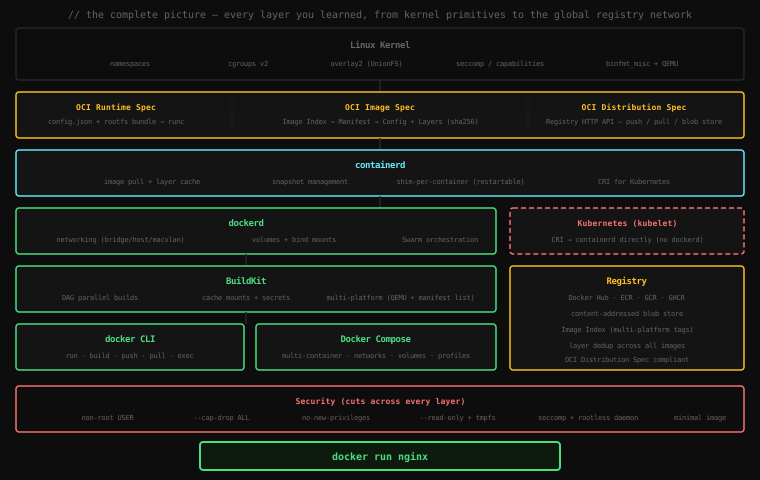
This is what happens between typing docker run nginx and nginx serving its first HTTP request. Every step maps to a lesson in this course.
#docker run nginx — The Full Story
You know enough now to trace every step.
In the registry: nginx resolves to docker.io/library/nginx:latest. The daemon sends GET /v2/library/nginx/manifests/latest with a Bearer token obtained from auth.docker.io. The registry returns an Image Index. The daemon selects the linux/amd64 entry and fetches that platform's manifest. For each layer not in the local cache, it sends GET /v2/library/nginx/blobs/{digest}, verifies the SHA-256 hash, and stores the layer in /var/lib/docker/overlay2/.
In the image: The config blob specifies CMD ["nginx", "-g", "daemon off;"], EXPOSE 80, and the ordered layer digests. containerd unpacks the layers through overlay2 — the alpine base, the nginx binary layer, the config layer — creating a merged view of the filesystem. A thin read-write layer is placed on top.
In BuildKit (if you built from a Dockerfile): your Dockerfile was compiled into a DAG, independent stages ran in parallel, cache mounts saved your dependency downloads, and any secrets you needed were injected without entering a layer.
In containerd: the image config is merged with your docker run flags to produce config.json — the OCI Runtime Spec bundle. A containerd-shim-runc-v2 process is forked. It calls runc create with the bundle.
In runc: clone(CLONE_NEWPID | CLONE_NEWNET | CLONE_NEWNS | CLONE_NEWUTS | CLONE_NEWIPC) — five new namespaces. Cgroup limits are applied. The seccomp profile is loaded. The capabilities you specified (or the defaults) are set. execve("/docker-entrypoint.sh") hands off to the container process.
In the kernel: the container process runs. From the kernel's perspective, it's just a process — with restricted namespaces, resource limits, and a filtered syscall table. The nginx master process calls bind(:80), which the kernel forwards through the veth pair, through the bridge, through iptables DNAT, to your -p 8080:80 mapping on the host. The first HTTP request arrives.
In the security layer: if you've applied the hardening from lesson 27 — non-root user, dropped capabilities, no-new-privileges, read-only filesystem — then this entire chain executes with the minimum authority needed to serve HTTP requests, and nothing more.
#What You've Actually Learned
This course didn't start with Docker. It started with a problem.
We started in 1990s-era production infrastructure — bare metal servers with unique hostnames, hand-crafted configurations, and the constant dread of environment drift. We watched virtualization solve the physical server problem while introducing a new tax: gigabytes of OS overhead for every isolated workload. We met dotCloud, a struggling PaaS startup that was about to throw away the product they'd built and open-source their internal tooling on a stage at PyCon.
We went down to the kernel, where the real story lives. You saw chroot — the 1982 primitive that started the idea of filesystem isolation. You saw clone() create PID, network, mount, UTS, and IPC namespaces, turning a process into something that can't see its neighbors. You saw cgroups enforce CPU and memory limits that can't be exceeded regardless of what the container process tries to do. You saw overlay2 stack readonly image layers with a single writable one on top, letting a thousand containers share the same nginx binary without consuming a thousand copies of it.
You traced a packet from the internet through iptables DNAT rules, across a veth pair, through the docker0 bridge, to a container's eth0. You learned when to break out of bridge networking — host mode for latency-critical tools, macvlan when containers need to be first-class citizens on the physical LAN, none when a training job should be cryptographically unable to phone home.
You learned that a container's writable layer is a scratchpad that vanishes on docker rm, and you learned the three mechanisms for data that must outlive a container: volumes (Docker's Merkle-safe persistent storage), bind mounts (your source code, live), and tmpfs (secrets that must never touch disk). You learned that stateless containers — where every durable piece of state lives in an external service — is not a constraint but a superpower: crash recovery becomes automatic, horizontal scaling becomes trivial, and deployments stop requiring 2am maintenance windows.
You watched Docker nearly fracture the industry it created. You understood why CoreOS was right to demand open standards, why Google was right to donate Kubernetes to neutral governance, and why Docker's greatest legacy isn't a product — it's the OCI Image Spec, the OCI Runtime Spec, and runc, which Docker built and then gave away. You learned that containerd — the runtime underneath Docker, underneath Kubernetes, underneath everything — exists because the container wars forced the monolith apart, and what emerged was better than what came before.
You saw multi-stage builds cut a 856 MB image to 7.5 MB, BuildKit's DAG halve build times without a single Dockerfile change, cache mounts turn a 45-second npm install into a 3-second one, and secret mounts close the credential-in-layer vulnerability that had no clean answer for years. You saw one Docker tag resolve to five different binaries across five CPU architectures through the OCI Image Index, built with QEMU, pushed as a Manifest List, pulled correctly by every machine without a single flag.
You learned that container security is not one wall but five independent layers — non-root user, dropped capabilities, no-new-privileges, read-only filesystem, minimal base image — and that breaking through one still means breaking through the rest. You learned that --privileged is not a flag but a surrender.
And now you've opened the registry — the final black box — and found it to be the most elegant thing of all: a flat directory of files named after their own contents, serving a simple HTTP API, turning the global distribution of software into a series of hash verifications.
#Where to Go From Here
You understand the full stack now. The natural next steps:
Kubernetes — containers at scale, across machines, with automatic scheduling, rolling deployments, and self-healing. Everything you learned here carries forward: OCI images, containerd, namespaces, cgroups. Kubernetes adds a control plane that decides where containers run.
Observability — what's happening inside your containers? Prometheus for metrics (often deployed as a container with --network host or a macvlan interface), structured logging pipelines, distributed tracing. The stateless philosophy you learned means logs go to stdout and get collected — not written to files inside the container.
GitOps — if your containers are reproducible artifacts built from version-controlled Dockerfiles, your deployment state can be version-controlled too. ArgoCD and Flux watch a Git repository and reconcile cluster state to match. The Dockerfile is the unit of trust; the registry is the delivery mechanism.
Supply chain security — Sigstore/cosign for signing images, SBOM generation (Software Bill of Materials), policy enforcement with OPA or Kyverno. The OCI Distribution Spec has attachment support for signatures, attestations, and SBOMs — metadata that lives in the registry alongside the image.
The edge — WebAssembly and containers are converging. WasmEdge and Spin implement the OCI image format for Wasm modules, which means the distribution infrastructure you understand — the registry, the manifest, the content-addressed blob store — is also how the next generation of lightweight runtimes packages and ships code.
Key Takeaway: A registry is an HTTP server implementing the OCI Distribution Spec, backed by a content-addressed flat blob store. Push is a three-step protocol: HEAD-check each layer (skip if present — this is how a base layer shared by thousands of images is stored once on Docker Hub), POST+PUT any missing blobs with hash verification, then PUT the manifest. Pull is the reverse: fetch the manifest, check local cache for each layer, download and verify only the missing ones. Every byte in a registry is identified by its SHA-256 hash — the hash is the guarantee of integrity, and no registry can silently deliver different bytes than what the manifest specifies. You now understand the complete Docker stack, from the kernel system calls that create a namespace to the HTTP protocol that distributes images across the planet. Everything in between — the OCI specs, containerd, the shim, BuildKit, the manifest list, the security layers — exists to make
docker run nginxfeel like a single, simple command.
This is the end of the Docker course. You started knowing that Docker "uses containers." You finish knowing what a container actually is — a process with restricted namespaces and cgroup limits, running on a content-addressed filesystem, secured by capabilities and seccomp, packaged as an OCI image and distributed over a hash-verified HTTP protocol that the entire industry agreed to standardise because the alternative — one company owning the infrastructure layer of the modern internet — was too dangerous to allow. You know Docker from the bottom up. Go build things.