Docker Security: Rootless Mode and Beyond
Rootless mode, Seccomp profiles, AppArmor, and why running as root inside a container is a nightmare — the complete picture of container security.
#The Security Misconception
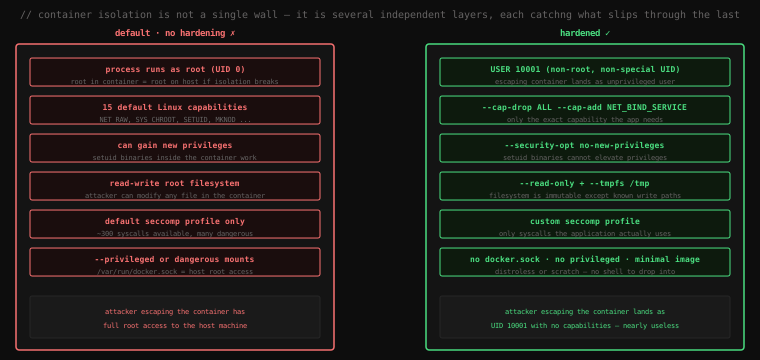
The most common misconception about container security is that the container boundary is a hard wall. It isn't. Containers are isolation, not virtualisation — they share the host kernel. A container process is a host process with extra restrictions. If those restrictions can be bypassed, you're in the host.
The question isn't "is this container isolated?" The question is "if an attacker compromises the process inside this container, what can they do?" The answer depends entirely on what privileges, capabilities, and access you gave that container. The defaults are more permissive than most people realise.
#The Root Problem
Start a container and check who you're running as:
docker run --rm alpine iduid=0(root) gid=0(root) groups=0(root)Root. UID 0. By default, every container process runs as the root user — because the base images run their entrypoints as root, and the Docker daemon doesn't change this unless you tell it to.
Now, uid=0 in a container is still uid=0 from the kernel's perspective. The container's PID namespace is separate from the host's, but the UID namespace, by default, is not remapped. The root user inside the container is the root user on the host.
Verify this from the host side:
docker run -d --name test alpine sleep 300
ps aux | grep "sleep 300" | head -1root 18341 0.0 0.0 sleep 300root in the USER column. The sleep process, which is "inside the container," is visible on the host as a process owned by root. If that process has a vulnerability that allows arbitrary code execution, the attacker is root on the host.
docker rm -f test#Fix One: Run as a Non-Root User
The single highest-impact security improvement for any container is running as a non-root user. Add a USER instruction to your Dockerfile:
FROM node:20-alpine

WORKDIR /app
COPY package*.json ./
RUN npm ci --omit=dev

COPY . .

# Create a non-root user and switch to it
RUN addgroup -S appgroup && adduser -S appuser -G appgroup
USER appuser

EXPOSE 3000
CMD ["node", "server.js"]
The addgroup/adduser commands (Alpine syntax; Debian uses groupadd/useradd) create a system user with no shell, no home directory, and no login. USER appuser switches all subsequent instructions and the container's runtime process to that user.
Verify:
docker build -t secureapp .
docker run --rm secureapp iduid=101(appuser) gid=101(appgroup)Now if an attacker exploits your Node.js application and escapes the container, they land as uid=101 on the host — an unprivileged user with no special access.
You can also override the user at runtime without modifying the image:
docker run --rm --user 1000:1000 alpine iduid=1000 gid=1000#The File Permission Consequence
Non-root users can't write to directories owned by root. If your application writes to /app and that directory is owned by root (it is, because WORKDIR /app runs before USER appuser), your app crashes on startup.
Fix with explicit ownership:
RUN addgroup -S appgroup && adduser -S appuser -G appgroup
# Give the app user ownership of the working directory
RUN chown -R appuser:appgroup /app
USER appuser
Or on distroless images that have a non-root user built in:
FROM gcr.io/distroless/nodejs20-debian12:nonroot
# "nonroot" tag runs as uid=65532 automatically#Linux Capabilities: Fine-Grained Privilege Control
Root's power doesn't come from the username — it comes from Linux capabilities. The kernel divides root's privileges into ~40 discrete capabilities. CAP_NET_BIND_SERVICE allows binding to ports below 1024. CAP_CHOWN allows changing file ownership. CAP_NET_RAW allows raw socket operations (ping, packet capture). Each capability can be granted or revoked independently.
By default, Docker containers start with 15 capabilities. Most applications need none of them.
Check what your container can do:
docker run --rm alpine cat /proc/self/status | grep CapEffCapEff: 00000000a80425fbDecode it:
docker run --rm alpine sh -c 'apk add -q libcap && capsh --decode=00000000a80425fb'0x00000000a80425fb=cap_chown,cap_dac_override,cap_fowner,cap_fsetid,cap_kill,
cap_setgid,cap_setuid,cap_setpcap,cap_net_bind_service,cap_net_raw,cap_sys_chroot,
cap_mknod,cap_audit_write,cap_setfcapFourteen capabilities, most of which a typical web application will never use.
#Drop Everything, Add Back What You Need
# A web API that only needs to bind port 80
docker run --rm \
  --cap-drop ALL \
  --cap-add NET_BIND_SERVICE \
nginx:alpine# A monitoring agent that needs raw socket access
docker run --rm \
--cap-drop ALL \
--cap-add NET_RAW \
--cap-add NET_ADMIN \
mymonitorIn a Compose file:
services:
  api:
    image: myapp:latest
    cap_drop:
      - ALL
    cap_add:
      - NET_BIND_SERVICE
This is the principle of least privilege applied to Linux capabilities. Most production services need zero capabilities — they bind to ports above 1024 (where NET_BIND_SERVICE isn't needed), don't manipulate file ownership, and have no reason to create raw sockets.
Test the effect:
# ping requires CAP_NET_RAW
docker run --rm alpine ping -c 1 8.8.8.8PING 8.8.8.8 (8.8.8.8): 56 data bytes
64 bytes from 8.8.8.8: ...# With NET_RAW dropped:
docker run --rm --cap-drop NET_RAW alpine ping -c 1 8.8.8.8ping: permission denied (are you root?)Dropped. Even though the container is running as root, the capability is gone.
#--security-opt no-new-privileges
Setuid binaries are executables with the setuid bit set — when executed, they run as the file's owner rather than the calling user. sudo and su are the classic examples. If a setuid-root binary exists inside a container, a non-root user inside that container can potentially exploit it to gain root.
--security-opt no-new-privileges tells the kernel (via the PR_SET_NO_NEW_PRIVS prctl) that this process and all its children can never gain more privileges than they started with. Setuid bits are ignored. Privilege escalation via filesystem tricks is blocked.
docker run --rm \
  --security-opt no-new-privileges \
  --user 1000 \
alpine iduid=1000 gid=0 groups=0# Even if a setuid binary exists, it can't escalate
docker run --rm \
--security-opt no-new-privileges \
--user 1000 \
alpine su rootsu: must be run as rootAdd this to every container that runs as a non-root user. It costs nothing and closes a significant escalation vector.
#Seccomp: Syscall Filtering
Capabilities control what Linux privileges a process has. Seccomp (Secure Computing mode) controls which system calls the process is allowed to make at all.
The Linux kernel has over 400 syscalls. A typical application uses a few dozen. The rest — ptrace, mount, pivot_root, kexec_load, create_module — are either rarely needed or actively dangerous from a container escape perspective.
Docker applies a default seccomp profile that blocks around 44 syscalls. You can see it:
docker info | grep seccomp Security Options: seccompThe profile is applied automatically. You don't have to do anything to get basic seccomp filtering.
#Custom Seccomp Profiles
For stricter isolation, write a profile that only allows the exact syscalls your application needs. This is advanced hardening for high-security environments:
{
  "defaultAction": "SCMP_ACT_ERRNO",
  "architectures": ["SCMP_ARCH_X86_64"],
  "syscalls": [
    {
      "names": ["read", "write", "open", "close", "stat", "fstat",
                "mmap", "mprotect", "munmap", "brk", "exit_group",
                "futex", "clone", "execve", "wait4", "socket",
                "connect", "sendto", "recvfrom", "bind", "listen",
                "accept4", "epoll_wait", "epoll_ctl"],
      "action": "SCMP_ACT_ALLOW"
    }
  ]
}
Apply it:
docker run --rm \
  --security-opt seccomp=/path/to/profile.json \
  myapp
Generate a starting profile by running your application under strace and capturing the syscalls it actually makes. Tools like oci-seccomp-bpf-hook can automate this profiling.
For most workloads, the default Docker seccomp profile is sufficient. Custom profiles are for regulated environments where you need auditable proof that specific dangerous syscalls are unreachable.
#Read-Only Filesystems
A writable root filesystem means an attacker who compromises your container can modify binaries, write scripts, install tools, and persist backdoors. Making the filesystem read-only eliminates this entire class of attack:
docker run --rm --read-only alpine sh -c "echo test > /test.txt"sh: can't create /test.txt: Read-only file systemBut most applications need some writable space — /tmp, a run directory, a log path. Mount those as tmpfs (in-memory, gone on stop):
docker run --rm \
  --read-only \
  --tmpfs /tmp:rw,noexec,nosuid,size=64m \
  --tmpfs /run:rw,noexec,nosuid,size=32m \
  nginx:alpine
noexec prevents executing binaries from tmpfs. nosuid prevents setuid escalation from files written there. size= caps memory usage.
In Compose:
services:
  api:
    image: myapp:latest
    read_only: true
    tmpfs:
      - /tmp:rw,noexec,nosuid,size=64m
- /run:rw,noexec,nosuid,size=32m#--privileged: The Nuclear Option
docker run --privileged ...This flag disables virtually all container isolation. A privileged container has all Linux capabilities. The seccomp and AppArmor profiles are dropped. The container can mount filesystems, load kernel modules, access all host devices, manipulate the host network stack, and chroot into the host filesystem.
A privileged container is barely a container. Here's what an attacker with access to a privileged container can do:
# Inside a privileged container — escaping to host
docker run --rm --privileged alpine sh

# Find the host's root filesystem
ls /dev/sda*  # or whatever the disk device is

# Mount it
mkdir /host
mount /dev/sda1 /host

# Chroot into the host
chroot /host
# Now you have a root shell on the actual host
Never use --privileged in production. It exists for CI pipelines that run Docker-in-Docker (building containers inside containers) and for specific system administration tools that genuinely need host-level access. If someone suggests adding --privileged to make something work, find the specific capability or permission that's actually needed.
#The Docker Socket
Almost as dangerous as --privileged:
docker run -v /var/run/docker.sock:/var/run/docker.sock ...Mounting the Docker socket gives the container the ability to talk to the Docker daemon with full control. The container can start privileged containers, mount host directories, and exfiltrate anything accessible from the host. Any container with the Docker socket is effectively a container with root on the host.
Avoid it when possible. If you're using it for CI/CD (to build images inside containers), consider Docker-in-Docker alternatives or rootless Docker, or run the socket-access container with strict network isolation and a read-only filesystem.
#Rootless Docker
The Docker daemon itself runs as root by default. Every container it manages runs with the daemon's authority. If the daemon is compromised, the attacker has root.
Rootless mode runs the Docker daemon itself as a non-root user, using Linux user namespace remapping. The daemon process is unprivileged. Containers it creates have their UIDs remapped — root inside the container maps to the daemon's unprivileged UID on the host, not to host root.
Setup (varies by distro, this is for Ubuntu):
# Install uidmap utilities
sudo apt install uidmap

# Install rootless Docker
dockerd-rootless-setuptool.sh install

# Start the rootless daemon for the current user
systemctl --user start docker

# Use it
export DOCKER_HOST=unix:///run/user/$(id -u)/docker.sock
docker run --rm alpine iduid=0(root) gid=0(root) groups=0(root)Inside the container, it still shows root. But from the host:
ps aux | grep "sleep 300"youruser 18341 0.0 0.0 sleep 300youruser — not root. The uid remapping means the container's root is your unprivileged user on the host. Escaping the container gives the attacker nothing special.
#Rootless Limitations
Rootless mode has tradeoffs:
- No ability to bind ports below 1024 (needs
--cap-add NET_BIND_SERVICEand kernel support) - Overlay2 may require kernel 5.11+ for rootless support (use fuse-overlayfs on older kernels)
- Not all storage drivers or network modes work
- Some CI systems don't support it yet
For most production Kubernetes environments, this is handled at the cluster level rather than per-daemon. But for CI runners and developer machines, rootless Docker is the right default.
#Image Security: Don't Build a Secure Container From an Insecure Image
Runtime hardening is half the picture. The image itself is the other half.
#Vulnerability Scanning
# Docker Scout (built into Docker Desktop and CLI)
docker scout cves nginx:latest✓ SBOM of image already cached, 215 packages indexed
2C 25H 29M 44L vulnerabilities found in 215 packages
Package Severity CVE
openssl 3.0.7 HIGH CVE-2023-0286
libexpat 2.5.0 MEDIUM CVE-2023-52425
...Or with trivy (open source, very thorough):
docker run --rm aquasec/trivy image nginx:latestScanning reveals vulnerabilities in the base OS packages, language runtimes, and libraries. Pin to specific versions and update regularly. A year-old base image is often hundreds of known CVEs.
#Minimal Base Images
Every package in the image is potential attack surface. Start minimal:
scratch          → 0 MB, zero attack surface (Go/Rust only)
distroless       → ~2-20 MB, no shell, no package manager
alpine           → ~5 MB, small but has apk and sh
debian:slim      → ~75 MB
ubuntu           → ~77 MB
If an attacker exploits your application in a distroless image, there's no bash, no curl, no apt. They can't interactively explore the environment or easily download additional tools. The attack is significantly harder even with code execution.
#Dockerfile Security Checklist
# ✓ Pin base image by digest (not just tag)
FROM node:20-alpine@sha256:a3ed95ca...

# ✓ Don't install unnecessary packages
RUN apk add --no-cache --virtual .build-deps gcc && \
    npm ci && \
    apk del .build-deps   # remove build tools after use

# ✓ Don't copy secrets into the image
# Use --mount=type=secret (lesson 24) instead of:
# ARG API_KEY           ← wrong
# ENV API_KEY=${API_KEY} ← wrong

# ✓ Non-root user
RUN addgroup -S app && adduser -S app -G app
USER app

# ✓ Declare what's needed explicitly
EXPOSE 3000#The Hardened Container Template
Putting it all together in a Compose service:
services:
  api:
    image: myapp:latest
    user: "10001:10001"
    read_only: true
    tmpfs:
      - /tmp:rw,noexec,nosuid,size=64m
    cap_drop:
      - ALL
    cap_add:
      - NET_BIND_SERVICE   # only if binding ports < 1024
    security_opt:
      - no-new-privileges:true
      - seccomp:./seccomp-profile.json
    environment:
      - NODE_ENV=production
    # No docker.sock mount
    # No privileged: true
Each restriction is independent. A bypassed seccomp filter still hits the capability restriction. A bypassed capability check still faces the non-root UID. A successful container escape still lands as UID 10001. Defense in depth means attackers must break multiple independent layers, not just one.
Key Takeaway: Container security is not binary — it's a set of independent layers, each limiting what an attacker can do if they compromise the process. The highest-impact changes: run as a non-root user (
USER 10001in Dockerfile — this changes the host UID the process runs as), drop all capabilities and add back only what's needed (--cap-drop ALL --cap-add NET_BIND_SERVICE), and add--security-opt no-new-privilegesto block setuid escalation. A read-only root filesystem with--tmpfsfor writable paths closes post-exploitation persistence.--privilegedand mounting/var/run/docker.sockboth give container root access to the host — avoid both in production. Rootless Docker runs the daemon itself as a non-root user, so container root maps to the daemon's unprivileged UID on the host.