The Hypervisor Revolution
Understanding Type 1 and Type 2 virtualization — how VMware and VirtualBox changed deployment, and the tradeoffs they introduced.
#The Industry's First Answer
By the mid-2000s, the bare metal struggle had a name, a reputation, and a body count of failed deployments. The industry needed a way to make environments portable — to ship not just the code, but the environment the code ran in.
The answer was virtualization.
Virtual machines weren't new. IBM had experimented with them in the 1960s. But the technology matured rapidly in the 2000s with VMware leading the charge, and it became the dominant infrastructure model for most of the following decade. To understand why Docker exists, you need to understand what VMs got right — and the cost they imposed to get there.
#What a Hypervisor Actually Does
The core idea of virtualization is elegant: make software believe it has its own dedicated hardware when it doesn't.
A hypervisor is the software layer that pulls this off. It sits between the physical hardware and the operating systems running on top of it. It takes the real CPU, RAM, and storage and partitions them into multiple virtual versions, handing each partition to a separate virtual machine.
Each VM gets:
- A virtualized CPU (appears to have dedicated cores)
- A virtualized block of RAM
- A virtualized disk (usually a large file on the host's real disk)
- A virtualized network interface
From inside the VM, everything looks like a real, dedicated machine. The OS boots normally. Applications install and run exactly as they would on physical hardware. The VM has no idea it's sharing a physical host with five other VMs.
That illusion is the entire value proposition.
#Type 1 vs Type 2
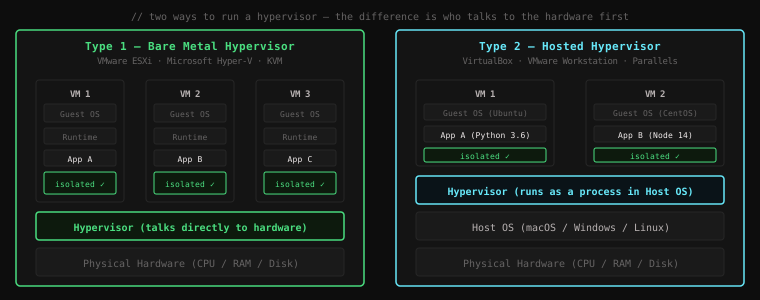
There are two ways to deploy a hypervisor, and they represent a fundamental architectural choice about who gets to talk to the hardware first.
#Type 1 — Bare Metal Hypervisor
A Type 1 hypervisor installs directly on the physical hardware. There is no host operating system between it and the machine. The hypervisor is the OS, in a sense — it owns the hardware and everything above it is a virtual machine.
Examples:
- VMware ESXi — the dominant enterprise hypervisor, runs most of the world's corporate data centers
- Microsoft Hyper-V — ships with Windows Server, powers Azure
- KVM (Kernel-based Virtual Machine) — built into the Linux kernel, powers AWS EC2 and Google Cloud
Physical Hardware
└── Type 1 Hypervisor (talks directly to CPU/RAM/disk)
    ├── VM 1 (Guest OS → App A)
    ├── VM 2 (Guest OS → App B)
    └── VM 3 (Guest OS → App C)
Because the hypervisor talks directly to hardware, performance overhead is minimal. The guest VMs run nearly as fast as if they were on bare metal. This is what you want in a data center running thousands of production workloads.
#Type 2 — Hosted Hypervisor
A Type 2 hypervisor runs on top of an existing operating system — your normal macOS, Windows, or Linux desktop. The host OS boots first, handles hardware access normally, and the hypervisor runs as a privileged application within it.
Examples:
- VirtualBox — open source, runs everywhere, the developer's workhorse
- VMware Workstation / Fusion — commercial, polished, popular in enterprise dev environments
- Parallels Desktop — macOS-focused, excellent Apple Silicon support
Physical Hardware
└── Host OS (macOS / Windows / Linux)
    └── Type 2 Hypervisor (runs as an application)
        ├── VM 1 (Guest OS → App A)
        └── VM 2 (Guest OS → App B)
Because every hardware request from the VM has to travel through both the hypervisor and the host OS, Type 2 adds more latency. But for development environments, the tradeoff is acceptable — you get full VM capabilities while still using your normal desktop for everything else.
#How VMs Solved the Environment Problem
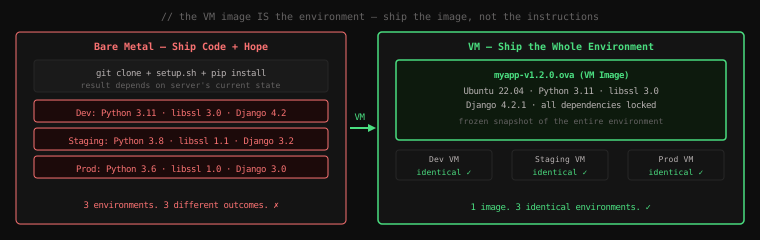
Here's what made virtual machines revolutionary: a VM image is a snapshot of an entire environment.
Instead of shipping code and hoping the target server had the right dependencies, you could ship the whole machine — OS, runtime, libraries, config, everything — as a single file. The recipient would run that file in their hypervisor and get an exact clone of your environment.
In practice, this was done with tools like Vagrant — a developer tool that described VM configurations as code:
# Vagrantfile — describe your VM environment as code
Vagrant.configure("2") do |config|
  config.vm.box = "ubuntu/jammy64"     # base image: Ubuntu 22.04

  config.vm.network "forwarded_port",
    guest: 8000, host: 8000            # expose app port

  config.vm.provision "shell", inline: <<-SHELL
    apt-get update
    apt-get install -y python3.11 python3-pip
    pip3 install -r /vagrant/requirements.txt
  SHELL
end
Run vagrant up and Vagrant would download the base image, provision it with your scripts, and hand you a running VM — identical on every machine that ran the same Vagrantfile. Commit that file to version control and your entire team ran the same environment.
# Everyone on the team runs this
vagrant up

# SSH into the VM
vagrant ssh

# Inside the VM — guaranteed environment
python3 --version   # Python 3.11.x, always
django-admin --version  # 4.2.1, always
This was genuinely transformative. The "works on my machine" problem, in theory, was solved. The machine was the artefact. Run the same image, get the same behaviour.
#VMs in Production
For production deployments, tools like VMware vSphere let ops teams manage fleets of VMs across physical hosts. You'd create a golden VM image for your application, test it thoroughly, then deploy copies of that image to your production hosts.
Scaling up meant cloning the VM and starting another instance. Rolling back meant booting the previous image. Environment consistency was enforced by the image itself — there was no longer a shared bare metal server that could drift.
Large organizations embraced this fully. By the late 2000s, VMware's ESXi was running most enterprise data centers. Physical servers that had run one application each now ran dozens of VMs, with proper isolation between them.
#The Benefits, Enumerated
- Isolation — VMs are fully isolated from each other. A crash or runaway process in VM 1 cannot affect VM 2. They share no libraries, no filesystem, no process table.
- Portability — a VM image runs on any host with a compatible hypervisor. Ship the image, get the same environment.
- Snapshots — take a snapshot of a VM before a risky deployment. If something breaks, revert to the snapshot in seconds.
- Consolidation — run many VMs on one physical host instead of many physical servers, dramatically reducing hardware costs.
- Security boundary — even if an application was compromised, the attacker was contained to the VM. Breaking out of a hypervisor was (and remains) extremely difficult.
#The Problem They Couldn't Escape
VMs solved environment drift. They introduced a new problem.
Every VM contains a full Guest OS — a complete Linux or Windows installation. On a 64 GB server running eight VMs, each VM might consume 2–4 GB of RAM just for its operating system, before your application has allocated a single byte.
That full OS needs to boot. Booting a Linux kernel, starting system services, mounting filesystems — this takes 30 to 60 seconds minimum. Spinning up a new VM to handle a traffic spike takes a minute before it can accept a single request.
And none of that OS overhead was doing useful work for your application. It was pure tax — the price you paid to get the isolation and portability that VMs provided.
For a small fleet of long-running servers, this was acceptable. But as the industry moved toward smaller, more numerous services — and as the idea of scaling horizontally in response to load became standard practice — the VM tax became an architectural constraint.
If it takes 60 seconds to start a new instance and costs 2 GB of RAM just for the OS, you can't use VMs as the unit of horizontal scaling. You need something that starts faster and wastes less.
The industry would spend a decade looking for that something.
Key Takeaway: Hypervisors solved bare metal's environment problem by making the environment itself the deployable artefact — ship a VM image and you ship the OS, runtime, libraries, and everything else together. Type 1 hypervisors run directly on hardware (ESXi, KVM) for production workloads; Type 2 run inside a host OS (VirtualBox, VMware Workstation) for development. VMs gave the industry isolation, portability, and consistency — but at the cost of a full Guest OS per workload. That overhead would become the next problem to solve.