Host, None, and Macvlan Networking
When you need to break the rules of isolation — host mode gives full network access, none removes it entirely, and macvlan puts containers directly on the physical network.
#When the Bridge Isn't the Answer
The bridge network from lesson 17 is the right default for almost every application. Containers get their own network namespace, communicate by name on user-defined networks, and are isolated from each other and from the host.
But bridge networking imposes a cost: the veth pair, the bridge forwarding, the iptables NAT for port publishing — every packet takes those hops. For most applications this overhead is invisible. For some workloads, it matters. For others, complete network isolation is a security requirement, not an inconvenience. And for a specific class of legacy applications, the container needs to appear as a real machine on the physical network with its own IP from the router.
Docker ships three other network modes for exactly these cases.
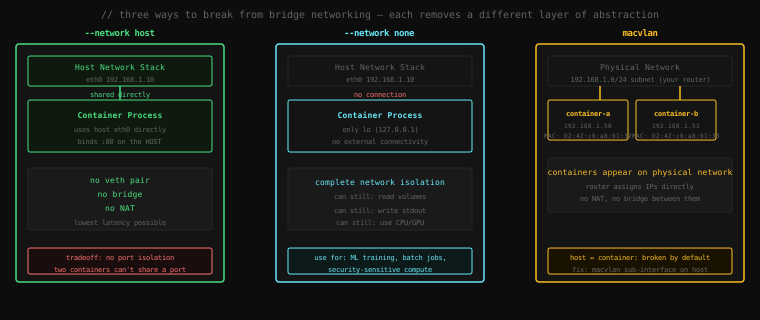
#--network host: No Abstraction at All
In host mode, Docker skips creating a NET namespace for the container entirely. The container process runs directly in the host's network namespace — the same one every other host process uses.
There is no veth pair. No bridge. No NAT. The container's process calls bind(:80) and port 80 is bound on the host's eth0 directly. No -p flag is needed — or even meaningful.
docker run --rm -d --network host --name web nginxNo -p 80:80. Now check from the host:
curl http://localhost:80<!DOCTYPE html>
<html>
<head>
<title>Welcome to nginx!</title>nginx bound port 80 directly on the host. From inside the container, the network looks identical to the host:
docker exec web ip addr1: lo: <LOOPBACK,UP,LOWER_UP> ...
inet 127.0.0.1/8 ...
2: eth0: <BROADCAST,MULTICAST,UP,LOWER_UP> ...
inet 192.168.1.10/24 ... ← the HOST's eth0, not a container one
3: docker0: <NO-CARRIER,...> ...
inet 172.17.0.1/16 ...The container sees the host's eth0, the host's docker0, everything. There's no eth0@ifX with a 172.17.x.x address — just the real host interfaces.
docker stop web#When to Use Host Networking
Performance-critical applications. The veth + bridge stack adds roughly 10–30 microseconds of latency per network hop. For most web applications this is imperceptible. For applications that are genuinely latency-sensitive — high-frequency trading systems, game servers, certain telemetry collectors — it can matter. --network host eliminates it entirely.
Network monitoring and inspection tools. Prometheus node exporter, packet sniffers, network diagnostic containers — these often need to see the host's actual interfaces and bind to host ports directly. Host networking is the standard approach for these.
Sidecars in specific scenarios. When a container needs to communicate with services on localhost that are running on the host (not in other containers), host networking lets it use 127.0.0.1 to reach them.
#The Hard Tradeoff
Host networking breaks port isolation. You cannot run two host-networked containers that both try to bind port 80 — the second one fails because port 80 is already taken by the first, exactly as it would if you ran two nginx processes directly on the host.
It also breaks container isolation in the network dimension. A compromised process inside a host-networked container can see all host network traffic, bind to any port, and contact any network service reachable from the host. For most infrastructure tooling containers this is acceptable. For application containers running user-supplied code, it is not.
#--network none: Complete Network Isolation
In none mode, Docker creates a NET namespace as normal but only puts a loopback interface in it. No veth pair is created. The container has no route to anything outside itself.
docker run --rm -it --network none alpine shInside the container:
ip link1: lo: <LOOPBACK,UP,LOWER_UP> mtu 65536 ...Just lo. No eth0. No bridge. No nothing.
ip addr1: lo: <LOOPBACK,UP,LOWER_UP> ...
inet 127.0.0.1/8 scope host loOnly the loopback address.
ping 8.8.8.8PING 8.8.8.8 (8.8.8.8): 56 data bytes
ping: sendto: Network unreachableCompletely unreachable. The container cannot make any outbound connection, receive any inbound connection, or communicate with any other container. It is network-dead.
exit#What none Containers Can Still Do
Network isolation does not mean compute isolation. A none container can still:
- Read and write volumes mounted from the host or from other containers
- Write to stdout/stderr (collected by Docker logs)
- Use CPU and GPU at full speed
- Access secrets mounted at build time via the filesystem
This makes none the right choice for:
ML training and batch jobs. A training run reads its dataset from a mounted volume, trains for hours, and writes the model back to another volume. It should never need a network connection. Using none makes that guarantee enforceable — if the training code tries to exfiltrate data or phone home, it simply cannot.
Security-sensitive compute. Code review pipelines, static analysis tools, anything that processes untrusted code. If the analysis container has no network, the untrusted code it's analysing can't exploit a network vulnerability to escape.
Reproducibility. A computation that should be deterministic should have no way to vary based on network state. none enforces this at the kernel level.
#macvlan: Putting Containers on the Physical Network
This is the mode most developers have never used but should understand — because when you need it, nothing else works.
#The Problem It Solves
The bridge network gives containers IPs in a private subnet (172.17.x.x or your user-defined range). Those IPs are not visible on your physical network. To reach a container from a machine on the same LAN, you have to go through a port-published host IP, through NAT.
For some applications this is wrong:
- A legacy application that checks its own IP against a whitelist
- A container that needs to receive multicast traffic from the physical network
- A network service that other physical machines need to reach directly (no NAT)
- A container running a DHCP server or DNS resolver that the LAN relies on
For these, you want the container to appear on the physical network with its own MAC address and an IP from the physical subnet — exactly like a real physical machine.
That's macvlan.
#How macvlan Works
macvlan is a Linux kernel driver that creates virtual network interfaces, each with its own MAC address, that share a physical NIC. From the network's perspective, each macvlan interface looks like a separate physical machine plugged into the switch.
Docker's macvlan network mode uses this to give each container its own virtual MAC and an IP from your physical network's subnet. The container's traffic goes directly onto the physical network segment — no bridge, no NAT.
#Setting Up a macvlan Network
You need to know three things about your physical network:
- The subnet (e.g.,
192.168.1.0/24) - The gateway (e.g.,
192.168.1.1) - The physical interface Docker will attach to (e.g.,
eth0)
You also need to define a range of IPs that Docker can assign from — these must not overlap with DHCP leases on your router:
docker network create \
  --driver macvlan \
  --subnet 192.168.1.0/24 \
  --gateway 192.168.1.1 \
  --ip-range 192.168.1.192/27 \
  --opt parent=eth0 \
  macvlan-net
--ip-range 192.168.1.192/27 allocates IPs from 192.168.1.192 to 192.168.1.223 (32 addresses) for Docker to assign. Reserve this range in your router's DHCP exclusion list so it doesn't hand these out to physical devices.
Now start containers on this network:
docker run -d --name db \
  --network macvlan-net \
  --ip 192.168.1.200 \
postgres:16docker run -d --name app \
--network macvlan-net \
--ip 192.168.1.201 \
myapp:latestCheck the IP inside db:
docker exec db ip addr show eth0eth0: <BROADCAST,MULTICAST,UP,LOWER_UP> mtu 1500 ...
inet 192.168.1.200/24 brd 192.168.1.255 scope global eth0192.168.1.200 — a real IP on your physical LAN. Any machine on your network can reach 192.168.1.200 directly. No NAT. No port forwarding. The router sees a new MAC address and treats the container like a physical device.
# From a different physical machine on the same LAN:
psql -h 192.168.1.200 -U postgres
It connects. No special configuration needed. The container is a first-class citizen on the network.
#The Host ↔ Container Catch
Here's the part macvlan documentation buries in footnotes: the host cannot communicate with macvlan containers by default.
Why? It's a consequence of how macvlan works at the driver level. The physical NIC (eth0) is now the "parent" for multiple virtual interfaces (one per container). When the host sends a frame from eth0, the macvlan driver ignores frames originating from the parent — it's a kernel limitation to prevent loops. The physical switch never sees the host trying to reach the container, so the frame is dropped.
From a different machine on the LAN: fine. From another container on the macvlan network: fine. From the host itself: silent drop.
The fix: a macvlan sub-interface on the host.
# Create a macvlan interface on the host with its own MAC
ip link add macvlan-host link eth0 type macvlan mode bridge
ip addr add 192.168.1.202/24 dev macvlan-host
ip link set macvlan-host up

# Add a host route so the host knows to use this interface to reach the container IPs
ip route add 192.168.1.192/27 dev macvlan-host
Now from the host:
ping 192.168.1.200PING 192.168.1.200: 56 data bytes
64 bytes from 192.168.1.200: icmp_seq=0 ttl=64 time=0.241 msThe host-side macvlan sub-interface has its own MAC and IP, separate from eth0. The macvlan driver forwards frames between the sub-interface and the container interfaces correctly. This route is not persistent across reboots — add it to your network configuration to make it permanent.
#macvlan vs macvlan802.1q (VLAN trunking)
There's a second macvlan variant where you use a VLAN trunk port:
# eth0.100 is a VLAN-tagged sub-interface (VLAN ID 100)
docker network create \
  --driver macvlan \
  --subnet 10.100.0.0/24 \
  --gateway 10.100.0.1 \
  --opt parent=eth0.100 \
  vlan100-net
Docker creates the eth0.100 VLAN sub-interface automatically if it doesn't exist. This is how you put containers on specific VLANs in a datacenter environment with 802.1q trunk ports.
#ipvlan: macvlan's Quieter Sibling
If macvlan is "give each container its own MAC", ipvlan is "give each container its own IP but share the host's MAC".
docker network create \
  --driver ipvlan \
  --subnet 192.168.1.0/24 \
  --gateway 192.168.1.1 \
  --opt parent=eth0 \
  ipvlan-net
ipvlan exists for environments that restrict per-port MAC addresses — some cloud providers, some managed switches in locked-down enterprise networks. With ipvlan, all container traffic leaves the host with the host's MAC address but carries the container's IP. The switch sees one MAC (good for MAC-limited environments), the router routes by IP.
ipvlan has two sub-modes:
- L2 mode (default): operates at Layer 2 like macvlan. Containers can reach each other directly.
- L3 mode: operates at Layer 3 only. No ARP, no broadcast. Packets are routed by the kernel. More secure and scalable, but containers can't communicate via multicast.
#The Decision Tree
When you're choosing a network mode:
Does the container need network access at all?
├── No → --network none
│
└── Yes → Does it need to appear on the physical LAN with a real IP?
           ├── Yes → macvlan (or ipvlan if MAC-limited environment)
           │
           └── No → Is latency or network throughput critically important?
                     ├── Yes, and I accept the isolation tradeoff → --network host
                     │
                     └── No → bridge (default) or user-defined bridge
                               └── Do containers need to find each other by name?
                                   ├── Yes → user-defined bridge (always)
                                   └── No → default bridge (legacy only)
The right answer for production multi-container applications is almost always a user-defined bridge network. The other modes exist for specific requirements that bridge can't meet.
#A Note on Performance Numbers
For completeness — the bridge overhead is real but small. Measured on a modern Linux kernel with iperf3 between two containers:
--network bridge:  ~23 Gbit/s throughput, ~50μs additional latency
--network host:    ~38 Gbit/s throughput, ~5μs additional latency
For a web API handling a few thousand requests per second, the bridge overhead is noise. For a service making hundreds of thousands of RPCs per second between co-located containers, the latency difference accumulates. Measure your actual workload before concluding you need host networking — most applications don't.
Key Takeaway: Host mode skips the NET namespace entirely — the container process uses the host's network stack directly, with no veth, no bridge, no NAT. Use it for monitoring tools and latency-critical applications, never for containers running untrusted code. None mode creates a NET namespace but puts only loopback inside it — completely network-isolated, still useful for compute-only workloads like ML training. macvlan creates virtual network interfaces with real MAC addresses on the physical NIC, letting containers appear as first-class members of the physical network with their own LAN IPs — the only solution when containers need direct physical-network presence. The macvlan quirk: the host itself can't reach macvlan containers by default; fix it by creating a macvlan sub-interface on the host side. ipvlan is macvlan's sibling for environments that restrict per-port MAC addresses.