Copy-on-Write: Why Containers Start in Milliseconds
The CoW strategy explained — how containers share the underlying image layers and only copy a file the moment they modify it, making startup near-instant.
#The Question Worth Asking
You've seen the demo. docker run ubuntu echo hello world completes in under a second. docker run -it ubuntu bash drops you into an Ubuntu shell in a fraction of that.
But wait. There's a full Ubuntu filesystem in that image — tens of thousands of files across /bin, /lib, /usr, /etc. Before the container can start, doesn't Docker need to copy all of that somewhere? Set it up for the process?
The answer is no. And understanding why not is the key to understanding container density, startup speed, and one of the most important performance tradeoffs in Docker.
#Startup: What Actually Happens
Let's measure it first so the claim is concrete.
time docker run --rm alpine echo hihi
real 0m0.187s
user 0m0.021s
sys 0m0.016s187 milliseconds. That includes Docker pulling the command from the client, the daemon creating the container, the process running, and the output returning. On a warm cache this drops below 100ms.
Compare that to a VM:
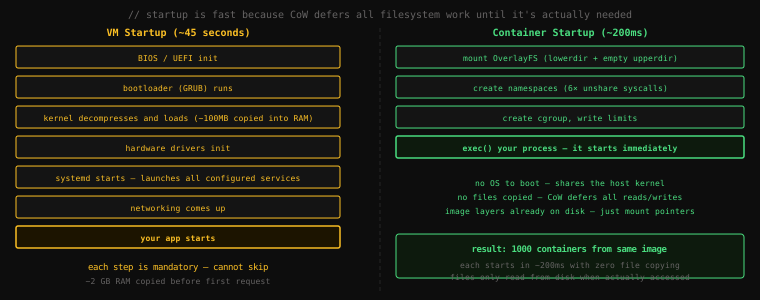
The VM is slow because it has a full OS to boot. The container is fast because it doesn't copy anything at startup. CoW is the mechanism that makes this possible.
#The Three Paths Through CoW
When a container process touches the filesystem, there are exactly three possible operations. Let's nail each one.
#Path 1: Reading a File That Hasn't Been Modified
This is the common case. Your Python app reads /usr/local/lib/python3.12/importlib/__init__.py on startup. This file is in a lower image layer — it's been there since python:3.12-slim was built.
Cost: zero. OverlayFS checks the upper layer first (empty), falls through to the lower layers, finds the file, and returns it. The file is served from the kernel's page cache — the same copy in memory that any other container using this image is already reading from. Nothing is copied. Nothing is moved.
This is the fundamental reason you can run 50 containers from the same Python base image and not pay 50× the memory for the Python standard library files. They're in the page cache once, shared by all 50.
#Path 2: Writing to a File That Exists in a Lower Layer
Your app writes a log line to a file it also reads from — or modifies a config at runtime. That file currently lives in a read-only lower layer.
The three-step copy-on-write operation:
1. Check: is this file already in upperdir?
          → no, it's in a lowerdir

2. Copy:  copy the ENTIRE file from lowerdir → upperdir
          (this is the "copy" in copy-on-write)

3. Write: apply the modification to the copy in upperdir
          from now on, reads from this container go to upperdir
The key cost is step 2: you pay to copy the whole file, not just the bytes you changed. Modify the last byte of a 500 MB file? You copy 500 MB to upperdir first. This is the CoW tax, and for certain workloads it matters enormously.
Let's see it in action. Start a container and time writing to a file that's in the image:
docker run --rm -it ubuntu bashInside the container, time a write to a file that exists in the base layer:
# /etc/hosts is in the image layers
time dd if=/dev/zero bs=1 count=1 >> /etc/hosts 2>/dev/nullreal 0m0.003sFast — but that 3ms included the CoW copy-up of /etc/hosts (a small file, ~200 bytes). Now write again:
time dd if=/dev/zero bs=1 count=1 >> /etc/hosts 2>/dev/nullreal 0m0.000sThe second write is essentially free — the file is now in upperdir. The copy-up happened once and is done.
Now demonstrate with a large file. Create a 100 MB file in the lower layer (we'll simulate this by timing a write to a pre-existing large file):
# Create a large file first (this goes directly to upperdir — no copy)
dd if=/dev/zero of=/tmp/bigfile bs=1M count=100 2>/dev/null

# Check it's in upperdir (it is, because /tmp didn't exist in the image)
# Now time overwriting a byte of it
time dd if=/dev/zero bs=1 count=1 seek=50000000 of=/tmp/bigfile conv=notrunc 2>/dev/nullreal 0m0.000sThat was fast because /tmp/bigfile was already in upperdir — we created it there. But if you were modifying a 100 MB file that came from the image's lower layers (say, a large database template file), the first write would trigger a 100 MB copy-up before the actual write could happen. The CoW tax scales with file size.
exit#Path 3: Creating a New File
Writing to a path that doesn't exist anywhere in the layer stack. New log file, new temp file, new output.
Cost: normal filesystem write. New files go directly to upperdir — there's nothing to copy up because there's no existing version. This is as fast as writing to any filesystem.
#The Page Cache: Memory Sharing in Practice
Let's make the memory efficiency claim concrete.
Start 5 containers from the same nginx image:
for i in $(seq 1 5); do
  docker run -d --name nginx-$i nginx
done
Now check their memory usage:
docker stats --no-streamCONTAINER ID NAME CPU % MEM USAGE / LIMIT MEM %
a1b2c3d4e5f6 nginx-5 0.00% 7.21MiB / 7.7GiB 0.09%
b2c3d4e5f6a7 nginx-4 0.00% 7.18MiB / 7.7GiB 0.09%
c3d4e5f6a7b8 nginx-3 0.00% 6.95MiB / 7.7GiB 0.09%
d4e5f6a7b8c9 nginx-2 0.00% 7.02MiB / 7.7GiB 0.09%
e5f6a7b8c9d0 nginx-1 0.00% 6.88MiB / 7.7GiB 0.09%Each container uses about 7 MB of RAM. Five containers: roughly 35 MB total. But the nginx image is 187 MB.
Where did the other 152 MB go? It's shared. The read-only lower layers of the image — the nginx binaries, shared libraries, configuration — are loaded into the kernel's page cache once. All five containers read from that shared cache. The 7 MB per container represents each container's private upper-layer state: open file descriptors, process memory, any writes made so far.
This is how you run 50 nginx containers on a machine with 4 GB of RAM and have memory to spare. A VM running nginx would consume 512 MB per instance just for the OS. The math is completely different.
Clean up:
for i in $(seq 1 5); do docker stop nginx-$i && docker rm nginx-$i; done#Where CoW Hurts: The Database Problem
CoW is ideal for processes that read a lot and write little — web servers, APIs, data processors. It's a problem for processes that write constantly to large files.
A database is the canonical example. Every time you INSERT a row into a SQLite database file, the kernel has to:
- Check if the
.dbfile is in upperdir — it might not be on first write - Copy the entire database file from lowerdir to upperdir (if it's not already there)
- Modify the copy
For a fresh container this means the first write to a large database file pays the full copy-up cost. A 2 GB database file: 2 GB copied before the first INSERT completes.
But that's just the beginning. Every write to a database file happens through the OverlayFS upper layer. OverlayFS was designed for read-mostly workloads. Under constant write pressure — thousands of INSERTs per second — OverlayFS adds overhead that a native filesystem doesn't have. Benchmarks show 20–30% write throughput degradation for database workloads running on OverlayFS compared to a native filesystem.
This is why you should never run database data files in a container's writable layer. Use a Docker volume instead — volumes bypass OverlayFS entirely and write directly to the host filesystem. We'll cover volumes in detail in lesson 19, but the principle is worth understanding now: CoW is the right default for application files, and the wrong choice for high-volume write workloads.
#Measuring Copy-up Cost Directly
Here's a way to feel the difference between hitting the CoW tax and bypassing it:
# Container with NO volume — writes go through OverlayFS
docker run --rm -it ubuntu bash -c "
  dd if=/dev/urandom of=/tmp/test bs=1M count=200 2>&1
"200+0 records in
200+0 records out
209715200 bytes (210 MB) copied, 0.847 s, 248 MB/s# Container WITH a volume — writes bypass OverlayFS
docker run --rm -it -v /tmp/docker-bench:/data ubuntu bash -c "
dd if=/dev/urandom of=/data/test bs=1M count=200 2>&1
"200+0 records in
200+0 records out
209715200 bytes (210 MB) copied, 0.412 s, 509 MB/sSame container image, same command, same data size. Writing through OverlayFS: 248 MB/s. Writing through a volume (direct to host filesystem): 509 MB/s. About 2× faster for a pure sequential write workload. For random writes the gap is even larger.
This is a synthetic benchmark, but the principle is real: for write-heavy data, OverlayFS is the wrong tool and volumes are the right one.
#The Density Payoff
Let's close with the full picture of what CoW enables at scale.
On a 32 GB server:
With VMs:
- Each VM boots a guest OS: ~2 GB RAM minimum
- 32 GB ÷ 2 GB = 16 VMs maximum
- Boot time: 30–60 seconds each
With containers (CoW + shared page cache):
- Each container's private memory: ~7–50 MB depending on workload
- Shared image layers in page cache: paid once regardless of count
- 32 GB ÷ 50 MB = 640 containers theoretical maximum
- Start time: 100–300 ms each
The 40× density difference isn't magic. It's CoW eliminating per-instance filesystem overhead, and the shared page cache eliminating per-instance memory for read-only data.
Every container on that machine is reading nginx binaries from the same memory pages. There's one copy of the Python standard library in RAM, shared by every Python container running. The write-only data — per-container state — is the only thing that's truly private and costs actual memory.
This is the economics that made containers the default unit of cloud deployment. Not because they're technically superior to VMs in every dimension — VMs have harder isolation boundaries and a guest kernel you can configure. But for workloads that read mostly and write targeted state, CoW makes containers dramatically cheaper to run at scale.
Key Takeaway: Copy-on-write is why containers start in milliseconds — at startup, nothing is copied. OverlayFS mounts the image layers as read-only
lowerdirand creates an emptyupperdir. Reads are served from the shared page cache (free, shared across all containers from the same image). The first write to a file already in a lower layer triggers the copy-up: the entire file is copied toupperdir, then modified — you pay the file size as a one-time cost. New files go directly toupperdir(no copy). CoW shines for read-heavy workloads and kills write-heavy ones — never run database data files in the writable container layer. Use volumes instead, which bypass OverlayFS and write directly to the host filesystem at full speed.