The Manifest List: One Tag, Every Architecture
How a single image tag like 'ubuntu:24.04' runs correctly on both Intel x86 and Apple Silicon ARM — the multi-arch manifest list explained.
#The Architecture Problem
In 2020, Apple shipped the M1 chip — an ARM64 processor in a laptop that was faster than most Intel machines. Within two years, a significant fraction of the developer community was running Docker on ARM64. The rest of the industry was still running x86-64. Production servers were predominantly x86-64, but ARM was growing there too (AWS Graviton, Ampere).
A container image is a filesystem containing compiled binaries. An x86-64 binary is machine code for Intel/AMD processors. An ARM64 binary is machine code for ARM processors. They are not interchangeable — running the wrong one causes an immediate exec format error.
If you're an image maintainer, the naive solution is two different tags: ubuntu:24.04-amd64 and ubuntu:24.04-arm64. If you're a developer, you now have to think about your architecture every time you write FROM ubuntu:24.04. Your Dockerfile works on your laptop but fails in CI, or vice versa.
This is a bad user experience, and the container ecosystem solved it cleanly.
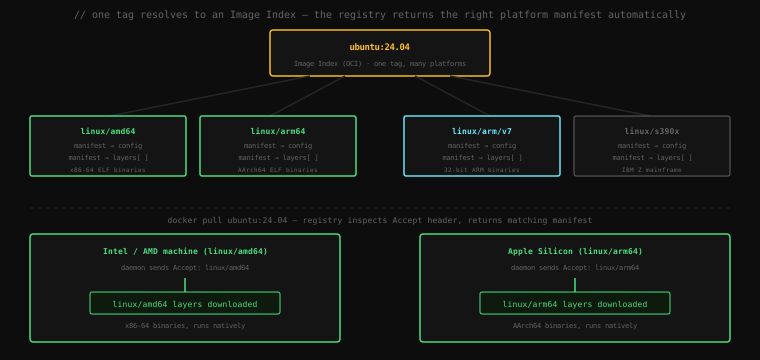
#The Image Index (Manifest List)
We first encountered the OCI Image Index in lesson 22. Now let's look at it properly.
The Image Index is a JSON document that sits at a tag and contains a list of platform entries — each pointing to a platform-specific manifest. When you docker pull ubuntu:24.04, the Docker daemon:
- Requests the manifest at
ubuntu:24.04from the registry - Receives the Image Index
- Reads the current host platform (e.g.,
linux/arm64) - Finds the matching entry in the index
- Pulls the platform-specific manifest, config, and layers
The architecture selection happens automatically. You never specify it.
Let's inspect this directly:
docker buildx imagetools inspect ubuntu:24.04Name: docker.io/library/ubuntu:24.04
MediaType: application/vnd.oci.image.index.v1+json
Digest: sha256:72297848456d5d37d1262630108ab308d3e9ec7ed1c3286a32fe09856619a782
Manifests:
Name: docker.io/library/ubuntu:24.04@sha256:1ae23480...
MediaType: application/vnd.oci.image.manifest.v1+json
Platform: linux/amd64
Name: docker.io/library/ubuntu:24.04@sha256:7f7e7e7e...
MediaType: application/vnd.oci.image.manifest.v1+json
Platform: linux/arm64
Name: docker.io/library/ubuntu:24.04@sha256:3b4c5d6e...
MediaType: application/vnd.oci.image.manifest.v1+json
Platform: linux/arm/v7
Name: docker.io/library/ubuntu:24.04@sha256:9a8b7c6d...
MediaType: application/vnd.oci.image.manifest.v1+json
Platform: linux/s390x
Name: docker.io/library/ubuntu:24.04@sha256:5e4f3a2b...
MediaType: application/vnd.oci.image.manifest.v1+json
Platform: linux/ppc64leFive separate manifests, each with distinct layers containing binaries for their platform — all reachable under one tag.
Add --raw to see the actual JSON:
docker buildx imagetools inspect ubuntu:24.04 --raw{
"schemaVersion": 2,
"mediaType": "application/vnd.oci.image.index.v1+json",
"manifests": [
{
"mediaType": "application/vnd.oci.image.manifest.v1+json",
"digest": "sha256:1ae23480...",
"size": 1194,
"platform": {
"architecture": "amd64",
"os": "linux"
}
},
{
"mediaType": "application/vnd.oci.image.manifest.v1+json",
"digest": "sha256:7f7e7e7e...",
"size": 1194,
"platform": {
"architecture": "arm64",
"os": "linux",
"variant": "v8"
}
}
]
}The platform object with architecture, os, and optional variant fields is how the daemon knows which entry to pick. Docker reads this against the host's runtime.GOOS and runtime.GOARCH and selects the first matching entry.
#Pulling a Specific Platform
By default, docker pull selects the host platform. You can override this:
# On an Intel machine, pull the ARM64 variant explicitly
docker pull --platform linux/arm64 ubuntu:24.04
docker image inspect ubuntu:24.04 | grep Architecture"Architecture": "arm64"The image is stored with the arm64 tag. If you try to run it on a native amd64 host without emulation:
docker run --rm ubuntu:24.04 uname -mOn Docker Desktop, this works — Docker Desktop installs QEMU and enables transparent emulation. On a bare Linux host without QEMU set up, this fails:
standard_init_linux.go:228: exec user process caused: exec format errorYou're trying to execute an ARM64 binary on an x86-64 processor. The kernel refuses.
#Running Foreign Architectures with QEMU
Docker Desktop on Mac and Windows ships with QEMU configured via binfmt_misc — a Linux kernel feature that registers interpreters for foreign binary formats. When the kernel encounters an ARM64 ELF binary, binfmt_misc intercepts the execve() call and hands it to QEMU, which translates the ARM64 instructions to x86-64 in real time.
This is transparent — the container process doesn't know it's being emulated. Performance is reduced (QEMU translation has overhead), but it works. This is how Apple Silicon developers run --platform linux/amd64 containers for compatibility testing, and how CI pipelines test ARM builds on Intel hardware.
On bare Linux (not Docker Desktop), you can set up QEMU yourself:
# Register QEMU interpreters with the kernel
docker run --rm --privileged multiarch/qemu-user-static --reset -p yes

# Now run ARM64 containers on an Intel host
docker run --rm --platform linux/arm64 ubuntu:24.04 uname -maarch64multiarch/qemu-user-static writes the QEMU binaries and registers them with binfmt_misc. The effect persists until the next reboot (unless made permanent).
#Building Multi-Platform Images
This is where docker buildx becomes essential. The standard docker build produces an image for the current host platform. To produce a multi-platform Image Index, you need BuildKit and a builder instance configured for cross-platform work.
#Setting Up a Multi-Platform Builder
# Create a new builder instance (uses the container driver)
docker buildx create --name multibuilder --use

# Bootstrap it — pulls the BuildKit image and starts it
docker buildx inspect --bootstrapName: multibuilder
Driver: docker-container
Platforms: linux/amd64, linux/arm64, linux/arm/v7, linux/386, ...The docker-container driver runs BuildKit in a container. It has access to QEMU for cross-compilation and can produce manifests for multiple platforms in one build.
#Building and Pushing
docker buildx build \
  --platform linux/amd64,linux/arm64 \
  --push \
  -t myregistry/myapp:latest \
  .
The --push flag is required for multi-platform builds. The local Docker image store can only hold one platform per tag — it doesn't support Image Index entries. Multi-platform builds have to go directly to a registry.
What happens during this build:
- BuildKit builds the
linux/amd64variant using native execution (if on an Intel host) - BuildKit builds the
linux/arm64variant using QEMU emulation (cross-compiled) - Both manifests are pushed to the registry
- An Image Index is created pointing to both manifests
- The tag
myregistry/myapp:latestresolves to the Image Index
Verify what was pushed:
docker buildx imagetools inspect myregistry/myapp:latestManifests:
Platform: linux/amd64
Platform: linux/arm64Now myregistry/myapp:latest works on both Intel and ARM64 machines without any flags.
#Loading a Single Platform Locally
Since --push is required for multi-platform, how do you test locally?
# Build and load a single platform for local testing
docker buildx build \
  --platform linux/amd64 \
  --load \
  -t myapp:test \
  .

docker run --rm myapp:test uname -mx86_64--load pulls the image into the local Docker image store. Only works with a single platform — the local store can't hold an Image Index.
#Writing Platform-Aware Dockerfiles
Sometimes your Dockerfile needs to behave differently per platform. BuildKit provides automatic ARG variables you can reference:
# These ARGs are automatically set by BuildKit — no need to declare them
# TARGETOS      → "linux"
# TARGETARCH    → "amd64" or "arm64"
# TARGETVARIANT → "v7" for linux/arm/v7, empty otherwise

FROM golang:1.22 AS builder
ARG TARGETOS
ARG TARGETARCH
WORKDIR /app
COPY . .
RUN GOOS=${TARGETOS} GOARCH=${TARGETARCH} \
    CGO_ENABLED=0 go build -o server .

FROM scratch
COPY --from=builder /app/server /server
CMD ["/server"]
When building --platform linux/arm64, BuildKit sets TARGETOS=linux and TARGETARCH=arm64. The Go build cross-compiles for ARM64. The same Dockerfile produces a native binary for each target platform.
For language runtimes that can't cross-compile (native extensions that require the target architecture's build environment), the pattern is different:
# FROM automatically selects the right base for each platform
FROM python:3.12-slim

# This RUN executes natively on each platform (with QEMU on foreign platforms)
RUN pip install cryptography
When building --platform linux/arm64, FROM python:3.12-slim pulls the arm64 Python image (thanks to the manifest list), and the pip install runs on the arm64 Python interpreter under QEMU. The resulting layer contains arm64-compiled native extensions.
#The Digest: Pinning to a Specific Platform
Tags are mutable — ubuntu:24.04 can be updated by Canonical to point to a new Image Index. Digests are immutable content addresses.
You can pin to the Image Index digest (covers all platforms):
docker pull ubuntu@sha256:72297848456d5d37d1262630108ab308d3e9ec7ed1c3286a32fe09856619a782Or pin to a specific platform manifest digest (only that platform):
# Pin exactly the linux/amd64 manifest
docker pull ubuntu@sha256:1ae23480369fa4139f6dec668d7a5a941b56ea174e9cf75e09771988fe621c95
In Dockerfiles, digest pinning prevents surprise breakage when an upstream image updates:
# Pinned to an immutable digest — this exact Image Index, forever
FROM ubuntu@sha256:72297848456d5d37d1262630108ab308d3e9ec7ed1c3286a32fe09856619a782
The tradeoff: you miss security updates. The practical approach is to pin in production Dockerfiles and update the digest deliberately, rather than taking automatic updates.
#When Your Base Image Doesn't Have Your Platform
Not all images support all platforms. This is the most common multi-platform build failure:
docker buildx build --platform linux/amd64,linux/arm64 .ERROR: failed to solve: some-legacy-base:latest: no match for platform in manifestsome-legacy-base:latest is x86-64 only. There's no arm64 manifest in its Image Index (or it has no Image Index at all — it's a single-platform image).
Options:
- Find an alternative base image that supports both platforms
- Use
--platform linux/amd64only and run with QEMU on ARM hosts - Use
FROM --platform=$BUILDPLATFORMto always pull the build host's variant, then cross-compile the binary
# Always use the amd64 base (the build machine's native platform)
# for the build stage, then copy only the compiled output to the
# final stage which uses the target platform
FROM --platform=$BUILDPLATFORM golang:1.22 AS builder
ARG TARGETOS TARGETARCH
RUN GOOS=${TARGETOS} GOARCH=${TARGETARCH} go build -o server .

FROM scratch
COPY --from=builder /server /server
$BUILDPLATFORM is the host platform; $TARGETPLATFORM is the target. The build stage always runs natively, avoiding QEMU overhead for the compilation step.
Key Takeaway: The OCI Image Index (Docker Manifest List) is what makes a single tag like
ubuntu:24.04work correctly on Intel, Apple Silicon, and Raspberry Pi without any flags or platform-specific tags. The registry returns the matching platform manifest automatically based on what the Docker daemon reports about the host.docker buildx imagetools inspectreveals the full Index structure. Building multi-platform images requiresdocker buildx build --platform linux/amd64,linux/arm64 --push— multi-platform outputs go directly to a registry since the local image store holds only one platform per tag. BuildKit injectsTARGETOS,TARGETARCH, andTARGETVARIANTautomatically for platform-conditional build logic.