The Stateless Philosophy
Why you should treat containers like cattle, not pets — the architectural philosophy that makes containers replaceable, scalable, and production-safe.
#The Most Important Idea in Container Architecture
You can technically run Docker like a virtual machine. Start a container, SSH into it, install packages, tweak config files, restart services, let it run for months, treat it as a long-lived server. Docker won't stop you.
But you'd be giving up almost everything that makes containers valuable.
The architectural philosophy behind containers — and behind all modern cloud infrastructure — is this: applications should be stateless processes. State should live in external services. When you get this right, a container becomes something you can throw away and recreate in seconds, with no data loss and no service interruption. When you get it wrong, a container becomes a fragile, irreplaceable snowflake that you're afraid to touch.
This lesson is about getting it right.
#Pets and Cattle
Randy Bias coined the metaphor that best explains the distinction.
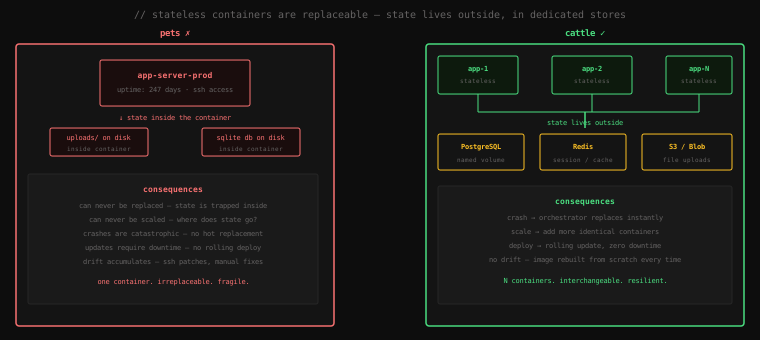
Pets are servers you give names to. You know them individually. When one gets sick, you nurse it back to health. You patch it, maintain it, SSH into it to diagnose problems. It's irreplaceable. If it dies, you're in trouble.
Cattle are servers you give numbers to. They're identical. When one gets sick, you shoot it and replace it with a healthy one. No individual attachment. No heroic recovery effort. The herd continues.
The entire promise of containers is to make your application containers work like cattle. You should be able to kill any container, right now, with no warning, and have the system automatically replace it with an identical fresh one — with no data loss, no service disruption, no manual intervention.
If you can't do that, you're running pets.
#What "Stateless" Actually Means
Stateless does not mean your application has no data. Every useful application has data. Stateless means the container process itself holds none of it.
When a request arrives at your application container, the container should be able to handle it without relying on anything stored locally from a previous request. It reads from a database, maybe from a cache, maybe from an object store — all of which are external. The container itself is a pure processor: request in, query external systems, response out.
Everything that must survive a container restart lives outside the container:
| Data type | Lives in |
|---|---|
| Application data (user records, orders) | External database (PostgreSQL, MySQL) |
| Session state / auth tokens | External cache (Redis, Memcached) |
| User-uploaded files | Object storage (S3, GCS, Azure Blob) |
| Application configuration | Environment variables, mounted config files |
| Logs | Collected by Docker logging driver, sent to external sink |
The container process itself holds none of these. It's stateless in the sense that you could stop it mid-request, start a fresh container from the same image, and pick up exactly where you left off — because the state was never in the container.
#Why This Matters in Practice
Let's walk through what statelessness enables.
#Crash Recovery Without Heroics
Pets fail and create incidents. Cattle fail and the system heals itself.
If your container stores session data in memory or on its local filesystem, a crash means every logged-in user is suddenly logged out. Your on-call engineer gets paged at 3am. They SSH into the host, figure out what crashed, restart the container, and hope it comes back clean.
If session data lives in Redis and files live in S3, a crash means the container is gone and a new one starts in its place within seconds. The user whose request was in-flight at crash time sees an error — one request fails. Every other user continues uninterrupted. No one gets paged.
The orchestrator (Docker Compose, Kubernetes, or just docker run --restart=always) handles the restart automatically. You don't have to.
#Horizontal Scaling
Pets can't be cloned. Cattle can.
Suppose your application is getting too much traffic for one container to handle. If the container has state — a local cache, a local session store, local uploads — you can't just add more containers. Which container holds the session for this user? Where are their uploaded files? The state is sharded across instances in ways that break.
If the container is stateless, you add more containers. Each one is identical. Each one talks to the same database, the same Redis, the same S3. Load is distributed across all of them. When traffic drops, you remove some. The application doesn't care — it never knew how many siblings it had.
# Scale to 5 instances — works because the app is stateless
docker compose up --scale app=5
This command is meaningless if your app stores anything locally.
#Zero-Downtime Deployments
Rolling updates only work if containers are replaceable.
A rolling deployment works like this: start one new container, wait for it to become healthy, then stop one old container, repeat until all containers are on the new version. At every point, some old and some new containers are handling traffic simultaneously.
This only works if old and new containers are interchangeable from the application's perspective — which means they must not hold local state that the other version can't access. State is in the database (which both versions can reach), not in the container.
If containers held local state, you'd be forced to do a stop-the-world deploy: stop all old containers at once, wait, start all new containers. Downtime is required. This is the classic reason "we can only deploy on weekends at 2am" exists.
#No Configuration Drift
The worst kind of pet server is the one that "just works" and nobody knows why.
Over months of SSH sessions and manual fixes, the running container has diverged from the Dockerfile that supposedly describes it. Someone installed a package directly. Someone edited a config file in place. Someone ran a one-off migration and forgot to document it. The container is now a unique artifact that can't be reproduced.
When it crashes, you're not starting from a known state. You're trying to recreate years of accumulated manual changes from memory.
Stateless containers with an immutable image break this pattern. The container is always exactly what the Dockerfile says it is. When it's replaced, the replacement is identical. The Dockerfile is the ground truth. Always.
#The 12-Factor App
The stateless philosophy predates Docker — it was articulated as the 12-Factor App methodology by Adam Wiggins at Heroku in 2011. The factors most directly relevant to container architecture:
Factor VI: Processes — Execute the app as one or more stateless processes
"Any data that needs to persist must be stored in a stateful backing service, typically a database. The memory space or filesystem of the process can be used as a brief, single-transaction cache."
Factor VII: Port Binding — Export services via port binding
"The app is completely self-contained and does not rely on runtime injection of a webserver into the execution environment."
Factor IX: Disposability — Maximize robustness with fast startup and graceful shutdown
"Processes are disposable, meaning they can be started or stopped at a moment's notice. This facilitates fast elastic scaling, rapid deployment of code or config changes, and robustness of production deploys."
Factor IX is the one most Docker setups fail at. "Disposable" means:
- Start time is seconds, not minutes
- Shutdown is graceful (SIGTERM is handled, in-flight requests complete)
- A sudden kill doesn't corrupt application state
If your container takes 90 seconds to start, your crash recovery is 90 seconds of degraded service. If it doesn't handle SIGTERM, Docker sends SIGKILL after a timeout and in-flight requests are abruptly terminated. Both of these are avoidable.
#What Breaks the Stateless Model
These are the common mistakes:
#Writing to the Container Filesystem
# Wrong — this file vanishes when the container is replaced
with open("/app/uploads/" + filename, "wb") as f:
f.write(file_content)# Right — delegate to object storage
s3_client.upload_fileobj(file_content, bucket, filename)Any file written inside a container at a path that isn't a mounted volume is lost when the container dies. This includes:
- User uploads written to a local directory
- Log files written to disk instead of stdout
- SQLite databases
- Application-level caches written to disk
#In-Process Session State
# Wrong — sessions live in the process, die with the container
sessions = {}

@app.post("/login")
def login(user):
    token = generate_token()
    sessions[token] = user  # ← in-memory, lost on restart
return token# Right — sessions live in Redis
@app.post("/login")
def login(user):
token = generate_token()
redis.setex(token, 3600, json.dumps(user))
return tokenIn-process caches and session stores are fine as a performance layer. They are not fine as the only store. The rule: any data a second instance of the container would need to function correctly must be in an external store.
#Hardcoded Configuration
# Wrong — config is baked into the image, different environments need different images
ENV DB_HOST=prod.db.internal
ENV DB_PASSWORD=supersecret# Right — image is environment-agnostic, config injected at runtime
CMD ["./server"]docker run -e DB_HOST=prod.db.internal -e DB_PASSWORD=... myapp:latestAn image that only works in production because it has production config baked in is an image you can't run locally, can't test in staging, and can't rotate secrets in without rebuilding. Environment variables are the standard mechanism for injecting configuration into a stateless container.
#Long Container Lifetimes as a Goal
# Wrong framing — treating uptime as a success metric
# "This container has been running for 180 days without a restart"
Long uptime on a container is not a virtue. It's a warning sign. It means you've been afraid to replace it — which means it has accumulated drift, or it holds state you can't afford to lose, or both.
The sign of a healthy stateless application is that you can run this without anyone noticing:
docker kill $(docker ps -q --filter name=app)Kill every app container. The orchestrator restarts them. Users see nothing. That's the goal.
#Making Your Container Disposable
A few practical steps:
Handle SIGTERM. When Docker stops a container, it sends SIGTERM first. Your application should catch this signal, stop accepting new requests, finish the ones in flight, then exit cleanly. Most web frameworks do this by default. If yours doesn't, add the handler.
import signal, sys

def handle_shutdown(sig, frame):
    # drain in-flight requests, close db connections
    sys.exit(0)

signal.signal(signal.SIGTERM, handle_shutdown)
Keep startup fast. If your application needs 60 seconds to warm up, your rolling deploys have 60-second gaps in capacity. Optimise startup: lazy-load where possible, don't block startup on optional services, pre-build caches at image build time rather than at startup.
Use health checks. Tell Docker when your container is actually ready to serve traffic:
HEALTHCHECK --interval=10s --timeout=3s --retries=3 \
  CMD curl -f http://localhost:8080/health || exit 1
Docker won't route traffic to a new container until its health check passes. This makes rolling deployments safe — you don't swap traffic to the new container until it's confirmed healthy.
#Where State Belongs
The stateless philosophy doesn't eliminate state — it concentrates it in dedicated systems built to hold it reliably:
Databases (PostgreSQL, MySQL, MongoDB) hold durable application data. They have their own replication, backup, and failover mechanisms. They're not containers you throw away — they're long-lived services. In Docker Compose, the database has a named volume. In production, it's usually a managed cloud service outside your container cluster entirely.
Caches (Redis, Memcached) hold volatile state — sessions, rate limit counters, computed results that can be regenerated. Redis can be configured for persistence if you want sessions to survive a Redis restart, or purely in-memory if you're willing to lose them (and redirect users to login again).
Object storage (S3, GCS, Azure Blob) holds unstructured data — uploads, attachments, generated files. These services are designed for this: cheap, durable, infinitely scalable, accessible from any container on any host.
Environment and secrets (environment variables, mounted secrets files, Vault) hold configuration. Not baked into the image. Injected at runtime.
Each of these services knows how to manage its own state reliably. Your application containers don't need to — they just connect to the service.
Key Takeaway: Stateless containers are the difference between fragile pets and resilient cattle. A stateless container holds no data that must survive a restart — all durable state lives in external services: databases for application data, Redis for sessions and caches, object storage for files, environment variables for configuration. This makes containers replaceable by design: crash recovery is automatic, horizontal scaling is trivial, and zero-downtime deployments become possible. The test is simple — can you
docker killevery running instance of your application right now, with no data loss and no service disruption? If yes, you're doing it right.