Docker Networking: The Bridge
How containers talk to each other without seeing the host's network — the default bridge network, virtual Ethernet pairs, and container DNS.
#Why This Lesson Needs to Go Deep
Docker networking is the topic where the most confident-sounding wrong answers live on the internet. "Just use --network host." "Containers can't talk to each other by name." "Port mapping is a Docker thing."
None of those are correct as general statements, and the misunderstanding usually comes from conflating four separate things:
- How a container gets a network interface at all
- How Docker connects containers to each other
- Why name-based communication works in some setups but not others
- How traffic from the outside world actually reaches a container
We're going to build the mental model from the kernel up. By the end, none of this will feel magical or arbitrary.
#The Foundation: Recap From Lesson 6
When Docker starts a container, it creates a new NET namespace for it. That namespace starts with nothing — no interfaces, no routing table, no firewall rules. Blank.
Then Docker wires it up. That wiring is what this lesson is about.
The mechanism Docker uses to connect a container's empty NET namespace to the outside world is a combination of two Linux kernel features you can use entirely without Docker: Linux bridges and veth pairs.
#Linux Bridges: A Software Ethernet Switch
A Linux bridge is a virtual network switch implemented entirely in the kernel. It operates at Layer 2 — it forwards Ethernet frames between whatever interfaces are plugged into it, just like a physical network switch does with physical cables.
Docker creates one bridge automatically at installation time. Check for it on your host:
ip link show docker03: docker0: <NO-CARRIER,BROADCAST,MULTICAST,UP> mtu 1500 qdisc noqueue state DOWN
link/ether 02:42:a1:b2:c3:d4 brd ff:ff:ff:ff:ff:ffThat docker0 is the bridge. It has a MAC address (like a physical NIC), an MTU, and a state. When no containers are running, its state is DOWN — no cables plugged in.
Check its IP address:
ip addr show docker03: docker0: <NO-CARRIER,BROADCAST,MULTICAST,UP> mtu 1500 ...
inet 172.17.0.1/16 brd 172.17.255.255 scope global docker0172.17.0.1/16 — the gateway IP for the entire 172.17.0.0/16 subnet. Every container Docker connects to this bridge gets an IP in this range, with 172.17.0.1 as their default gateway. The host is the router.
#veth Pairs: The Virtual Ethernet Cable
A veth pair is two virtual network interfaces that are connected to each other like opposite ends of a physical cable. Whatever you send into one end comes out the other end instantly. They always come in pairs — you can't create just one.
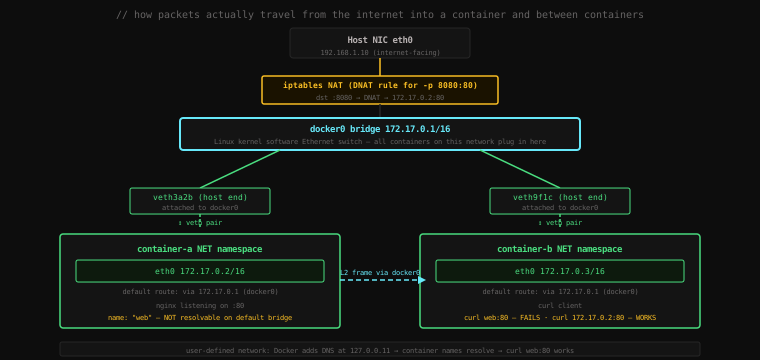
Docker uses veth pairs to connect a container's NET namespace to the docker0 bridge:
- One end goes inside the container's NET namespace, where it appears as
eth0 - The other end stays on the host and gets attached to the
docker0bridge
When a container sends a packet, it goes into eth0 inside the namespace, pops out of the other end of the veth pair on the host, and arrives at the docker0 bridge. The bridge forwards it toward its destination — either another container's veth pair, or out through the host's real network interface.
This is not abstracted away at some higher level. These are real kernel objects you can see with ip commands.
#Watching It Happen
Let's observe the entire setup live. First, note what network interfaces exist right now:
ip link show | grep -E "^[0-9]"1: lo: <LOOPBACK,UP,LOWER_UP> ...
2: eth0: <BROADCAST,MULTICAST,UP,LOWER_UP> ...
3: docker0: <NO-CARRIER,BROADCAST,MULTICAST,UP> ...Three interfaces: loopback, your real NIC, and the docker0 bridge (currently empty). Now start a container:
docker run -d --name web nginxCheck interfaces again immediately:
ip link show | grep -E "^[0-9]"1: lo: <LOOPBACK,UP,LOWER_UP> ...
2: eth0: <BROADCAST,MULTICAST,UP,LOWER_UP> ...
3: docker0: <BROADCAST,MULTICAST,UP,LOWER_UP> ... ← now UP (a cable is plugged in)
9: veth3a2b4c5@if8: <BROADCAST,MULTICAST,UP,LOWER_UP> ... ← new!A new interface appeared: veth3a2b4c5. That's the host end of the veth pair Docker just created. The @if8 suffix means its peer is interface index 8 — which is inside the container's NET namespace.
Start a second container:
docker run -d --name client alpine sleep 3600ip link show | grep veth9: veth3a2b4c5@if8: <BROADCAST,MULTICAST,UP,LOWER_UP> ...
11: veth9f1c2d3@if10: <BROADCAST,MULTICAST,UP,LOWER_UP> ...Two veth pairs — one per container. Both are attached to docker0. Let's confirm:
brctl show docker0bridge name bridge id STP enabled interfaces
docker0 8000.0242a1b2c3d4 no veth3a2b4c5
veth9f1c2d3Two interfaces plugged into the bridge. This is exactly what a switch shows when you run show interfaces — two cables connected.
Now look at what's inside the container:
docker exec web ip addr show eth08: eth0@if9: <BROADCAST,MULTICAST,UP,LOWER_UP> mtu 1500 ...
inet 172.17.0.2/16 brd 172.17.255.255 scope global eth0eth0@if9 — the container side of the veth pair, peer is interface 9 (our veth3a2b4c5 on the host). IP is 172.17.0.2/16. Check the routing table inside the container:
docker exec web ip routedefault via 172.17.0.1 dev eth0
172.17.0.0/16 dev eth0 proto kernel scope link src 172.17.0.2Default gateway is 172.17.0.1 — the docker0 bridge. All traffic not on the local subnet goes through the bridge, which routes it to the host's eth0, which routes it to the internet.
#Container-to-Container Communication: IP Works
Let's prove the two containers can talk. What's the IP of our web container?
docker inspect web --format '{{.NetworkSettings.IPAddress}}'172.17.0.2Now from inside the client container, ping it:
docker exec client ping -c 3 172.17.0.2PING 172.17.0.2 (172.17.0.2): 56 data bytes
64 bytes from 172.17.0.2: seq=0 ttl=64 time=0.112 ms
64 bytes from 172.17.0.2: seq=1 ttl=64 time=0.098 ms
64 bytes from 172.17.0.2: seq=2 ttl=64 time=0.089 msWorks. The packet path: client eth0 → veth pair → docker0 bridge → veth pair → web eth0. The bridge forwards it at Layer 2 because both containers are on the same 172.17.0.0/16 subnet.
curl the nginx server by IP:
docker exec client wget -qO- http://172.17.0.2<!DOCTYPE html>
<html>
<head>
<title>Welcome to nginx!</title>
...IP-based communication works fine on the default bridge.
#The Name Resolution Problem: The Default Bridge's Fatal Flaw
Now try by container name:
docker exec client ping webping: bad address 'web'docker exec client wget -qO- http://webwget: bad address 'web'Fails. The container name web doesn't resolve to anything. Let's see why.
Check what DNS the client container is using:
docker exec client cat /etc/resolv.confnameserver 192.168.1.1
search .The host's DNS server. Docker just copied the host's resolv.conf into the container. This DNS server knows nothing about Docker containers — it's your router or your ISP's resolver. It can resolve google.com. It cannot resolve web.
This is the default bridge network's fundamental limitation: Docker does not provide container name resolution on the default bridge. Containers can only reach each other by IP address, which you have to look up manually or hardcode.
This is by design — the default bridge (bridge) exists for backward compatibility. For real application networking, Docker provides something better.
#User-Defined Networks: The Fix
Create a named network:
docker network create app-networkdocker network lsNETWORK ID NAME DRIVER SCOPE
a1b2c3d4e5f6 app-network bridge local
b2c3d4e5f6a7 bridge bridge local
c3d4e5f6a7b8 host host local
d4e5f6a7b8c9 none null localStart containers on this network:
docker run -d --name web2 --network app-network nginx
docker run -d --name client2 --network app-network alpine sleep 3600
Now try name-based communication:
docker exec client2 ping -c 3 web2PING web2 (172.18.0.2): 56 data bytes
64 bytes from 172.18.0.2: seq=0 ttl=64 time=0.091 ms
64 bytes from 172.18.0.2: seq=1 ttl=64 time=0.086 ms
64 bytes from 172.18.0.2: seq=2 ttl=64 time=0.084 msWorks. web2 resolved to 172.18.0.2 — by name, automatically.
docker exec client2 wget -qO- http://web2<!DOCTYPE html>
<html>
<head>
<title>Welcome to nginx!</title>Works. Let's see how. Check the DNS config inside the container:
docker exec client2 cat /etc/resolv.confsearch app-network
nameserver 127.0.0.11
options ndots:0nameserver 127.0.0.11 — that's Docker's embedded DNS resolver. On user-defined networks, Docker injects this resolver into every container's resolv.conf. It's a small DNS server running inside the container's network namespace that knows about every container on the same user-defined network by name.
Ask it directly what web2 resolves to:
docker exec client2 nslookup web2Server: 127.0.0.11
Address 1: 127.0.0.11
Name: web2
Address 1: 172.18.0.2 web2.app-network127.0.0.11 answered with 172.18.0.2. Docker updates this resolver automatically when containers join or leave the network — it's live service discovery with zero configuration.
#Why User-Defined Networks Are Always Right for Multi-Container Apps
The default bridge has no DNS. User-defined bridges do. That's the core difference, but there are more:
Isolation. Containers on different user-defined networks cannot communicate at all — even if they're on the same host. The default bridge puts every container in one flat network. User-defined networks are segregated by default.
# client2 is on app-network, web is on the default bridge
docker exec client2 ping 172.17.0.2 # web's IP on default bridgePING 172.17.0.2 (172.17.0.2): 56 data bytes
--- 172.17.0.2 ping statistics ---
3 packets transmitted, 0 packets received, 100% packet lossUnreachable. Containers on separate user-defined networks have no Layer 3 route between them. Intentional isolation by default.
Live connect/disconnect. You can attach or detach containers from user-defined networks without restarting them:
docker network connect app-network web    # connect the default-bridge web to app-network too
docker exec client2 ping -c 2 web64 bytes from 172.18.0.4: seq=0 ttl=64 time=0.103 ms
64 bytes from 172.18.0.4: seq=1 ttl=64 time=0.094 msNow web is reachable by name from app-network because Docker added a new interface to it. The running nginx container didn't restart — it just got a second network interface.
docker network disconnect app-network web # remove itThis capability is what Docker Compose uses under the hood: it creates a user-defined network for your project and connects all services to it, giving them automatic DNS and mutual isolation from other Compose projects.
#Port Publishing: iptables Is Doing the Work
When you run docker run -p 8080:80 nginx, traffic from host:8080 reaches the container's port 80. Let's see how.
docker run -d -p 8080:80 --name published nginxCheck iptables NAT rules:
sudo iptables -t nat -L DOCKER --line-numbers -nChain DOCKER (2 references)
num target prot opt source destination
1 RETURN all -- 0.0.0.0/0 0.0.0.0/0
2 DNAT tcp -- 0.0.0.0/0 0.0.0.0/0 tcp dpt:8080 to:172.17.0.4:80Rule 2 is the one Docker added: any TCP packet arriving on port 8080 gets DNAT'd (Destination Network Address Translation) to 172.17.0.4:80 — the container's IP and port.
The packet journey for an external request to http://your-host:8080/:
1. Packet arrives at host eth0 with dst :8080
2. iptables PREROUTING checks DOCKER chain
3. Rule 2 matches: rewrite dst to 172.17.0.4:80
4. Kernel routes the modified packet to docker0 (172.17.x.x subnet)
5. docker0 bridge forwards via veth pair to container eth0
6. nginx inside container receives on :80
7. Response: SNAT applied on the way out, src rewritten back to host IP
Docker manages these iptables rules automatically — they appear when you add -p and disappear when the container stops. You can verify they're gone:
docker stop published && docker rm published
sudo iptables -t nat -L DOCKER -nChain DOCKER (2 references)
num target prot opt source destination
1 RETURN all -- 0.0.0.0/0 0.0.0.0/0Rule 2 is gone. The port is no longer reachable.
#Inspecting a Network in Full
docker network inspect gives you the complete picture of any network:
docker network inspect app-network[
{
"Name": "app-network",
"Driver": "bridge",
"IPAM": {
"Config": [{ "Subnet": "172.18.0.0/16", "Gateway": "172.18.0.1" }]
},
"Containers": {
"a1b2c3...": {
"Name": "web2",
"IPv4Address": "172.18.0.2/16",
"MacAddress": "02:42:ac:12:00:02"
},
"b2c3d4...": {
"Name": "client2",
"IPv4Address": "172.18.0.3/16",
"MacAddress": "02:42:ac:12:00:03"
}
},
"Options": {
"com.docker.network.bridge.name": "br-a1b2c3d4e5f6"
}
}
]Everything in one place: subnet, gateway, which containers are connected, their IPs and MACs. The bridge name (br-a1b2c3d4e5f6) is what shows in ip link and brctl show on the host.
#The Three Default Networks
Docker creates three networks at installation that you'll always see in docker network ls:
bridge — the default bridge (docker0). Where containers land if you don't specify --network. No DNS, manual IP lookups. Don't use for new applications.
host — no network isolation at all. The container shares the host's network namespace directly. Container processes bind to the host's ports directly — no veth pair, no bridge, no NAT. nginx in a --network host container binds port 80 on the host directly. Fast (no virtual network overhead), but breaks isolation and prevents you from running two containers that use the same port. Use only for performance-critical situations where network overhead matters.
none — a container with no network interface at all (just loopback). Completely network-isolated. For compute jobs that should never touch the network.
# Confirm host networking bypasses everything
docker run --rm --network host nginx &
curl http://localhost:80 # directly on the host, no -p needed<!DOCTYPE html>... Welcome to nginx!docker stop $(docker ps -q)#Cleaning Up
docker stop web web2 client client2
docker rm web web2 client client2
docker network rm app-network
After stopping all containers, veth pairs disappear from the host:
ip link show | grep veth
# (no output)
Docker cleans up the kernel objects when the container exits. The bridge remains but goes back to DOWN state — no cables plugged in.
#The Mental Model, Complete
Internet
  ↓
Host NIC (eth0)
  ↓
iptables DNAT (for -p port mappings)
  ↓
docker0 / br-xxxx  (Linux bridge — the software switch)
  ↓            ↓
veth pair A    veth pair B  (virtual cables — one per container)
  ↓            ↓
container-A   container-B
(eth0 inside   (eth0 inside
 NET namespace)  NET namespace)
Default bridge (docker0): containers communicate by IP only. No DNS. One flat network. Legacy behaviour.
User-defined bridge: containers communicate by IP and by name. Docker's embedded resolver at 127.0.0.11 answers name queries. Isolated from other user-defined networks. This is what you always want for multi-container applications.
Port publishing (-p): Docker writes iptables DNAT rules. Traffic arriving at the host port gets rewritten to the container's IP:port. Docker manages the rules — they appear and disappear with containers.
Key Takeaway: Docker networking is built on two Linux primitives: bridges (kernel software switches) and veth pairs (virtual Ethernet cables connecting two network namespaces). Docker creates one veth pair per container — one end inside the container as
eth0, the other plugged into thedocker0bridge on the host. The defaultbridgenetwork works for IP-based communication but has no DNS — container names don't resolve. User-defined networks add Docker's embedded DNS resolver (127.0.0.11), making container names resolve automatically — this is why you should always usedocker network createor Docker Compose (which creates a user-defined network automatically) for multi-container applications. Port publishing writes iptables DNAT rules that rewrite traffic arriving at host ports to the container's internal IP and port.