Storage Drivers: Under the Hood
A look at overlay2, aufs, and devicemapper — how each driver implements the layered filesystem, their tradeoffs, and why overlay2 won.
#Why There Are Multiple Drivers
Docker launched in 2013. The Linux kernel in 2013 did not have OverlayFS — that landed in kernel 3.18 in 2014. Before it existed, Docker needed a different way to implement the layered, copy-on-write filesystem that makes containers possible.
The answer was pluggable storage drivers — an abstraction layer inside Docker that could swap out the CoW filesystem implementation. Different Linux distributions had different kernel capabilities, different use cases had different performance profiles, and the "right" storage backend was genuinely unclear in those early years.
By 2024 the dust has settled. overlay2 is the correct answer for almost every situation. But the other drivers still appear in production systems, error messages, and Docker's own documentation — so understanding them, and why overlay2 won, is worth your time.
#Check What You're Running
Before anything else:
docker info | grep -i "storage driver" Storage Driver: overlay2Almost certainly overlay2 on any Linux host running kernel 4.x or newer. If you see something else, this lesson explains why and what to do about it.
Full storage detail:
docker info | grep -A8 "Storage Driver" Storage Driver: overlay2
Backing Filesystem: extfs
Supports d_type: true
Using metacopy: false
Native Overlay Diff: true
userxattr: falseBacking Filesystem: extfs — overlay2 lives on top of an ext4 filesystem. Supports d_type: true — a filesystem feature overlay2 requires (more on this below). Everything here is healthy.
#overlay2 — The Winner
overlay2 is Docker's name for its storage driver that uses the Linux kernel's native OverlayFS. The "2" distinguishes it from an older, buggier implementation called overlay (without the 2) that predated some kernel improvements.
We've already spent two lessons building OverlayFS from scratch, so the mechanism is familiar. What's worth understanding here is how overlay2 organises things on disk — because you'll need to navigate this directory when debugging storage issues.
ls /var/lib/docker/overlay2/0a1b2c3d4e5f6789abcd... # layer directories (SHA256-ish IDs)
1b2c3d4e5f6789abcd01...
2c3d4e5f6789abcd012b...
...
l/ # the symlink shortcut directory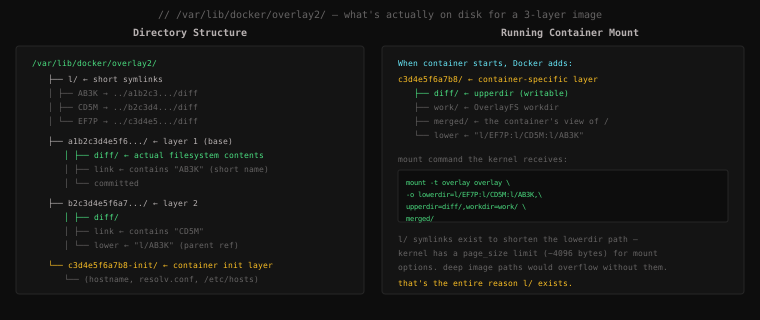
Let's walk through the actual files inside a layer directory:
# Pick any layer directory
LAYER=$(ls /var/lib/docker/overlay2/ | grep -v ^l | head -1)
ls /var/lib/docker/overlay2/$LAYER/diff link lower committeddiff/— the actual filesystem content of this layer. This is the tarball contents unpacked. Every file this layer adds or modifies lives here.link— a text file containing this layer's short name (e.g.,AB3K). Used by thel/directory.lower— a text file listing this layer's parent layers as short names (e.g.,l/CD5M:l/AB3K). Only present in non-base layers.committed— a marker file that says this layer is complete and read-only.
The l/ directory is the most confusing part to encounter for the first time:
ls /var/lib/docker/overlay2/l/AB3K -> ../0a1b2c3d4e5f.../diff
CD5M -> ../1b2c3d4e5f67.../diff
EF7P -> ../2c3d4e5f6789.../diffShort symlinks pointing to layer diff/ directories. The reason they exist: when Docker mounts a container, it passes the full lowerdir path to the kernel as a mount option string. Full overlay2 layer IDs are 64-character SHA256 hashes. An image with 20 layers would produce a lowerdir= string of over 1,400 characters — potentially exceeding the kernel's page-size limit for mount options. The l/ symlinks shorten each layer path to 26 characters, keeping the total mount option string well within limits.
Now inspect a running container's layer:
docker run -d --name inspect-me nginx
CONTAINER_LAYER=$(docker inspect inspect-me | python3 -c "
import json,sys
data = json.load(sys.stdin)
print(data[0]['GraphDriver']['Data']['WorkDir'].replace('/work',''))
")
ls $CONTAINER_LAYERdiff link lower merged workThe container layer has two extras that image layers don't:
merged/— the active OverlayFS mount point. This is the container's/. When youdocker execinto the container, you're walking this directory.work/— the OverlayFS workdir, used internally for atomic write operations.
# Peek at the merged filesystem directly from the host
ls $CONTAINER_LAYER/merged/bin boot dev docker-entrypoint.d etc home lib lib64 media mnt opt proc root run sbin srv sys tmp usr varThat's the container's filesystem, readable directly from the host. No exec required. Useful for debugging — if a process inside the container is failing to find a file, you can inspect the merged view directly.
docker stop inspect-me && docker rm inspect-me#The d_type Requirement
overlay2 requires the backing filesystem to support d_type — a field in directory entries that stores the file type (regular file, directory, symlink, etc.) without requiring a full inode lookup.
Most modern filesystems (ext4, xfs with ftype=1) support this. The problem historically appeared with XFS formatted with ftype=0 — the default on some older RHEL/CentOS 7 installations. If Docker detected an XFS filesystem without d_type support, it would refuse to use overlay2 and fall back to devicemapper.
Check if your XFS has d_type enabled:
xfs_info /var/lib/docker | grep ftypenaming =version 2 bsize=4096 ascii-ci=0, ftype=1ftype=1 — d_type is on. If you see ftype=0, you need to reformat (there's no in-place conversion) or use a different filesystem for Docker's data directory.
#aufs — The Original Default
Before overlay2, Docker's default on Ubuntu was aufs (Advanced Union File System). It predates OverlayFS and was actually used as a reference implementation when OverlayFS was being designed.
aufs was never merged into the mainline Linux kernel — it was always a separate patch that Ubuntu maintained in their kernel. This was its fatal flaw. It worked fine on Ubuntu, was unavailable on RHEL (which tracks mainline kernel closely), required maintaining an out-of-tree kernel module, and couldn't benefit from the same review and optimisation that mainline kernel features receive.
When OverlayFS landed in kernel 3.18 and Docker implemented overlay2 on top of it, aufs was deprecated. Ubuntu 20.04 dropped the aufs kernel module entirely. If you find a production server still using aufs today, it's running a very old Docker version on a very old kernel — upgrade immediately.
You won't encounter aufs on any reasonably modern setup. It's mentioned here so you recognise it in legacy documentation and ancient Stack Overflow answers — don't follow advice that assumes aufs.
#devicemapper — RHEL's Answer
Red Hat Enterprise Linux and CentOS historically shipped kernels without aufs and without OverlayFS (pre-3.18). Docker needed a storage driver that worked on RHEL, and the answer was devicemapper — using Linux's device-mapper thin provisioning to implement CoW at the block device level rather than the filesystem level.
devicemapper operated in two modes:
loop-lvm (default, bad): Docker creates a sparse file on disk and mounts it as a loopback device. Simple to set up, terrible for performance. Writing to a loopback device adds a full I/O layer, and the sparse file can't grow past its initial allocation without manual intervention. This was Docker's out-of-the-box devicemapper experience for years on RHEL, and it was slow enough to give Docker a bad reputation on enterprise Linux.
direct-lvm (production mode, better): Uses a real block device — a dedicated disk or LVM logical volume — for Docker's storage pool. Eliminates the loopback overhead. Still more complex to configure than overlay2 and still has worse performance characteristics for Docker's access patterns.
The devicemapper issues are now moot for most users. RHEL 8 ships with kernel 4.18, which includes OverlayFS. Docker on modern RHEL/CentOS/Fedora uses overlay2. The devicemapper driver is still present in Docker for backward compatibility but is deprecated and not recommended for new deployments.
If you docker info on an old system and see Storage Driver: devicemapper, check:
docker info | grep "Data loop file"If you see a path there, you're in loop-lvm mode — this needs to be fixed before any production use. The correct fix is to migrate to overlay2 (requires kernel 4.x+ with d_type support).
#btrfs and zfs
Both are native CoW filesystems that can back Docker directly, eliminating the need for an OverlayFS layer on top. Docker has drivers for both.
btrfs: Efficient native snapshots, subvolumes map cleanly to Docker layers. Interesting for setups where Docker's data directory is already on a btrfs partition. Poor track record of data corruption on certain workloads historically, though it's improved significantly in recent kernel versions.
zfs: Extremely mature, feature-rich, the most proven CoW filesystem. Strong on Solaris heritage, now available on Linux via OpenZFS. Better data integrity guarantees than any other option. Used in some high-reliability Docker deployments. Requires manual OpenZFS installation since it's not in the mainline kernel (licensing conflict).
Neither btrfs nor zfs is the right choice unless you have a specific reason — your data directory is already on btrfs/zfs, you need ZFS's specific data integrity features, or you're running a storage-specialised host. For everyone else: overlay2 on ext4 or xfs.
#vfs — The Testing Driver
docker info | grep "Storage Driver"
# You do NOT want to see:
#  Storage Driver: vfs
vfs does no CoW at all. Every container gets a full filesystem copy — no shared layers, no deduplication, no efficient reads. It exists purely for testing Docker itself on filesystems or platforms that don't support any real CoW driver (certain CI environments, early macOS Docker implementations).
In production: never. On your developer machine: you'd notice immediately because docker pull ubuntu would consume 77 MB every time you started a new container from it.
#Configuring the Storage Driver
The storage driver is set in Docker's daemon configuration:
cat /etc/docker/daemon.jsonIf the file doesn't exist (Docker uses defaults):
{}To explicitly set overlay2 with direct-lvm or custom options:
{
  "storage-driver": "overlay2",
  "storage-opts": [
    "overlay2.size=20G"
  ]
}
overlay2.size sets a per-container quota on the writable layer — useful on shared hosts to prevent one container filling the disk. Requires the backing filesystem to support project quotas.
After changing daemon.json:
sudo systemctl restart docker
docker info | grep "Storage Driver"
Warning: changing the storage driver invalidates all existing images and containers. Everything in /var/lib/docker/ is driver-specific. Switching drivers requires a clean slate — back up any important container data first.
#The Comparison, Summarised
| Driver | CoW mechanism | Kernel | Status | Use when |
|---|---|---|---|---|
| overlay2 | OverlayFS | 4.0+ (3.18+ for basic) | Current default | Always, unless blocked |
| aufs | Userspace union FS | Ubuntu-patched only | Deprecated, removed | Never (legacy only) |
| devicemapper | Block-level thin provisioning | Any | Deprecated | Legacy RHEL pre-8 |
| btrfs | Native btrfs snapshots | Any with btrfs | Maintained niche | Already on btrfs |
| zfs | Native ZFS snapshots | OpenZFS required | Maintained niche | High-reliability storage |
| vfs | Full copy (no CoW) | Any | Testing only | Never in production |
If you're on a modern Linux system with kernel 4.0+ and a filesystem that supports d_type, you're on overlay2 and there's nothing to do. The storage driver question is only relevant when you're troubleshooting a legacy system, migrating off devicemapper, or making deliberate infrastructure choices for high-reliability storage.
Key Takeaway: overlay2 is Docker's current default and correct choice for virtually all deployments — it uses the Linux kernel's native OverlayFS with no out-of-tree modules, excellent performance, and broad hardware support. It stores image layers as
diff/directories under/var/lib/docker/overlay2/, withl/symlinks shortening paths to stay within kernel mount option limits. aufs was the original default before OverlayFS existed in the mainline kernel — it's deprecated and gone on modern systems. devicemapper was RHEL's answer for pre-OverlayFS kernels — it's now deprecated in Docker and superseded by overlay2 on RHEL 8+. Ifdocker infoshows anything other than overlay2 on a modern kernel, investigate and migrate.