The Client-Server Architecture
The Docker CLI is not Docker. Understanding the split between the docker client, the daemon (dockerd), and why this design decision matters.
#A Misconception Worth Fixing Early
When you type docker run ubuntu bash and something happens, it's easy to think of Docker as one program. You ran a command, a container appeared. Black box.
But there's no such thing as "Docker" as a single monolithic process. What you're actually dealing with is at minimum three distinct components, each with its own responsibility, communicating over well-defined interfaces. Understanding the split matters because it affects how you debug problems, how you manage remote servers, how CI pipelines connect to Docker, and why certain errors say what they say.
Let's make the architecture explicit.
#The Three-Layer Stack
When docker run executes, the request travels through four stops before a process starts in the kernel.
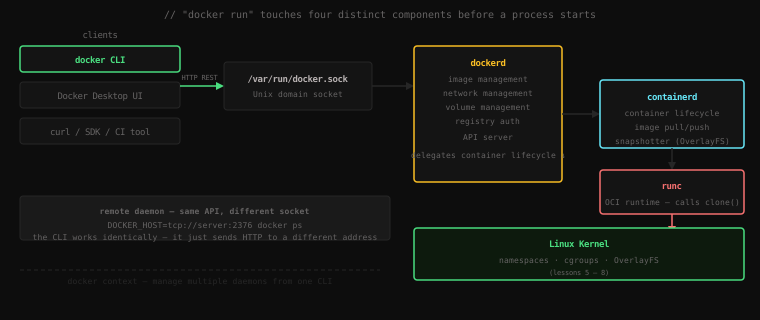
The Docker CLI (/usr/bin/docker) is a thin client. When you type docker run ubuntu bash, the CLI translates that into an HTTP REST request and sends it — not to the internet, but to a Unix socket on your local machine.
The Docker daemon (dockerd) is the persistent background process — the actual engine. It listens on that Unix socket, receives the HTTP request from the CLI, and does the orchestration work: managing images, networks, volumes, and container metadata.
containerd is a separate daemon that dockerd delegates to for container lifecycle operations — creating, starting, stopping, and deleting containers. It's a CNCF graduated project, fully independent of Docker. It manages the OverlayFS snapshots and calls the runtime.
runc is the OCI-compliant container runtime — a small binary that containerd calls to actually start a container. It calls clone() in the Linux kernel to create the namespaces and cgroups, then exec()s the container process inside them. runc is what touches the kernel. Everything above it is orchestration.
#Finding the Moving Parts
Let's verify this architecture is real, not theoretical. On your Linux machine:
Is dockerd running?
systemctl status docker● docker.service - Docker Application Container Engine
Loaded: loaded (/lib/systemd/system/docker.service; enabled)
Active: active (running) since Wed 2026-04-16 09:14:32 UTC; 2h 31min ago
Main PID: 843 (dockerd)
Tasks: 18
CGroup: /system.slice/docker.service
└─843 /usr/bin/dockerd -H fd:// --containerd=/run/containerd/containerd.sockdockerd is PID 843. It's been running since boot. It started with --containerd=/run/containerd/containerd.sock — which is how it knows where to find containerd.
Is containerd separate?
systemctl status containerd● containerd.service - containerd container runtime
Loaded: loaded (/lib/systemd/system/containerd.service; enabled)
Active: active (running) since Wed 2026-04-16 09:14:31 UTC; 2h 31min ago
Main PID: 821 (containerd)Its own service, its own PID (821), started one second before dockerd. Two separate processes.
Where is the socket?
ls -la /var/run/docker.socksrw-rw---- 1 root docker 0 Apr 16 09:14 /var/run/docker.sockThat s at the start means it's a Unix domain socket — a file descriptor used for local IPC, not a TCP port. The docker group has read-write access — that's how non-root users run Docker without sudo.
#Talking to the Daemon Directly
The Docker CLI is just an HTTP client. That means anything that can make HTTP requests can talk to dockerd. Let's bypass the CLI entirely and speak to the daemon ourselves using curl with the --unix-socket flag.
First, ask the daemon what version it is:
curl --silent --unix-socket /var/run/docker.sock http://localhost/version | python3 -m json.tool{
"Platform": {
"Name": "Docker Engine - Community"
},
"Version": "24.0.7",
"ApiVersion": "1.43",
"MinAPIVersion": "1.12",
"GitCommit": "afdd53b",
"GoVersion": "go1.20.10",
"Os": "linux",
"Arch": "amd64",
"KernelVersion": "5.15.0-89-generic"
}That's the exact same data docker version shows — the CLI calls this same endpoint.
Now list running containers:
curl --silent --unix-socket /var/run/docker.sock http://localhost/containers/json | python3 -m json.tool[
{
"Id": "f3a1b9c2d4e5...",
"Names": ["/demo"],
"Image": "ubuntu",
"Command": "sleep 300",
"State": "running",
"Status": "Up 3 minutes",
...
}
]Same data as docker ps. The CLI is just formatting this JSON response into a table.
Let's go further — pull an image using nothing but curl:
curl --silent --unix-socket /var/run/docker.sock \
-X POST "http://localhost/images/create?fromImage=alpine&tag=latest"{"status":"Pulling from library/alpine","id":"latest"}
{"status":"Pulling fs layer","progressDetail":{},"id":"7264a8db..."}
{"status":"Pull complete","progressDetail":{},"id":"7264a8db..."}
{"status":"Status: Downloaded newer image for alpine:latest"}A streaming response — the same output docker pull alpine shows, before the CLI formats it. This is the raw API.
#Why This Architecture?
Separating the client from the daemon wasn't just an engineering preference. It enables several important capabilities:
Multiple clients, one daemon. The daemon is a server that can handle concurrent requests. You can have a CLI session, a CI pipeline, and a web UI all talking to the same dockerd at the same time — each gets a consistent view of running containers.
Remote management. The Unix socket is local, but the daemon can also listen on a TCP port. Point your CLI at a remote daemon and control containers on another machine as if they were local.
Scriptable API. Any language with an HTTP library can build a Docker integration. Python has docker-py. Go has the official SDK. A shell script can use curl. The API is the contract; the client is interchangeable.
Separation of concerns. The daemon handles persistence, scheduling, and API. containerd handles container lifecycle. runc handles the kernel calls. Each layer can be replaced or upgraded independently. Kubernetes, for example, talks directly to containerd — it skips dockerd entirely.
#Controlling a Remote Daemon
Let's say you have a Docker daemon running on a remote server (with TLS properly configured — more on that later). From your local machine, you connect using DOCKER_HOST:
export DOCKER_HOST=tcp://my-server.example.com:2376
docker psCONTAINER ID IMAGE COMMAND CREATED STATUS PORTS NAMES
a1b2c3d4e5f6 nginx ... 2h ago Up 2h 80/tcp webThat's listing containers on the remote machine. Every subsequent docker command in this shell goes to that daemon. Your local machine has no containers running — Docker is doing this over TCP to a daemon on the other side.
The CLI has no idea or care where the daemon is. It formats the HTTP request and sends it to whatever address DOCKER_HOST points at.
For managing multiple daemons — local development, staging server, production — Docker provides contexts:
# Create a named context pointing at a remote daemon
docker context create staging --docker "host=tcp://staging.example.com:2376"

# Switch to it
docker context use staging

# All docker commands now go to the staging daemon
docker psCONTAINER ID IMAGE COMMAND CREATED STATUS NAMES
...staging containers...# Switch back to local
docker context use defaultEach context stores the daemon address and TLS credentials. Switch between them without touching environment variables. This is how a single developer can manage local, staging, and production Docker environments from one terminal.
#What Happens When the Daemon Is Down
Here's a diagnostic that matters: when Docker commands fail, the error tells you exactly which layer broke.
Start by stopping the Docker daemon:
sudo systemctl stop dockerNow try any Docker command:
docker psCannot connect to the Docker daemon at unix:///var/run/docker.sock.
Is the docker daemon running?That message tells you: the CLI tried to connect to the socket, got no response, and gave up. The CLI is fine. The daemon is not running. The socket exists but nobody is listening on the other end.
This is different from a running daemon that returned an error — in that case you'd get an HTTP error code with a message from the daemon itself. Distinguishing "can't reach the daemon" from "daemon returned an error" is the first step in debugging Docker issues.
Restart Docker:
sudo systemctl start docker
docker psCONTAINER ID IMAGE COMMAND CREATED STATUS PORTS NAMESBack. The daemon is up, the socket is live, the CLI can talk to it again.
#The Full Call Chain, One More Time
Let's trace exactly what happens when you run docker run alpine echo hi:
1. docker CLI        parses the command, builds HTTP POST /containers/create + POST /containers/{id}/start
2. HTTP over socket  sends the request to /var/run/docker.sock
3. dockerd           receives request, checks image cache, pulls alpine if needed,
                     creates container metadata, asks containerd to start it
4. containerd        sets up OverlayFS snapshot (lowerdir = alpine layers, fresh upperdir),
                     calls runc with the container config
5. runc              calls clone() — creates PID, NET, MNT, UTS, IPC namespaces,
                     sets up cgroup, mounts the OverlayFS root, exec()s "echo hi"
6. kernel            runs "echo hi" inside the isolated environment
7. output            "hi" travels back up: stdout → containerd → dockerd → HTTP response → CLI → your terminal
Seven steps. Each one crossing a clear boundary. And now you've seen every one of those boundaries up close — in the kernel, in the filesystem, in the process table. Nothing is hidden anymore.
Key Takeaway:
dockerthe CLI is a thin HTTP client.dockerdis the daemon it talks to via a Unix socket at/var/run/docker.sock.dockerddelegates container lifecycle tocontainerd, which callsruncto make the actual kernel syscalls. This layered architecture means any HTTP client can control Docker, remote daemons are controlled identically to local ones viaDOCKER_HOSTordocker context, and the components can be replaced independently — Kubernetes already does this, talking directly tocontainerdwithout involvingdockerdat all. When Docker commands fail, read the error: "cannot connect to the daemon" means the socket is dead; an HTTP error code means the daemon is running but rejected the request.