Multi-Stage Builds and Dangling Images
How to keep production images lean — multi-stage builds that compile in one stage and ship only the binary, plus cleaning up the dangling image mess.
#The Problem With Single-Stage Builds
To compile a Go binary you need the Go toolchain — the compiler, the linker, the standard library source, the build cache. That's roughly 850 MB. Your compiled binary might be 8 MB.
In a single-stage Dockerfile:
FROM golang:1.22
WORKDIR /app
COPY . .
RUN go build -o server .
CMD ["/app/server"]
The final image contains everything: the Go toolchain (850 MB), your source code, all intermediate build artifacts, and the 8 MB binary you actually want to run. You're shipping 850 MB to run 8 MB of code. Every docker push, every docker pull in CI, every container start pays that cost.
The compiler is not needed at runtime. The source code is not needed at runtime. The build cache is not needed at runtime. They have no business being in a production image.
Multi-stage builds fix this.
#The Pattern: Build in One Stage, Ship From Another
A multi-stage Dockerfile uses multiple FROM instructions. Each FROM starts a new stage with a fresh filesystem. You can COPY files between stages using COPY --from=<stage>.
Only the last stage becomes the final image. Every earlier stage is used during the build and then discarded — it never enters the image that gets pushed to a registry.
# Stage 1: builder — fat, full toolchain, disposable
FROM golang:1.22 AS builder
WORKDIR /app
COPY go.mod go.sum ./
RUN go mod download
COPY . .
RUN CGO_ENABLED=0 GOOS=linux go build -o server .

# Stage 2: final — tiny, no toolchain, this is what ships
FROM scratch
COPY --from=builder /app/server /server
EXPOSE 8080
CMD ["/server"]
The AS builder names the first stage so we can reference it in COPY --from=builder. Without a name you'd use the stage index: COPY --from=0.
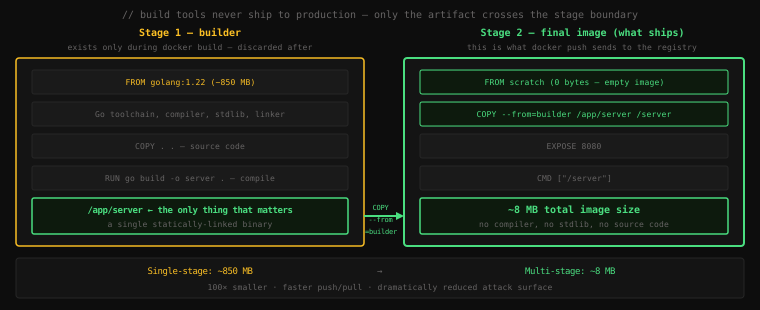
Let's prove it. First, set up a minimal Go project:
mkdir goapp && cd goapp
go mod init goapp
main.go
package main

import (
    "fmt"
    "net/http"
)

func main() {
    http.HandleFunc("/", func(w http.ResponseWriter, r *http.Request) {
        fmt.Fprintln(w, "hello from a lean container")
    })
    fmt.Println("listening on :8080")
    http.ListenAndServe(":8080", nil)
}
Dockerfile (single-stage first):
FROM golang:1.22
WORKDIR /app
COPY . .
RUN go build -o server .
CMD ["/app/server"]
Build and check the size:
docker build -t goapp:fat .
docker image ls goapp:fatREPOSITORY TAG IMAGE ID CREATED SIZE
goapp fat a1b2c3d4e5f6 12 seconds ago 856MB856 MB. Now the multi-stage version. Replace the Dockerfile:
FROM golang:1.22 AS builder
WORKDIR /app
COPY go.mod ./
RUN go mod download
COPY . .
RUN CGO_ENABLED=0 GOOS=linux go build -o server .

FROM scratch
COPY --from=builder /app/server /server
EXPOSE 8080
CMD ["/server"]docker build -t goapp:lean .
docker image ls goappREPOSITORY TAG IMAGE ID CREATED SIZE
goapp lean b2c3d4e5f6a7 8 seconds ago 7.53MB
goapp fat a1b2c3d4e5f6 2 minutes ago 856MB7.53 MB vs 856 MB. Same application. The CGO_ENABLED=0 flag disables C interop so Go produces a fully statically linked binary with zero external library dependencies — which is why it runs on FROM scratch with literally nothing else in the image.
Run it:
docker run --rm -p 8080:8080 goapp:leanlistening on :8080curl http://localhost:8080/hello from a lean containerA 7.5 MB image, a single binary, zero OS, zero attack surface.
#FROM scratch — The Empty Base
scratch is Docker's special empty image. It has no filesystem, no shell, no libc, no nothing. Using it as a base produces the smallest possible image — just whatever you COPY into it.
It only works when your binary is fully self-contained:
- Go with
CGO_ENABLED=0— statically linked, zero C dependencies ✓ - Rust with
musltarget —x86_64-unknown-linux-musl, statically linked ✓ - C with
-static— explicitly static compilation ✓
It doesn't work for:
- Go binaries that use CGo (need libc)
- Python (needs the interpreter, stdlib, shared libraries)
- Node.js (needs the V8 runtime)
- Any binary that dynamically links system libraries
For those, use a minimal base instead of scratch.
#distroless — scratch With Just Enough
Google's distroless images are the next step up from scratch. They include the bare minimum runtime libraries (libc, SSL certificates, timezone data) but no shell, no package manager, no utilities.
FROM golang:1.22 AS builder
WORKDIR /app
COPY . .
RUN go build -o server .

# Distroless has libc — works even with CGo
FROM gcr.io/distroless/base-debian12
COPY --from=builder /app/server /server
CMD ["/server"]
Distroless images:
gcr.io/distroless/base— libc + SSL certs (~20 MB)gcr.io/distroless/static— SSL certs only, no libc (~2 MB, for fully static binaries)gcr.io/distroless/python3— Python runtime, no pip, no shell (~50 MB)gcr.io/distroless/nodejs— Node.js runtime, no npm, no shell (~100 MB)
The key property: no shell. If an attacker compromises your container process, there's no /bin/sh to drop into, no curl to download tools, no apt to install anything. The attack surface is minimal by construction.
# Trying to exec into a distroless container:
docker run --rm -it gcr.io/distroless/base-debian12 /bin/shdocker: Error response from daemon: failed to create shim task:
OCI runtime exec failed: exec: "/bin/sh": stat /bin/sh: no such file or directoryNo shell. That's the point.
#Multi-Stage for Python
Python can't use FROM scratch but multi-stage still helps significantly. The pattern: install and build everything in a full image, copy only what's needed to a slim final image.
# Stage 1: build — install everything including compilers for native extensions
FROM python:3.12 AS builder
WORKDIR /app
COPY requirements.txt .
# Build wheels — compiled native extensions baked in
RUN pip install --user --no-cache-dir -r requirements.txt

# Stage 2: runtime — slim image, no build tools
FROM python:3.12-slim
WORKDIR /app
# Copy the installed packages from the builder
COPY --from=builder /root/.local /root/.local
COPY . .
ENV PATH=/root/.local/bin:$PATH
CMD ["uvicorn", "main:app", "--host", "0.0.0.0", "--port", "8000"]
The builder stage uses the full python:3.12 image (with gcc, make, build-essential) to compile any native Python extensions (NumPy, cryptography, Pillow — anything with C code). The final stage uses python:3.12-slim and copies only the compiled packages, not the compiler.
Size impact depends heavily on your dependencies. For an app with native extensions:
- Single stage on full Python: ~1.4 GB
- Multi-stage to slim: ~280 MB
#Multi-Stage for Node.js
Same pattern — build assets in one stage, serve from another:
# Stage 1: build frontend assets
FROM node:20 AS frontend-builder
WORKDIR /app
COPY package*.json ./
RUN npm ci
COPY . .
RUN npm run build   # produces /app/dist/

# Stage 2: serve with nginx — no Node.js, no node_modules
FROM nginx:1.25-alpine
COPY --from=frontend-builder /app/dist /usr/share/nginx/html
EXPOSE 80
The final image is just nginx + your compiled static files. No Node.js runtime, no node_modules, no source TypeScript — nothing the browser doesn't need.
Single stage (node:20 + full node_modules): ~1.1 GB
Multi-stage (nginx:alpine + dist only): ~25 MB#Targeting a Specific Stage
Use --target to stop the build at a named stage. Essential for debugging and for running tests inside the build pipeline:
FROM golang:1.22 AS builder
WORKDIR /app
COPY . .
RUN go build -o server .

FROM golang:1.22 AS tester
WORKDIR /app
COPY . .
RUN go test ./...

FROM scratch AS final
COPY --from=builder /app/server /server
CMD ["/server"]# Run tests — stop at the tester stage
docker build --target tester -t goapp:test .
# Build the final production image
docker build --target final -t goapp:prod .CI pipelines use this to run tests in the same reproducible environment as the production build, without actually producing a production image on test failure.
#Dangling Images
Build the same tag twice:
docker build -t goapp:lean .
# ... time passes, you make a change ...
docker build -t goapp:lean .
docker image lsREPOSITORY TAG IMAGE ID CREATED SIZE
goapp lean c3d4e5f6a7b8 10 seconds ago 7.53MB
<none> <none> b2c3d4e5f6a7 5 minutes ago 7.53MBThat <none>:<none> entry is a dangling image — the previous goapp:lean lost its tag when the new build took it over. The image still exists on disk; it just has no human-readable name anymore.
Dangling images accumulate silently, especially on CI servers that build on every commit. Each one keeps its layer directories in /var/lib/docker/overlay2/ even though nothing references them by name.
See all dangling images:
docker image ls -f dangling=trueREPOSITORY TAG IMAGE ID CREATED SIZE
<none> <none> b2c3d4e5f6a7 5 minutes ago 7.53MB
<none> <none> a9b8c7d6e5f4 1 hour ago 856MB
<none> <none> 8f7e6d5c4b3a 2 hours ago 258MBRemove them all:
docker image pruneWARNING! This will remove all dangling images.
Are you sure you want to continue? [y/N] y
Deleted Images:
untagged: sha256:b2c3d4...
deleted: sha256:b2c3d4...
untagged: sha256:a9b8c7...
deleted: sha256:a9b8c7...
Total reclaimed space: 1.11GBFor CI servers where you want this automatic and unattended:
docker image prune -f # skip the confirmation promptNote: docker image prune only removes dangling images (untagged with no containers using them). It won't touch tagged images or images that stopped containers still reference. To also remove unused images that aren't currently used by any container:
docker image prune -a # also removes tagged but unused imagesBe careful with -a on a developer machine — it removes every image not actively in use by a running or stopped container, including base images you'll want on the next build.
#The Full Cleanup Command
When Docker storage balloons — which it will on any active development machine — the comprehensive cleanup:
docker system pruneWARNING! This will remove:
- all stopped containers
- all networks not used by at least one container
- all dangling images
- all dangling build cache
Are you sure you want to continue? [y/N]With -a it also removes unused images. With -f it skips the prompt. This is the git clean -fd of Docker — effective but irreversible. Running containers and their images are never touched.
Check how much space Docker is actually using before you nuke it:
docker system dfTYPE TOTAL ACTIVE SIZE RECLAIMABLE
Images 12 3 4.21GB 3.8GB (90%)
Containers 8 2 124MB 98MB (79%)
Local Volumes 3 2 890MB 0B (0%)
Build Cache 47 0 1.2GB 1.2GBBuild cache is often the biggest consumer and entirely reclaimable. Images accumulate from months of docker pull and failed builds. Containers stick around because developers forget to --rm their one-off runs.
Key Takeaway: Multi-stage builds solve the fundamental tension between "I need a full toolchain to build" and "I don't want a full toolchain in production." Each
FROMin a Dockerfile starts a new stage; only the last stage ships.COPY --from=<stage>moves specific files across the boundary — everything else is discarded. Go binaries withCGO_ENABLED=0can useFROM scratchfor 8 MB images; Python and Node.js use slim or distroless bases instead, still achieving 70–90% size reductions. Dangling images (<none>:<none>) accumulate silently every time you rebuild a tag —docker image prunerecovers the space. Checkdocker system dfregularly to understand what's eating your disk, anddocker system pruneto reclaim it.