BuildKit: The Next-Gen Build Engine
How BuildKit replaced the legacy builder with a parallel, cache-efficient, secrets-aware build pipeline — and why your builds got dramatically faster.
#The Problem With Building Images
We covered multi-stage builds in lesson 16 — how they shrink production images by separating the build environment from the runtime environment. What we didn't cover is how slow the legacy builder made them.
The original Docker build engine worked exactly like reading a Dockerfile from top to bottom. Each FROM, RUN, COPY was executed in sequence. Stage 1 completed, then stage 2 started, then stage 3. If you had a frontend build and a backend build that had no relationship to each other, they ran one after the other regardless. If you were building for testing only and didn't need the final production stage, it built the production stage anyway. If your Go modules hadn't changed but your source code had, the entire RUN go mod download step repeated even though the result would be identical.
BuildKit, introduced in Docker 18.09 and enabled by default in Docker 23.0, replaced the legacy engine with a fundamentally different architecture. The improvements are dramatic enough that the Dockerfiles you already have get faster without any changes — and new Dockerfile syntax unlocks capabilities the legacy builder simply couldn't express.
#How BuildKit Thinks About Builds
The legacy builder thought about a Dockerfile as a list of instructions to execute in order.
BuildKit thinks about a Dockerfile as a directed acyclic graph (DAG) of dependencies. Before executing anything, it analyses the entire Dockerfile, determines which stages depend on which other stages, and builds the dependency graph. Independent stages are executed in parallel. Stages that are never referenced in the final output aren't built at all.
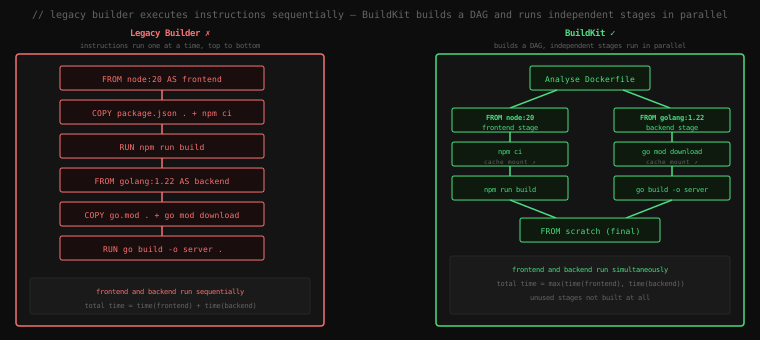
Let's verify that BuildKit is active:
docker info | grep "Builder Version" Builder Version: BuildKitIf you see BuildKit, you're already using it. From Docker 23.0 onwards, docker build routes through BuildKit automatically.
#Parallel Stage Execution
Consider a Dockerfile that builds a frontend and a backend independently before combining them:
# Stage 1: frontend — Node.js build
FROM node:20-alpine AS frontend
WORKDIR /app
COPY frontend/package*.json ./
RUN npm ci
COPY frontend/ .
RUN npm run build

# Stage 2: backend — Go build
FROM golang:1.22-alpine AS backend
WORKDIR /app
COPY go.mod go.sum ./
RUN go mod download
COPY . .
RUN CGO_ENABLED=0 go build -o server .

# Stage 3: final
FROM alpine:3.20
COPY --from=frontend /app/dist /app/static
COPY --from=backend /app/server /app/server
CMD ["/app/server"]
With the legacy builder: frontend completes, then backend starts. Total time = time(frontend) + time(backend).
With BuildKit: both stages start simultaneously because BuildKit sees that frontend and backend don't depend on each other. Total time = max(time(frontend), time(backend)).
On a codebase where both stages take around 90 seconds each, BuildKit turns a 3-minute build into a 90-second one. No Dockerfile changes needed.
BuildKit also skips unused stages. If you run:
docker build --target backend .BuildKit builds only the backend stage and its dependencies. The frontend stage isn't touched. The legacy builder ran everything up to the target regardless.
#Cache Mounts: Persistent Build Caches
This is the feature that makes the biggest practical difference on projects with large dependency trees.
The problem: every RUN npm install, RUN go mod download, or RUN pip install in a Dockerfile runs inside a fresh container. Package managers maintain their own download caches — npm caches tarballs in ~/.npm, Go caches modules in /root/go/pkg/mod, Maven caches JARs in ~/.m2. In a Docker build, that cache directory is inside the container, which is thrown away after each layer. Every build re-downloads every dependency from the internet.
BuildKit's --mount=type=cache solves this by mounting a persistent cache directory into the build step. The cache survives across builds. The package manager's download cache accumulates over time, and subsequent builds hit the local cache instead of the network.
#Node.js
FROM node:20-alpine AS deps
WORKDIR /app
COPY package*.json ./
RUN --mount=type=cache,target=/root/.npm \
    npm ci --prefer-offline
--mount=type=cache,target=/root/.npm mounts a BuildKit-managed cache volume at /root/.npm for the duration of this RUN. npm writes its tarball cache there. On the next build, it's still there. --prefer-offline tells npm to use cached tarballs instead of checking the network when possible.
The first build downloads everything. The second build installs from cache. The difference is dramatic — what was a 45-second npm install on a cold build becomes a 3-second install on warm cache.
#Go
FROM golang:1.22-alpine AS builder
WORKDIR /app
COPY go.mod go.sum ./
RUN --mount=type=cache,target=/root/go/pkg/mod \
    --mount=type=cache,target=/root/.cache/go-build \
    go mod download
COPY . .
RUN --mount=type=cache,target=/root/go/pkg/mod \
    --mount=type=cache,target=/root/.cache/go-build \
    CGO_ENABLED=0 go build -o server .
Two cache mounts: the module cache (/root/go/pkg/mod) for downloaded module source, and the build cache (/root/.cache/go-build) for compiled artifacts. The build cache means incremental compilation — only files that changed since the last build are recompiled.
#Maven
FROM maven:3.9-eclipse-temurin-21 AS builder
WORKDIR /app
COPY pom.xml .
RUN --mount=type=cache,target=/root/.m2 \
    mvn dependency:go-offline -q
COPY src/ src/
RUN --mount=type=cache,target=/root/.m2 \
    mvn package -DskipTests -q
Maven's local repository at ~/.m2 accumulates all downloaded JARs. Caching it means subsequent builds don't re-download Spring Boot's 50+ transitive dependencies.
#Important: Cache Mounts vs Layer Cache
Cache mounts and BuildKit's layer cache are different things. Layer cache kicks in when an instruction and its inputs haven't changed — Docker reuses the cached layer entirely and skips the instruction. Cache mounts are active during a RUN command and give the package manager a warm local cache, but the RUN still executes. The combination is: layer cache skips the step entirely when nothing changed, cache mounts make the step fast when it does run.
#Build Secrets: Credentials That Never Touch a Layer
This is the security feature that solves a problem the legacy builder had no clean answer to.
Sometimes a build step needs credentials. Pulling packages from a private registry. Cloning a private Git repository. Calling an authenticated API. With the legacy builder, the only way to get credentials into a RUN step was to pass them as build arguments:
# Legacy builder — WRONG
ARG NPM_TOKEN
RUN echo "//registry.npmjs.org/:_authToken=${NPM_TOKEN}" > ~/.npmrc && \
    npm install && \
    rm ~/.npmrc   # deleting the file doesn't help — it's in the layer
The rm ~/.npmrc doesn't help. Every Docker layer is a snapshot of the filesystem at that point. The layer created by the RUN instruction above contains the .npmrc file with the token — the deletion creates a new layer on top that hides the file, but the token is still readable in the layer history. Anyone with pull access to the image can extract it with docker save.
BuildKit's --mount=type=secret injects a secret into the build step as a file. The secret is not stored in any layer, any intermediate image, or any build cache. It exists only in memory for the duration of the specific RUN instruction that uses it.
FROM node:20-alpine
WORKDIR /app
COPY package*.json ./
RUN --mount=type=secret,id=npm_token \
    NPM_TOKEN=$(cat /run/secrets/npm_token) \
    npm config set //registry.npmjs.org/:_authToken "$NPM_TOKEN" && \
    npm install
The secret is mounted at /run/secrets/npm_token. You pass it at build time:
docker buildx build \
  --secret id=npm_token,src=~/.npm_token \
  -t myapp:latest .
Or from an environment variable:
docker buildx build \
  --secret id=npm_token,env=NPM_TOKEN \
  -t myapp:latest .
The secret file exists inside the container only while the RUN instruction is executing. After the instruction completes, the mount is removed. The resulting layer contains no trace of it. You can verify this:
# inspect the image — no .npmrc, no token, nothing
docker run --rm myapp:latest find / -name ".npmrc" 2>/dev/null
# (empty output)#SSH Forwarding
A closely related feature for a common problem: cloning private Git repos during a build.
FROM golang:1.22 AS builder
WORKDIR /app

RUN --mount=type=ssh \
    git clone git@github.com:myorg/private-lib.git /deps/private-lib

COPY . .
RUN go build -o server .# Forward your SSH agent into the build
docker buildx build --ssh default .BuildKit forwards your local SSH agent socket into the build. The build step can authenticate with GitHub using your SSH key, but the key itself never enters the build environment. No id_rsa files in any layer.
#Inline Build Progress
A minor but noticeable improvement: BuildKit's progress output shows parallel stages running simultaneously:
docker buildx build -t myapp:latest .[+] Building 94.3s (12/12) FINISHED
=> [internal] load build definition from Dockerfile
=> [frontend 1/4] FROM node:20-alpine
=> [backend 1/4] FROM golang:1.22-alpine ← both stages, simultaneously
=> [frontend 2/4] COPY package*.json ./
=> [backend 2/4] COPY go.mod go.sum ./
=> [frontend 3/4] RUN npm ci ← 61.2s
=> [backend 3/4] RUN go mod download ← 44.8s
=> [frontend 4/4] RUN npm run build ← 18.4s
=> [backend 4/4] RUN go build -o server . ← 29.1s
=> [final 1/2] COPY --from=frontend /app/dist ...
=> [final 2/2] COPY --from=backend /app/server ...The interleaved [frontend ...] and [backend ...] lines confirm they're running simultaneously. The legacy builder would show one stage completing entirely before the other started.
#docker buildx: The BuildKit Frontend CLI
docker buildx is the CLI interface for BuildKit's extended capabilities. For standard single-platform builds, docker build and docker buildx build are equivalent since Docker 23.0. buildx becomes essential for:
#Multi-Platform Builds
# Build for both Intel and Apple Silicon
docker buildx build \
  --platform linux/amd64,linux/arm64 \
  --push \
  -t myregistry/myapp:latest .
BuildKit emulates non-native architectures using QEMU. The resulting image is pushed as an OCI Image Index (the multi-platform manifest we saw in lesson 22) — a single tag that resolves to the correct platform image automatically.
#Build Inspection
# Inspect the cache state for a build
docker buildx du

# Full cache breakdown
docker buildx prune --dry-run#Build Drivers
docker buildx supports multiple build drivers:
# Default: BuildKit inside the Docker daemon
docker buildx use default

# Create a BuildKit instance in a separate container (supports more features)
docker buildx create --name mybuilder --use
docker buildx inspect --bootstrap
The container-based driver supports multi-platform builds natively (without QEMU on some platforms) and exposes BuildKit's full feature set.
#The .dockerignore Connection
BuildKit changed how the build context is handled. The legacy builder sent the entire build context directory to the daemon before the build started — even files that would never be COPY'd. A 2GB node_modules/ directory would be uploaded to the daemon on every build.
BuildKit is lazier in the right way: it reads the Dockerfile first and only requests the files it actually needs from the build context. A COPY package.json . instruction requests only package.json. The 2GB node_modules/ stays on the client.
That said, .dockerignore still matters for two reasons: it explicitly excludes directories from even being considered, and it's respected by the legacy builder which you might still encounter in older CI environments.
A good .dockerignore for a Node project:
node_modules
dist
.git
*.log
.env
Key Takeaway: BuildKit replaced the legacy builder with a DAG-based execution engine that runs independent stages in parallel and skips unused ones entirely — a multi-stage build that took 3 minutes with the legacy builder may take 90 seconds with BuildKit. Cache mounts (
--mount=type=cache) give package managers persistent local caches across builds, eliminating repeated network downloads on incremental rebuilds. Secrets mounts (--mount=type=secret) inject credentials for the duration of a single instruction without storing them in any layer — the only correct solution to the "private registry at build time" problem. BuildKit has been the default in Docker since 23.0;docker buildxexposes its full capabilities including multi-platform image builds.