Runc and Containerd
Why Docker donated its own heart to the community — understanding the split into runc (the low-level runtime) and containerd (the high-level daemon).
#The Monolith Problem
When Docker first launched, the Docker daemon did everything. One process, running as root, responsible for the entire container lifecycle: pulling images, unpacking layers, creating network interfaces, setting up volumes, spawning containers, collecting their output, monitoring their health, cleaning up after they stopped.
This design made Docker easy to ship — one binary, one daemon, one API. But it had a consequence that became more obvious as Docker moved into production: the daemon was a single point of failure for every container on the host.
If dockerd crashed, all containers died. If you needed to upgrade dockerd, you had to restart it, which killed every running container. If a security vulnerability was found in any part of the daemon, the entire surface area was exposed — the image puller, the network configurator, and the container executor all ran in the same privileged process.
The CoreOS critiques from lesson 21 landed hardest here. The response to them wasn't defensive. Docker started splitting the monolith.
#The Split: Two Layers
The decomposition happened in two stages, producing two distinct components with different responsibilities:
runc — the low-level runtime. Takes a prepared filesystem bundle (rootfs + config.json as specified by the OCI Runtime Spec from lesson 22) and executes a container process inside it. Sets up namespaces, cgroups, seccomp profiles, capabilities — the Linux kernel isolation work. Then exits. It's not a daemon. It runs, creates the container, hands off the process, and terminates.
containerd — the high-level daemon. Everything above runc: pulling images, managing the snapshot system (overlay2, etc.), preparing filesystem bundles, calling runc, collecting container I/O, managing the container lifecycle. containerd is a long-running daemon, but it's a much smaller and more focused one than the original Docker daemon.
Docker donated runc to the OCI in 2015 (covered in lesson 22). containerd was donated to the CNCF in March 2017 and graduated as a stable project in February 2019. Today, containerd is the most widely deployed container runtime on Earth — it runs inside every major Kubernetes distribution.
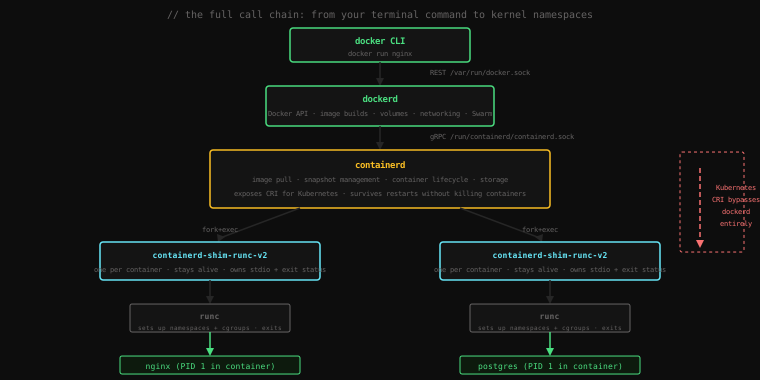
#What containerd Does
Start a container and look at the process tree:
docker run -d --name web nginx
ps aux | grep -E 'containerd|shim|nginx'root 1823 0.5 1.2 containerd --config /etc/containerd/config.toml
root 18441 0.0 0.0 containerd-shim-runc-v2 -namespace moby -id 9f3a...
root 18471 0.0 0.0 nginx: master process nginx -g daemon off;
www-data 18510 0.0 0.0 nginx: worker processThree distinct actors:
containerd— the persistent daemon, PID 1823, started at bootcontainerd-shim-runc-v2— one instance per container, PID 18441nginx— the actual container process, PID 18471
Notice what's missing: runc is not running. It ran, set up the container, and exited. containerd and the shim are the only persistent processes.
When docker run is invoked:
- The Docker CLI sends an HTTP request to dockerd over
/var/run/docker.sock - dockerd checks if the image is locally available; if not, it delegates the pull to containerd
- containerd pulls each layer (if not cached), verifies hashes, stores blobs on disk
- containerd prepares the snapshot: stacks layers using overlay2, creates the read-write layer on top
- containerd generates
config.jsonfrom the image config + thedocker runflags you provided - containerd forks a new
containerd-shimprocess - The shim calls
runc createwith the filesystem bundle - runc creates the namespaces, sets up cgroups, mounts proc/dev/sys, and calls
execve()to launch the container process - runc exits
- The container process (nginx) runs as a child of the shim, not of containerd
docker stop web
docker rm web#What containerd Manages Directly
containerd has its own CLI tool, ctr, for inspecting and managing its state directly. This bypasses Docker entirely:
# List containerd's view of running containers
sudo ctr containers list

# List images containerd has pulled
sudo ctr images list

# List snapshots (the prepared filesystems)
sudo ctr snapshots list
ctr is deliberately low-level and not intended for everyday use — it's a debugging and inspection tool. For a Docker-compatible experience using containerd directly, nerdctl mirrors the Docker CLI syntax but speaks directly to containerd without going through dockerd.
#The Shim: Why It Exists
The containerd-shim-runc-v2 process is the least-understood piece of this architecture. It looks like overhead — why is there an extra process between containerd and the container?
The shim solves a specific problem: containerd must be able to restart without killing running containers.
Here's the issue. containerd is a daemon. Daemons need to be upgradable, restartable, and crashable — without taking down every container on the host with them. But containers have file descriptors: the container's stdin, stdout, and stderr are pipes that connect the container process to the outside world. If containerd held those file descriptors directly, killing containerd would close the pipes, potentially killing the container process or losing its output.
The shim holds those file descriptors. One shim per container, each a tiny process whose only job is to:
- Own the container's stdio pipes so containerd can come and go without affecting them
- Report the container's exit status back to containerd when the container process terminates
- Serve as the re-attach point — if containerd restarts, it can reconnect to the shim and regain visibility into the running container
Let's prove the restart property:
docker run -d --name web nginx
docker psCONTAINER ID IMAGE COMMAND STATUS
9f3a8b2e1cd4 nginx "/docker-entrypoint.…" Up 3 secondsNow restart containerd (not the container):
sudo systemctl restart containerd
sleep 2
docker psCONTAINER ID IMAGE COMMAND STATUS
9f3a8b2e1cd4 nginx "/docker-entrypoint.…" Up 18 secondsThe container is still running. containerd restarted, found the existing shims, reconnected to them, and resumed managing the containers as if nothing happened.
This was impossible with the original Docker monolith. The shim architecture is what made containerd restartable.
docker rm -f web#The Shim Name
The shim binary is named containerd-shim-runc-v2. The name is deliberate: it's the shim for runc, version 2. This means containerd's shim interface is pluggable — you can have different shim implementations for different runtimes.
This is how Kata Containers works (containers that run inside lightweight VMs), and how gVisor works (containers with a userspace kernel for additional isolation). Each has its own shim that implements the containerd shim API but delegates to a different underlying runtime instead of runc.
containerd-shim-kata-v2    → runs container in a QEMU microVM
containerd-shim-runsc-v2   → runs container under gVisor's userspace kernel
containerd-shim-runc-v2    → the standard runc path
containerd doesn't care which shim it's using. The shim API is the boundary.
#How Kubernetes Uses containerd
One of the key outcomes of the container wars was that Kubernetes no longer needs to go through Docker.
Originally, Kubernetes talked to Docker to manage containers. Docker would receive Kubernetes's requests, translate them into Docker API calls, and delegate to containerd internally. Kubernetes → dockerd → containerd was three hops where Kubernetes only needed one.
The Kubernetes project defined the Container Runtime Interface (CRI) — a gRPC API that any container runtime can implement to integrate with Kubernetes. containerd implements CRI natively. Kubernetes talks to containerd directly:
Kubernetes (kubelet) → [CRI gRPC] → containerd → shim → runc → containerThe dockerd layer is gone entirely. When Kubernetes removed dockershim (the compatibility shim that translated CRI calls into Docker API calls) in Kubernetes 1.24 in 2022, this was the change: Kubernetes now requires CRI directly, which means CRI-O or containerd, not dockerd.
This doesn't affect your images. OCI images built with Docker run on containerd. The image format is the standard; the daemon is just the implementation.
You can verify what runtime your Docker installation is using:
docker info | grep -A 3 "Runtimes" Runtimes: io.containerd.runc.v2 runc
Default Runtime: runc
Init Binary: docker-initdocker info | grep "Container Runtime" Container Runtime: containerdThe Docker daemon is sitting on top of containerd, which uses runc. The stack is explicit.
#The Full Stack, Assembled
Every time you run docker run, here is the exact sequence of processes involved:
docker run nginx
    │
    │  HTTP POST /containers/create
    ▼
dockerd
    │  handles: networking, volumes, auth, build cache, Swarm
    │
    │  gRPC → containerd.sock
    ▼
containerd
    │  handles: image pull, snapshot prep, config.json generation
    │
    │  fork()
    ▼
containerd-shim-runc-v2        ← stays running, one per container
    │
    │  runc create <bundle>
    ▼
runc                           ← runs, sets up isolation, exits
    │  clone(CLONE_NEWPID|CLONE_NEWNET|...)
    │  cgroup limits applied
    │  seccomp profile loaded
    │  execve("/docker-entrypoint.sh")
    ▼
nginx (PID 1 in container)     ← the only thing running when the dust settles
Five layers to create one process. But the layers are why you can:
- Restart containerd without killing containers (shim)
- Upgrade runc without restarting containers (shim owns the process)
- Use Kubernetes without Docker (containerd speaks CRI)
- Use non-runc runtimes for isolation-sensitive workloads (pluggable shim)
Each layer is independently versioned, independently maintained, and independently replaceable.
#Practical Visibility
A few commands useful for understanding what's actually running:
# Which version of containerd is Docker using?
docker info | grep "containerd version"

# Which version of runc?
docker info | grep "runc version"

# See every shim process and which container it corresponds to
ps aux | grep containerd-shim | grep -v grep

# Get the PID of a container's main process on the host
docker inspect --format '{{.State.Pid}}' web

# See the container's cgroup from the host
cat /proc/$(docker inspect --format '{{.State.Pid}}' web)/cgroup
These give you a host-side view of what containers are actually doing — the same view that monitoring tools, security scanners, and orchestrators have when they look at your containers.
Key Takeaway: Docker decomposed its monolithic daemon into two layers —
runc(the OCI-spec low-level runtime that sets up namespaces and cgroups, then exits) andcontainerd(the persistent daemon that handles image management, snapshot preparation, and container lifecycle). Between them sits thecontainerd-shim, one per container: it holds the container's stdio file descriptors so containerd can restart without killing running containers. Kubernetes bypasses dockerd entirely and talks to containerd via the CRI gRPC interface — the dockershim was removed in Kubernetes 1.24. The layered architecture is the direct result of the container wars: each interface is standardized, each component is independently replaceable, and no single daemon is a required point of failure.