The OCI: Establishing Standards
Why the Open Container Initiative exists — how standardizing the image format and runtime spec ensured no single company could own the container ecosystem.
#From Political Conflict to Technical Standard
Lesson 21 covered why the OCI came to exist: Docker's expanding scope, CoreOS's technical objections, the rkt launch, and the community conflict that followed. The resolution — forming the Open Container Initiative under the Linux Foundation in June 2015 — was a political act. But the output was purely technical.
The OCI produced two specifications. Not tools, not implementations — specifications. Documents describing exactly what a container image must look like and exactly what a container runtime must do with it. Anyone could implement them. No one company owned them. Any tool that produced an OCI image would work with any runtime that consumed one.
This lesson is about what those specifications actually say.
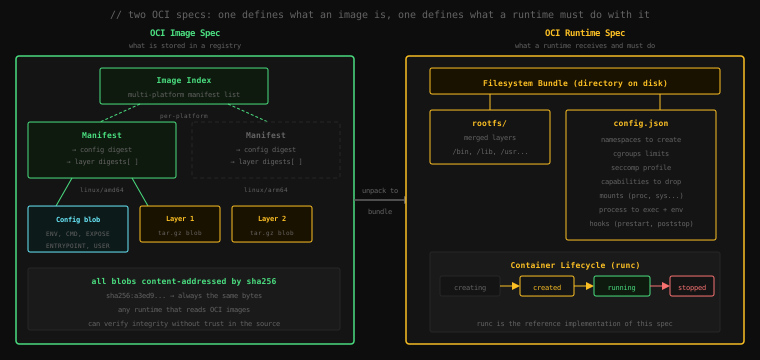
#The OCI Image Spec
The image spec answers one question: what exactly is a container image?
Before the OCI, "a container image" meant "whatever Docker's tooling produced and consumed." There was no external definition. The OCI image spec made it explicit: a container image is a content-addressed collection of JSON documents and compressed tar archives, organized in a specific way.
#Content Addressing
The foundational concept is content addressing. Every component of an OCI image — every layer, every config file, every manifest — is identified by the SHA-256 hash of its contents. The name nginx:latest is just a human-readable pointer. Underneath it is a hash like sha256:a3ed95caeb02ffe68cdd9fd84406680ae93d633cb16422d00e8a7c22955b46d4.
Content addressing has a property that's more important than it first appears: the hash is the verification. When you pull an image, Docker (or any OCI-compliant tool) downloads each blob and checks its SHA-256 hash against what the manifest specified. If the bytes don't match the hash, the download is corrupt or tampered with. The pull fails. There is no separate signature to check, no certificate authority to trust — the hash is self-verifying.
#The Manifest
The manifest is the entry point to an image. It's a JSON document that lists two things: where to find the image's configuration, and where to find the image's layers.
Let's see it directly. Pull an image and inspect its manifest:
docker pull nginx:alpine
docker buildx imagetools inspect nginx:alpine --raw{
"schemaVersion": 2,
"mediaType": "application/vnd.oci.image.index.v1+json",
"manifests": [
{
"mediaType": "application/vnd.oci.image.manifest.v1+json",
"digest": "sha256:1ae23480369fa4139f6dec668d7a5a941b56ea174e9cf75e09771988fe621c95",
"size": 1855,
"platform": {
"architecture": "amd64",
"os": "linux"
}
},
{
"mediaType": "application/vnd.oci.image.manifest.v1+json",
"digest": "sha256:7f7e7e7e...",
"size": 1855,
"platform": {
"architecture": "arm64",
"os": "linux"
}
}
]
}This is an Image Index — a top-level manifest that lists platform-specific manifests. When you docker pull nginx:alpine on an Intel machine, Docker fetches the Image Index, finds the linux/amd64 entry, follows that digest to the platform-specific manifest, and proceeds from there.
#The Platform Manifest
The platform-specific manifest lists the actual content — one config blob and a list of layer blobs:
{
  "schemaVersion": 2,
  "mediaType": "application/vnd.oci.image.manifest.v1+json",
  "config": {
    "mediaType": "application/vnd.oci.image.config.v1+json",
    "digest": "sha256:a3ed95cae...",
    "size": 7682
  },
  "layers": [
    {
      "mediaType": "application/vnd.oci.image.layer.v1.tar+gzip",
      "digest": "sha256:4abcb236...",
      "size": 3408729
    },
    {
      "mediaType": "application/vnd.oci.image.layer.v1.tar+gzip",
      "digest": "sha256:9b96c5e0...",
      "size": 622
    }
  ]
}
Each digest is a content address. Docker fetches each blob by hash, verifies it, and stores it locally. If a layer with that exact hash is already in the local cache, it's not downloaded again — the hash guarantees the cached bytes are identical.
#The Config Blob
The config blob contains everything Docker needs to know about how to run the image: the environment variables, the command to run, the exposed ports, the working directory, the user, and the history of each layer.
docker image inspect nginx:alpine[
{
"Id": "sha256:a3ed95...",
"RepoTags": ["nginx:alpine"],
"Architecture": "amd64",
"Os": "linux",
"Config": {
"Env": [
"PATH=/usr/local/sbin:/usr/local/bin:/usr/sbin:/usr/bin:/sbin:/bin",
"NGINX_VERSION=1.27.0"
],
"Cmd": ["nginx", "-g", "daemon off;"],
"ExposedPorts": {
"80/tcp": {}
},
"WorkingDir": "",
"Entrypoint": ["/docker-entrypoint.sh"],
"User": ""
},
"RootFS": {
"Type": "layers",
"Layers": [
"sha256:4abcb236...",
"sha256:9b96c5e0..."
]
}
}
]The Config section here is the image config. The RootFS.Layers array is the ordered list of layer digests. Every field in Config maps directly to Dockerfile instructions: ENV → Env, CMD → Cmd, EXPOSE → ExposedPorts, ENTRYPOINT → Entrypoint.
#The Layers
Each layer is a .tar.gz archive containing the filesystem changes made by one Dockerfile instruction. When a runtime prepares a container, it extracts each layer in order on top of the previous, producing the complete filesystem.
You can examine this directly:
docker save nginx:alpine -o nginx.tar
mkdir nginx-contents
tar -xf nginx.tar -C nginx-contents
ls nginx-contentsblobs/
oci-layout
index.jsoncat nginx-contents/index.json{
"schemaVersion": 2,
"manifests": [
{
"mediaType": "application/vnd.oci.image.manifest.v1+json",
"digest": "sha256:1ae234...",
"size": 1855
}
]
}ls nginx-contents/blobs/sha256/1ae234... ← the manifest
a3ed95... ← the config
4abcb2... ← layer 1 (tar.gz)
9b96c5... ← layer 2 (tar.gz)Every blob in the image, identified by hash. This is exactly how a registry stores images — as a flat collection of content-addressed blobs. A registry isn't a special database; it's a content-addressed blob store with a manifest API on top.
rm -rf nginx-contents nginx.tar#The OCI Runtime Spec
The runtime spec answers the complementary question: given an image, what must a container runtime do?
#The Filesystem Bundle
Before a runtime executes a container, it prepares a filesystem bundle — a directory on the host that contains exactly two things:
rootfs/— the complete container filesystem, produced by extracting and stacking the image layersconfig.json— a JSON file describing all the Linux isolation parameters
The runtime spec defines both of these in precise detail. Any tool can produce a filesystem bundle that conforms to the spec. Any runtime that implements the spec can execute it.
#config.json
config.json is the most important artifact in the runtime spec. It's a complete description of the sandbox the runtime must create:
{
  "ociVersion": "1.0.2",
  "process": {
    "user": {"uid": 0, "gid": 0},
    "args": ["nginx", "-g", "daemon off;"],
    "env": [
      "PATH=/usr/local/sbin:...",
      "NGINX_VERSION=1.27.0"
    ],
    "cwd": "/"
  },
  "root": {
    "path": "rootfs",
    "readonly": false
  },
  "mounts": [
    {"destination": "/proc", "type": "proc", "source": "proc"},
    {"destination": "/dev",  "type": "tmpfs", "source": "tmpfs"},
    {"destination": "/sys",  "type": "sysfs", "source": "sysfs", "options": ["ro"]}
  ],
  "linux": {
    "namespaces": [
      {"type": "pid"},
      {"type": "network"},
      {"type": "ipc"},
      {"type": "uts"},
      {"type": "mount"}
    ],
    "resources": {
      "memory": {"limit": 536870912},
      "cpu": {"shares": 1024}
    },
    "seccompProfile": "...",
    "capabilities": {
      "bounding": ["CAP_NET_BIND_SERVICE"],
      "effective": ["CAP_NET_BIND_SERVICE"]
    }
  },
  "hooks": {
    "prestart": [...],
    "poststart": [...],
    "poststop": [...]
  }
}
This is the full isolation contract. Notice what's specified:
linux.namespaces— which Linux namespaces to create (we covered these in lesson 6)linux.resources— cgroup limits: memory cap, CPU shares (lesson 7)linux.seccompProfile— which syscalls the process is allowed to makelinux.capabilities— which Linux capabilities the process hasmounts— filesystems to mount inside the container (proc, dev, sys)hooks— lifecycle callbacks at prestart, poststart, and poststop
The runtime spec doesn't tell the runtime how to create namespaces — that's a kernel mechanism. It tells the runtime what to create. The implementation is up to the runtime; the behavior is specified.
#The Container Lifecycle
The runtime spec also defines a state machine with four states:
creating → created → running → stoppedcreating: the runtime is setting up namespaces, cgroups, and the rootfs. The container process has not started yet.created: all setup is complete. The container process exists (it's been forked) but has not been instructed to start. This state exists so you can inspect or modify the environment before execution begins.running: the container process is executing. This is the normal operational state.stopped: the process has exited (either normally or by signal). Resources may not yet be released.
The spec defines four operations: create, start, kill, and delete. Higher-level tools like docker run combine create + start into a single command, but the underlying spec keeps them separate so that inspection and injection can happen in the created state.
#runc: The Reference Implementation
runc is the reference implementation of the OCI Runtime Spec. It was written by Docker, donated to the OCI, and is now maintained as an independent open-source project.
"Reference implementation" means: runc is proof that the spec is implementable, and its behavior defines what the spec means in ambiguous cases. It's not the only runtime that implements the spec — crun (written in C, used by Podman and Red Hat container tools) also implements the OCI Runtime Spec, and there are others.
You can see runc operating directly. When Docker starts a container, it eventually calls runc:
docker run -d --name web nginx:alpine
ps aux | grep runcroot 12345 0.0 0.0 runc initYou'll catch it briefly. runc starts, sets up the container, execs the container process, and exits — it's not a daemon. The container process (nginx) runs directly as a child of containerd, not of runc. runc's job is setup, not supervision.
You can also invoke runc directly, bypassing Docker entirely. First, prepare a bundle:
mkdir -p /tmp/mycontainer/rootfs
cd /tmp/mycontainer

# Export an alpine filesystem into rootfs/
docker export $(docker create alpine) | tar -C rootfs -xf -

# Generate a default config.json
runc spec
runc spec generates a template config.json with sensible defaults. Inspect it:
cat config.json | head -30{
"ociVersion": "1.0.2-dev",
"process": {
"terminal": true,
"user": {
"uid": 0,
"gid": 0
},
"args": [
"sh"
],
"env": [
"PATH=/usr/local/sbin:...",
"TERM=xterm"
],
"cwd": "/"
},
"root": {
"path": "rootfs",
"readonly": false
},
...
}Now run it — note this requires root, because runc creates namespaces directly:
sudo runc run mycontainer/ #You're inside an Alpine shell. No Docker daemon. No containerd. Just runc + the OCI bundle directly. This is the lowest level at which containers operate.
exit
sudo runc delete mycontainer
cd /
rm -rf /tmp/mycontainer#Why the Specs Matter Today
You might never directly interact with OCI manifests or call runc yourself. But the specs are why the container ecosystem works the way it does.
Image portability. An image built with Docker, Buildah, Kaniko, or any OCI-compliant build tool will run on containerd, CRI-O, Podman, or any OCI-compliant runtime. The format is the contract. You can switch your Kubernetes cluster from one runtime to another without rebuilding your images.
Registry portability. OCI images can be pushed to Docker Hub, GitHub Container Registry, Amazon ECR, Google Artifact Registry, or any OCI Distribution Spec-compliant registry. The registry is interchangeable because the format is standardized.
Security auditing. The config.json is the complete security profile of a container: what capabilities it has, what syscalls it can make, what its resource limits are. Security tools that audit container configuration are reading this spec. When you see a tool warn "container running as root" or "seccomp profile not set," it's reading the OCI runtime config.
The Kubernetes runtime interface. Kubernetes communicates with container runtimes through the Container Runtime Interface (CRI). CRI implementations (containerd, CRI-O) consume OCI images and produce OCI runtime bundles. The entire chain from kubectl apply to a running process is: Kubernetes → CRI → OCI Runtime Spec → runc → kernel namespaces. Each interface in that chain is standardized.
Key Takeaway: The OCI produced two specifications: the Image Spec (what a container image is — a content-addressed collection of a manifest, a config blob, and compressed layer tars) and the Runtime Spec (what a container runtime must do — accept a filesystem bundle containing
rootfs/andconfig.json, create the specified namespaces and cgroups, and execute the process). Every blob is identified by SHA-256 hash, making images self-verifying.runcis the reference implementation of the runtime spec — Docker, containerd, and Kubernetes all eventually call it. The specs are the reason an image built with any tool runs on any runtime: the format is the contract, and it belongs to no single company.