Chroot: The Jail That Started It All
The 1979 Unix primitive that first showed us we could lie to a process about where the filesystem begins — the grandfather of container isolation.
#A Very Old Idea
Before Docker. Before LXC. Before namespaces became a developer's vocabulary. There was chroot.
It landed in Unix in 1979 — a single system call added by Bill Joy while he was building what would become BSD. By the time Linux was born in 1991, chroot was already a decade old. By the time dotCloud was solving multi-tenant isolation in 2010, chroot had been in every Unix-like OS for thirty years.
And yet, it was the primitive everything built on.
To understand containers — really understand them, not just use them — you need to understand what chroot got right, and more importantly, what it got catastrophically wrong. Because the wrong parts are exactly what namespaces were designed to fix.
#The Problem: Processes Know Too Much
When a process runs on a Linux system, it has access to the entire filesystem. It can read /etc/passwd. It can poke around in /home/otheruser/. Given the right permissions, it can read files belonging to any other user or application on the system.
For a shared server hosting multiple users or multiple applications, this is a problem. You don't want your web server able to read the database's config files. You don't want a customer's application able to sniff around the filesystem and find another customer's data.
The 1979 solution to this was elegant in its simplicity: lie to the process about where the filesystem starts.
#The Idea: Relocating Root
Every Unix process has a concept called the root directory — the / that everything else is relative to. Normally this is the actual root of the filesystem. But what if you could change it?
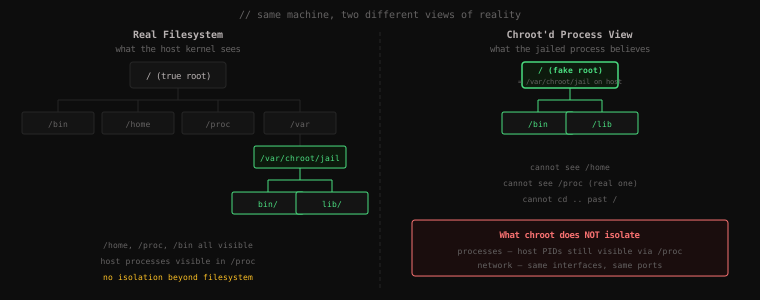
chroot does exactly that. It changes a process's root directory to a different path on the filesystem. From that point on, the process believes it's at / — but it's actually inside a subdirectory of the real filesystem.
If you chroot a process into /var/jail/myapp/, then:
- When the process tries to read
/etc/passwd, it actually reads/var/jail/myapp/etc/passwd - When it tries to
cd ..from/, it stays at/— it cannot escape - Everything above the jail is invisible and unreachable
The process is in a box. It just doesn't know it.
#Let's Build One
This is where it gets fun. Let's not just read about chroot — let's build a jail from scratch and walk inside it. You'll need a Linux machine (or WSL2, or a VM).
First, create a directory that will become the fake root of our jail:
mkdir -p /tmp/myjailNow here's the thing chroot doesn't tell you: if you just chroot into an empty directory, you get nothing. No shell. No commands. No ls. The process needs its tools to exist inside the jail.
Let's give our jail a minimal bash shell. Start by finding where bash lives on your system:
which bash/bin/bashGood. Now let's copy it into the jail. We'll recreate the directory structure:
mkdir -p /tmp/myjail/bin
cp /bin/bash /tmp/myjail/bin/
If you tried to chroot right now, bash would crash instantly. Why? Because bash is a dynamically linked binary — it depends on shared libraries that don't exist inside the jail yet.
Let's find out what libraries bash needs:
ldd /bin/bashlinux-vdso.so.1 (0x00007ffce45e4000)
libtinfo.so.6 => /lib/x86_64-linux-gnu/libtinfo.so.6 (0x00007f3b9c400000)
libc.so.6 => /lib/x86_64-linux-gnu/libc.so.6 (0x00007f3b9c200000)
/lib64/ld-linux-x86-64.so.2 (0x00007f3b9c6d0000)ldd lists every shared library the binary needs at runtime. We need to copy all of these into the jail, preserving their paths:
mkdir -p /tmp/myjail/lib/x86_64-linux-gnu
mkdir -p /tmp/myjail/lib64

cp /lib/x86_64-linux-gnu/libtinfo.so.6  /tmp/myjail/lib/x86_64-linux-gnu/
cp /lib/x86_64-linux-gnu/libc.so.6      /tmp/myjail/lib/x86_64-linux-gnu/
cp /lib64/ld-linux-x86-64.so.2          /tmp/myjail/lib64/
Now let's add ls as well so we can actually see what's in the jail. Same process — copy the binary and its libraries:
cp /bin/ls /tmp/myjail/bin/

# Check what ls needs
ldd /bin/lslinux-vdso.so.1 (0x00007ffd3b9e7000)
libselinux.so.1 => /lib/x86_64-linux-gnu/libselinux.so.1 (0x...)
libc.so.6 => /lib/x86_64-linux-gnu/libc.so.6 (0x...)
libpcre2-8.so.0 => /lib/x86_64-linux-gnu/libpcre2-8.so.0 (0x...)
/lib64/ld-linux-x86-64.so.2 (0x...)Copy any libraries you don't have yet:
cp /lib/x86_64-linux-gnu/libselinux.so.1  /tmp/myjail/lib/x86_64-linux-gnu/
cp /lib/x86_64-linux-gnu/libpcre2-8.so.0  /tmp/myjail/lib/x86_64-linux-gnu/
Let's see what our jail looks like now:
find /tmp/myjail -type f/tmp/myjail/bin/bash
/tmp/myjail/bin/ls
/tmp/myjail/lib/x86_64-linux-gnu/libtinfo.so.6
/tmp/myjail/lib/x86_64-linux-gnu/libc.so.6
/tmp/myjail/lib/x86_64-linux-gnu/libselinux.so.1
/tmp/myjail/lib/x86_64-linux-gnu/libpcre2-8.so.0
/tmp/myjail/lib64/ld-linux-x86-64.so.2A bare-bones filesystem. Two binaries, a handful of shared libraries. Nothing else. This is our jail.
#Walking Inside
Now we enter. You need to be root (or use sudo) because chroot is a privileged operation:
sudo chroot /tmp/myjail /bin/bashYou're now inside the jail. Your prompt probably won't show a hostname — we didn't set one — but you're in. Let's verify:
ls /bin lib lib64That's it. Three directories. The entire world, from this process's perspective. Let's try to escape:
cd /
cd ..
pwd/We went above root. And landed back at root. The jail held.
Now try to find the real /etc/passwd:
cat /etc/passwdbash: cat: command not foundWe didn't copy cat into the jail — it doesn't exist here. But even if we had, there's no /etc/ directory in this jail. The real /etc/passwd is completely invisible from inside here. The host's sensitive files — gone.
Let's look at what the process tree looks like from inside. First, we need to try to mount /proc (you may need to open a second terminal and note the host's process IDs):
# If /proc exists in the jail (it won't unless mounted):
ls /procls: cannot access '/proc': No such file or directoryThe jail has no /proc. That turns out to be a double-edged sword — and we'll get back to it.
Exit the jail:
exitYou're back on the host. Notice how fast that was — no VM to shut down, no kernel to unload. The exit just terminates the bash process, and you're back to the host shell instantly.
#What Just Happened
Let's make sure the mental model is solid before we move on, because this is the foundation everything else builds on.
When you ran sudo chroot /tmp/myjail /bin/bash, the kernel did something specific: it changed the root directory of that bash process (and all processes it spawns) to /tmp/myjail. From that process's point of view, that directory is /.
The path remapping happens transparently at the kernel level. When the jailed process opens /bin/bash, the kernel silently prepends /tmp/myjail and opens /tmp/myjail/bin/bash. The process never knows. It thinks it's opening /bin/bash. It's actually opening a file deep inside a subdirectory of the real filesystem.
This is the core idea that containers are built on: you can give a process a lie about its environment, enforced by the kernel. The process can't tell the difference. It can't break out (if done correctly). It operates in its constructed reality.
#Where chroot Falls Apart
Here's the hard truth: chroot is a very partial jail. It isolates exactly one thing — the filesystem namespace. Everything else on the system is still fully shared.
Process visibility. If you mount /proc inside the jail (necessary for many real applications), the jailed process can see every process on the host. Not just its own processes — everyone's. From inside the jail, you could run ps aux and see the full process table of the host system. This is a significant information leak.
Network. The jailed process has access to the same network interfaces as the host. It can bind to ports, make connections, sniff traffic. There's no network boundary at all.
Users. User IDs inside the jail are the same as on the host. If a process inside the jail runs as UID 0 (root), it's root on the host too — not just in the jail.
The escape. This last point is the critical one. A process running as root inside a chroot jail can escape it. The technique is well-known: create a new directory inside the jail, chroot again into that new directory, then cd .. repeatedly until you're back at the real filesystem root. The chroot call itself requires root, and root inside a chroot jail is root on the host.
This is why chroot was never really a security boundary. It was always described as a "jail" but it was more like a room with a lock that anyone with a key could open from the inside.
#What chroot Taught Us
Despite its limitations, chroot proved something enormously important: you can lie to a process about its environment, and the process has no way to know.
That idea — kernel-enforced isolation through a constructed view of system resources — is the philosophical foundation of every container technology that followed. chroot did it for the filesystem. What if you could do the same for:
- The process table? (PID namespace)
- The network stack? (Network namespace)
- The user IDs? (User namespace)
- The hostname? (UTS namespace)
- The IPC mechanisms? (IPC namespace)
- The mount table itself? (Mount namespace)
That's the question that led to Linux namespaces. Each namespace type takes the core insight of chroot — give a process an isolated, kernel-enforced view of one resource — and applies it to a different category of system resource.
chroot was the proof of concept. Namespaces were the production implementation.
Key Takeaway:
chroothas been in Unix since 1979. It isolates a process's view of the filesystem by remapping its root directory, making everything above the jail invisible and unreachable. It's powerful enough that you can build a minimal working environment — a shell, a few binaries, required libraries — and walk inside it in seconds. Butchrootonly isolates the filesystem. Processes, network, and users are completely unprotected. Root inside a chroot is root on the host, and escape is trivial.chrootproved the concept — that you can give a process a kernel-enforced lie about its environment — but the real question it raised was: what if you applied that same lie to everything? That's what namespaces answer.