Linux Namespaces: Lying to a Process
How the Linux kernel makes a process believe it's the only thing running on the machine — a deep dive into PID, NET, MNT, UTS, IPC, and USER namespaces.
#The Question chroot Left Open
Last lesson we built a chroot jail and walked inside it. The filesystem disappeared. We couldn't cd .. past our fake root. The host's sensitive files were gone.
But then we checked the process table — and it was all still there. Every host process, visible. The network stack, fully shared. The hostname, identical to the host. User IDs, same mappings as the host.
chroot told one lie: "this is where your filesystem starts." Everything else remained brutally honest.
The question chroot left open: what if you could tell a process the same kind of lie about everything?
Not just the filesystem. The processes. The network. The hostname. The users. Every resource the process knows about.
That's what Linux namespaces do.
#What a Namespace Is
A namespace is an independent instance of some kernel resource — a separate copy that a process gets to itself.
Normally, all processes on a Linux system share one global process table, one network stack, one hostname, one filesystem hierarchy. Namespaces allow the kernel to create additional isolated instances of these resources and assign individual processes — or groups of processes — to them.
A process inside a namespace sees only that namespace's instance of the resource. Not the global one. Not other namespaces. Just its own.
The kernel currently provides six namespace types that Docker uses:
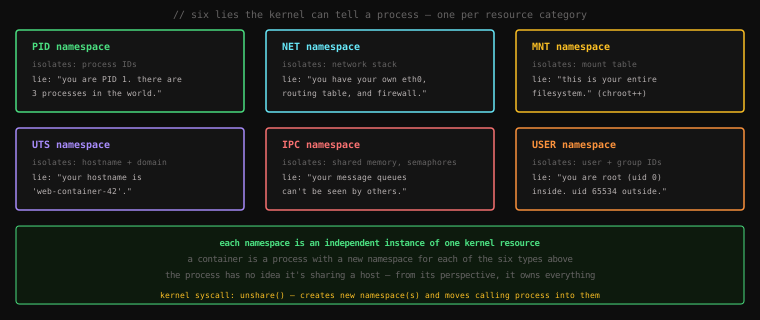
Let's go through each one. And we won't just read about them — we'll create them live, using a tool called unshare.
#unshare — Your Namespace Lab
unshare is a Linux command that does exactly what its name says: it runs a program with some namespaces unshared from the parent process, creating new ones instead. It's the command-line interface to the unshare() system call.
You'll need a Linux machine (or WSL2, or any Linux VM). Let's start.
#PID Namespace
The PID namespace isolates the process ID number space. Every Linux process has a PID — a number the kernel uses to identify it. Normally, all processes on a system share one global PID counter: PID 1 is systemd (or init), and every new process gets the next available number.
A new PID namespace gives a process its own counter, starting at 1. From inside the namespace, only processes in that namespace are visible. The rest of the host's processes don't exist.
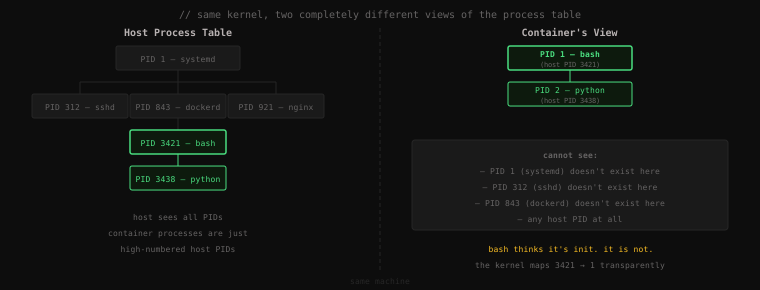
Let's see this live. Run this on your Linux machine:
sudo unshare --pid --fork --mount-proc bashLet's break down what that command asks for before we hit enter:
--pid— create a new PID namespace--fork— fork a child process to be PID 1 in the new namespace (required for PID namespaces to work correctly)--mount-proc— mount a fresh/procinside the new namespace (so tools likepswork correctly)bash— the program to run inside
You're now inside the new PID namespace. Let's see the process table:
ps auxUSER PID %CPU %MEM VSZ RSS TTY STAT START TIME COMMAND
root 1 0.0 0.0 7236 4096 pts/0 S 10:32 0:00 bash
root 8 0.0 0.0 9076 3328 pts/0 R+ 10:32 0:00 ps auxTwo processes. bash at PID 1 — the init of this namespace. ps at PID 8. That's the entire world from here.
On your host (open a second terminal without entering the namespace), run:
ps aux | grep bashroot 3421 0.0 0.0 7236 4096 pts/0 S 10:32 0:00 bashThe same bash process, listed as PID 3421. Two views of the same process. The kernel maintains the mapping between 1 (inside) and 3421 (outside) transparently.
Exit the namespace:
exit#UTS Namespace
UTS stands for UNIX Time-sharing System — a historical name, but what it isolates is simple: the hostname and domain name.
When you run a container and it has a hostname like f3a1b9c2d4e5 — that's a UTS namespace. The container's hostname is completely independent of the host's.
Let's create one:
sudo unshare --uts bashYou're inside a new UTS namespace. The hostname is still inherited from the host at the moment of creation. Let's change it:
hostnameyour-real-hostnamehostname container-sandbox
hostnamecontainer-sandboxNow open a second terminal on the host and check:
hostnameyour-real-hostnameCompletely isolated. You changed the hostname inside the namespace and the host didn't notice. The two hostnames are now independent variables maintained by the kernel for each namespace.
Exit:
exitBack on the host, the hostname is unchanged.
#NET Namespace
The NET namespace gives a process its own complete, independent network stack: its own network interfaces, its own routing table, its own firewall rules, its own port space.
This is why two Docker containers can both bind to port 8080 without conflict. Each one is in its own NET namespace — their port spaces are completely separate.
Let's create a new network namespace and look at what we start with:
sudo unshare --net bashNow check the network interfaces:
ip link1: lo: <LOOPBACK> mtu 65536 qdisc noop state DOWN mode DEFAULT group default qlen 1000
link/loopback 00:00:00:00:00:00 brd 00:00:00:00:00:00Just lo — the loopback interface, and it's DOWN. No eth0. No wlan0. Nothing. This namespace was born with a blank network stack.
Compare that to the host in another terminal:
ip link1: lo: <LOOPBACK,UP,LOWER_UP> ...
2: eth0: <BROADCAST,MULTICAST,UP,LOWER_UP> ...The container starts with nothing — Docker then plumbs a virtual ethernet pair between the container's namespace and the host's namespace, which is how containers get network connectivity. But that's done explicitly after the namespace is created. The namespace itself starts isolated.
Exit:
exit#MNT Namespace
The MNT (mount) namespace isolates the filesystem mount table — the list of all mounted filesystems. This is the evolution of chroot.
Where chroot changed the root pointer of a single process, an MNT namespace gives a process its own complete mount table. Every mount, unmount, or bind-mount operation inside the namespace is invisible outside it, and vice versa.
Docker uses this to give each container its own filesystem root — a fresh Ubuntu, Alpine, or Debian image — completely independent of the host's filesystem. The container can mount and unmount things freely without touching the host's mount table at all.
Let's see it:
sudo unshare --mount bashNow create a tmpfs mount (a RAM-based filesystem) inside:
mkdir /tmp/ns-test
mount -t tmpfs tmpfs /tmp/ns-test
df -h /tmp/ns-testFilesystem Size Used Avail Use% Mounted on
tmpfs 7.7G 0 7.7G 0% /tmp/ns-testMounted. Now check from the host in another terminal:
df -h /tmp/ns-testdf: /tmp/ns-test: No such file or directoryWait — the directory exists on the host (we created it in /tmp/ which is shared), but the mount is invisible. The host's mount table doesn't have it. The mount exists only inside the MNT namespace.
Exit and the mount disappears entirely:
exit#IPC Namespace
The IPC namespace isolates POSIX interprocess communication mechanisms: message queues, shared memory segments, and semaphores.
This is less tangible to demonstrate but critical for security. If two processes on the same machine use shared memory to communicate, they need to be in the same IPC namespace — otherwise they can't see each other's memory segments. Containers in separate IPC namespaces cannot accidentally (or maliciously) read each other's shared memory.
# Create a shared memory segment in the host namespace
ipcmk -M 1024Shared memory id: 131072# Enter a new IPC namespace
sudo unshare --ipc bash
# Try to list shared memory segments
ipcs -m------ Shared Memory Segments --------
key shmid owner perms bytes nattch statusEmpty. The shared memory segment created on the host is invisible inside the new IPC namespace. They cannot interfere.
#USER Namespace
The USER namespace is the most powerful — and the most security-critical. It maps user and group IDs from inside the namespace to different IDs on the host.
The classic use: inside the namespace, a process can have UID 0 (root). Outside, it maps to some unprivileged UID like 65534. The process thinks it's root. It has root-like capabilities within its namespace. But on the host, it's just an ordinary user. This is the "rootless containers" feature modern Docker supports — you get root inside the container without needing root on the host.
# Create a user namespace without sudo — user namespaces are one of the few
# namespace types that can be created by unprivileged users
unshare --user bashwhoaminobodyiduid=65534(nobody) gid=65534(nogroup) groups=65534(nogroup)You're nobody because no UID mapping has been set up yet. But you can set one up:
# In another terminal, find the PID of the unshare'd bash
# Then write a mapping: inside namespace UID 0 = host UID 1000
echo "0 1000 1" > /proc/<PID>/uid_map
echo "0 1000 1" > /proc/<PID>/gid_map
Now inside the namespace:
iduid=0(root) gid=0(root) groups=0(root)Inside: root. Outside: UID 1000 (your regular user account). Same process, two identities — the kernel maps between them on every syscall.
#Seeing All Namespaces at Once
Linux provides a command to list every namespace currently in use on the system:
lsns NS TYPE NPROCS PID USER COMMAND
4026531836 mnt 183 1 root /sbin/init
4026531837 uts 183 1 root /sbin/init
4026531838 ipc 183 1 root /sbin/init
4026531839 pid 183 1 root /sbin/init
4026531840 net 183 1 root /sbin/init
4026531841 user 183 1 root /sbin/init
4026532178 mnt 2 3421 root bash ← container
4026532179 uts 2 3421 root bash
4026532180 ipc 2 3421 root bash
4026532181 pid 2 3421 root bash
4026532182 net 2 3421 root bashEach namespace is identified by an inode number (the big integers). You can see the host's default namespaces (all pointing to PID 1 / init) and the container's separate set of namespaces (pointing to its bash process).
You can also inspect any process's namespace membership:
ls -la /proc/<PID>/ns/lrwxrwxrwx 1 root root 0 Apr 15 10:32 ipc -> ipc:[4026532180]
lrwxrwxrwx 1 root root 0 Apr 15 10:32 mnt -> mnt:[4026532178]
lrwxrwxrwx 1 root root 0 Apr 15 10:32 net -> net:[4026532182]
lrwxrwxrwx 1 root root 0 Apr 15 10:32 pid -> pid:[4026532181]
lrwxrwxrwx 1 root root 0 Apr 15 10:32 uts -> uts:[4026532179]
lrwxrwxrwx 1 root root 0 Apr 15 10:32 user -> user:[4026531841]Each ns/ entry is a symlink to the namespace the process is in, identified by type and inode. Two processes sharing a namespace link to the same inode. Two processes in different namespaces link to different inodes. The kernel uses these to determine what view of reality each process gets.
#Stacking All Six
A container isn't created with one namespace — it's created with all six simultaneously. When Docker starts a container, it calls unshare() with flags for every namespace type:
New PID namespace   → process thinks it's PID 1
New NET namespace   → gets its own network stack
New MNT namespace   → gets its own filesystem root
New UTS namespace   → gets its own hostname
New IPC namespace   → gets its own shared memory space
New USER namespace  → UID 0 inside, unprivileged outside
The combination of all six is what makes a container feel like a completely separate machine. Remove any one of them and the isolation leaks. A container without a PID namespace can see host processes. Without a NET namespace, it shares ports. Without MNT, it shares the filesystem. All six together is what creates the illusion Docker sells.
#Namespaces vs. VMs: What's Actually Different
There's a critical difference between namespace-based isolation (containers) and hypervisor-based isolation (VMs) that's worth nailing down before we move on.
A VM has a real kernel inside it. That kernel boots, owns hardware (virtual hardware), and enforces isolation at the machine level. No process in VM 1 can escape to VM 2 — not without exploiting the hypervisor itself, which is extremely difficult.
A container shares the host kernel. The isolation is enforced by the kernel's namespace implementation. If there's a kernel vulnerability that allows namespace escape, all containers on that host are affected simultaneously. The security boundary is thinner.
This isn't a flaw in Docker — it's a deliberate tradeoff. You pay less overhead (no guest OS, no hypervisor translation) and get faster startup and better density. The security tradeoff is real and known. For most workloads it's acceptable. For workloads that require hard multi-tenant security boundaries — financial services, shared hosting — you use VMs or add an additional isolation layer.
Namespaces buy you isolation. Hypervisors buy you harder isolation. The right tool depends on what you're protecting against.
Key Takeaway: Linux namespaces extend
chroot's insight — lying to a process about its environment — across six categories of system resource: PID, NET, MNT, UTS, IPC, and USER. Each namespace type creates an isolated, kernel-enforced view of one resource. A container is a process with new instances of all six simultaneously. You can create and explore namespaces directly usingunshareon any Linux system — no Docker required. The kernel has had this capability since 2002 (mnt) through 2013 (user); Docker's contribution was packaging all six into a workflow any developer could use.