The 2013 PyCon Demo
The five-minute demo that changed infrastructure forever — what Solomon Hykes showed the world, why the crowd went silent, and why nothing was the same afterward.
#Everything We've Built To This Point
Stop for a moment. Look back at where we've been.
We started with bare metal — scp deployments, drift between servers, the "works on my machine" problem that wasted entire afternoons. We watched VMs solve environment portability at the cost of a 2 GB Guest OS tax per workload. We met dotCloud, a company trying to beat Heroku, and watched them accidentally build something more important than their own product.
Then we went into the kernel. We built a chroot jail by hand, copied binaries and shared libraries one by one, and walked inside. We created namespaces with unshare and watched a process believe it was the only thing running on the machine. We set memory limits in cgroupfs and watched the OOM killer fire the instant a process exceeded its ceiling. We built an OverlayFS mount, modified a file through the merged view, and found the copy-on-write result sitting in the upper layer.
Eight lessons. Eight pieces of a puzzle.
On March 15, 2013, at PyCon in Santa Clara, California, a 28-year-old French developer named Solomon Hykes assembled the puzzle in front of an audience — and the industry's next decade began.
#The Room
PyCon 2013 was a Python conference. Not an infrastructure conference. Not a DevOps summit. The audience was mostly Python developers who'd come to hear about language features, frameworks, libraries.
Lightning talks at PyCon are five minutes, no extensions. Hykes had five minutes and a laptop. He walked to the front of the room and said something like: "I want to show you a small piece of technology we've been building at dotCloud."
No hype. No keynote production. No demo video with dramatic music. Just a terminal.
#What He Typed
The first command was this:
docker run ubuntu echo hello worldThe terminal showed some output — we'll walk through exactly what that output was in a moment — and then printed:
hello worldThe audience was quiet.
Then he showed running a different command in the same Ubuntu environment. Then shipping that environment to a different machine and running it identically. Then spinning up multiple isolated environments on the same host without them interfering.
Five minutes. The GitHub repository went up the same day. Within a week, the repository had over 10,000 stars. Within months, every major cloud provider was talking about Docker.
#Recreating the Demo Today
Let's do what Hykes did. If you don't have Docker installed:
# On Ubuntu/Debian
curl -fsSL https://get.docker.com | sudo sh

# Verify it's running
docker --versionDocker version 24.0.7, build afdd53bNow — the exact demo command:
docker run ubuntu echo hello worldIf this is your first time running this, Docker will need to pull the Ubuntu image first. Watch the output carefully:
Unable to find image 'ubuntu:latest' locally
latest: Pulling from library/ubuntu
7b1a6ab2e44d: Pull complete
Digest: sha256:626ffe58f6e7566e00254b638eb7e0f3b11d4da9675284965...
Status: Downloaded newer image for ubuntu:latest
hello world
Let's walk through every line of that output, because each one is telling you something meaningful.
#Line by Line
Unable to find image 'ubuntu:latest' locally
Docker checked its local image cache first. It stores pulled images in /var/lib/docker/. The ubuntu:latest image wasn't there yet, so it has to fetch it.
7b1a6ab2e44d: Pull complete
That hash is a layer ID. The Ubuntu image is made of one or more layers (we covered these in lesson 8 — the OverlayFS lower layers). Docker downloads each layer separately. On subsequent runs, any layer you already have is skipped — only new ones are downloaded.
Digest: sha256:626ffe...
A content hash of the full image. This is how Docker verifies the image hasn't been tampered with. The digest is deterministic — the same content always produces the same hash. If the image on the registry changed, the hash would change.
Status: Downloaded newer image for ubuntu:latest
The image is now in local cache. Next time you run this command, the pull step is skipped entirely.
hello world
The output of echo hello world running inside an Ubuntu container. The process ran, printed its output, and exited. The container is gone.
Run it again immediately:
docker run ubuntu echo hello worldhello worldNo pull step. Instant. The image layers are cached, the namespace setup takes milliseconds, and the echo completes in the same amount of time it would take on the host.
#What Actually Happened in the Kernel
That single command triggered a cascade of operations that we now have the vocabulary to understand fully.
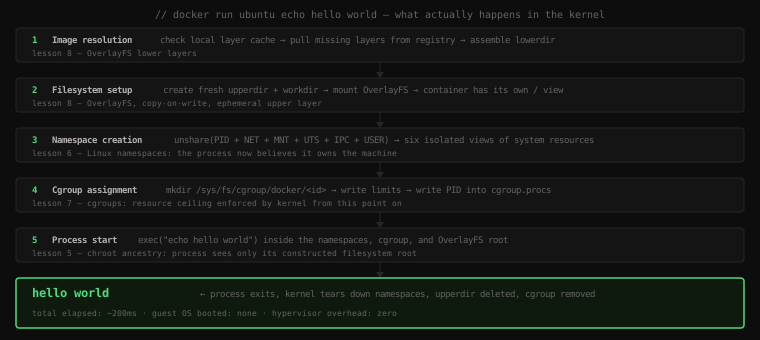
Let's verify each step is real, not abstract. Run a container that stays alive:
docker run -d --name demo ubuntu sleep 300The -d flag runs it in the background. sleep 300 keeps it alive for 5 minutes. Now let's inspect each layer of what Docker created.
The OverlayFS mount:
docker inspect demo | grep -A10 '"GraphDriver"'"GraphDriver": {
"Data": {
"LowerDir": "/var/lib/docker/overlay2/abc123.../diff:...",
"MergedDir": "/var/lib/docker/overlay2/def456.../merged",
"UpperDir": "/var/lib/docker/overlay2/def456.../diff",
"WorkDir": "/var/lib/docker/overlay2/def456.../work"
},
"Name": "overlay2"
},Real lowerdir, upperdir, workdir, merged paths — exactly what we built by hand in lesson 8.
The namespaces:
# Get the container's PID on the host
CPID=$(docker inspect --format='{{.State.Pid}}' demo)
echo "Container process on host: PID $CPID"

ls -la /proc/$CPID/ns/Container process on host: PID 28431
lrwxrwxrwx 1 root root 0 Apr 15 10:32 ipc -> ipc:[4026532234]
lrwxrwxrwx 1 root root 0 Apr 15 10:32 mnt -> mnt:[4026532232]
lrwxrwxrwx 1 root root 0 Apr 15 10:32 net -> net:[4026532236]
lrwxrwxrwx 1 root root 0 Apr 15 10:32 pid -> pid:[4026532233]
lrwxrwxrwx 1 root root 0 Apr 15 10:32 uts -> uts:[4026532231]
lrwxrwxrwx 1 root root 0 Apr 15 10:32 user -> user:[4026531841]Six namespace symlinks — each pointing to a different inode from the host's default namespaces. This is the process's isolation envelope, visible through /proc as we covered in lesson 6.
The cgroup:
cat /sys/fs/cgroup/docker/$( docker inspect --format='{{.Id}}' demo )/cgroup.procs28431The container's PID is sitting inside a cgroup under /sys/fs/cgroup/docker/. The cgroup was created when the container started. It will be deleted when the container exits. Exactly what we did by hand in lesson 7.
#Going Inside
Now let's do what Hykes showed next — open an interactive shell inside the container and look around:
docker exec -it demo bashYou're now inside the container. The terminal prompt may change to show root@<container-id>. Let's explore and connect every observation back to the mechanisms underneath.
Check the process table:
ps auxUSER PID %CPU %MEM VSZ RSS TTY STAT START TIME COMMAND
root 1 0.0 0.0 2788 988 ? Ss 10:32 0:00 sleep 300
root 7 0.0 0.0 4624 3768 pts/0 Ss 10:32 0:00 bash
root 14 0.0 0.0 7060 2876 pts/0 R+ 10:32 0:00 ps auxThree processes. sleep 300 is PID 1 — the init of this PID namespace. bash and ps aux are the two processes from this exec session. The host is running hundreds of processes. This process tree, from inside the container, shows three. PID namespace at work.
Check the hostname:
hostnamef3a1b9c2d4e5A container ID as the hostname — completely independent of the host's hostname. UTS namespace at work.
Check the network interfaces:
ip link1: lo: <LOOPBACK,UP,LOWER_UP> mtu 65536 ...
47: eth0@if48: <BROADCAST,MULTICAST,UP,LOWER_UP> mtu 1500 ...A loopback and one ethernet interface — eth0. This is a virtual ethernet pair that Docker plumbed between this container's NET namespace and the host's. Not the host's real eth0. A virtual one, created specifically for this container. NET namespace at work.
Check the OS:
cat /etc/os-releasePRETTY_NAME="Ubuntu 22.04.3 LTS"
NAME="Ubuntu"
VERSION_ID="22.04"Ubuntu 22.04, inside a container running on whatever Linux distro you're on. The Ubuntu filesystem came from the image's OverlayFS lower layers. MNT namespace at work.
Try to break out. See if you can see the host's processes:
# This will only show container PIDs
ls /proc | sort -n | head -201
7
14
...Low numbers only — container PIDs. No evidence of the thousands of host processes. The /proc here is mounted fresh for this PID namespace.
Exit:
exitYou're back on the host. Clean up:
docker stop demo && docker rm demo#Why the Audience Went Quiet
The developers at PyCon 2013 were quiet not because they were unimpressed. They were quiet because they were doing the mental math.
If this is real — if you can actually run Ubuntu on a Mac in two hundred milliseconds without a VM — what does that do to the "works on my machine" problem? What does it do to staging environments? What does it do to CI pipelines? What does it do to production deployment?
Everything broke on the trip from dev to prod because environments drifted. VMs solved the drift but added weight you couldn't afford at microservice scale. Docker solved the drift and eliminated the weight.
The insight was complete. The implementation was usable. The demo was reproducible by anyone with a Linux machine and five minutes.
That's what made it different from everything that came before.
#What Happened Next
GitHub stars are a noisy metric but they're a leading indicator of developer attention. 10,000 stars in a week was a signal the community had never seen at this scale for an infrastructure tool.
Within three months, Docker had been mentioned in articles by every major tech publication. Within six, major cloud providers were adding container support. Within a year, Docker had shipped version 1.0 with production stability guarantees. Within two years, Google had open-sourced Kubernetes to manage fleets of Docker containers, and the entire industry was reorganizing around containers as the unit of deployment.
dotCloud the PaaS company wound down. Docker, Inc. raised $15 million in Series A funding. The four-year-old company built to compete with Heroku became the company that made Heroku-style isolation available to every developer on every machine.
Five minutes. One terminal. hello world.
Key Takeaway:
docker run ubuntu echo hello worldexecutes five sequential steps: resolve and cache image layers, mount an OverlayFS with the image aslowerdirand a freshupperdir, create new instances of all six Linux namespaces, assign the process to a new cgroup, then exec the command inside all of that. The process that runs sees an isolated Ubuntu filesystem, believes it's PID 1, has its own hostname and network stack, and is subject to hard resource limits — all enforced by the host kernel with no guest OS, no hypervisor, no VM boot sequence. The PyCon 2013 demo worked because every primitive it depended on — namespaces, cgroups, OverlayFS — was already in the Linux kernel. Docker's contribution was assembling them into a workflow that any developer could use in under five minutes.