The Bare Metal Struggle
Why 'it works on my machine' was the most expensive sentence in tech — and the infrastructure nightmare that made it inevitable.
#Before We Talk About Docker
Docker didn't appear out of nowhere. It was invented because the industry was in genuine pain.
To understand why containers matter — really understand it, not just parrot "portability" — you have to feel the problem they were solving. So we're starting before Docker existed. Before Kubernetes. Before cloud-native. We're starting with a server, an application, and a deployment process that made senior engineers dread Fridays.
#What Is "Bare Metal"?
A bare metal server is exactly what it sounds like: physical hardware with an operating system installed directly on it. No virtualization layer. No hypervisor. The OS talks directly to the CPU, RAM, and disk.
In the early days of web infrastructure — and well into the 2000s and 2010s for many companies — this was the default. You had a server. You installed Linux on it. You installed your application's dependencies on it. You ran your application on it.
Physical Hardware
└── Operating System (Linux / Windows Server)
    ├── Runtime (Python 3.6, Node 14, Java 8...)
    ├── System Libraries (libssl, libpq, libc...)
    ├── Your Dependencies (Django, Express, Spring...)
    └── Your Application
Everything — the runtime, the libraries, the configuration — lived directly on the OS. The machine was the environment.
This model has one defining characteristic: there is no boundary between your application and the operating system it runs on. Your app breathes the same air as every other process on that machine.
#The Deployment Ceremony
Shipping code to a bare metal server in the pre-container era looked something like this.
You'd SSH into the server, pull the latest code, install or update any new dependencies, restart the application process, and pray.
ssh deploy@prod-server-01
cd /var/www/myapp
git pull origin main
pip install -r requirements.txt
sudo systemctl restart gunicorn
tail -f /var/log/gunicorn/error.log
If it worked, you went to bed. If it didn't — and it often didn't — you were debugging at midnight.
The failure modes were legion. A new dependency had a transitive requirement that conflicted with something already installed. A library upgraded itself during pip install and broke an unrelated part of the app. The Python version on the server was 3.6.8 but you'd been developing on 3.11.2 and a string formatting edge case behaved differently. The server was running CentOS 7, your laptop was running Ubuntu 22, and a C extension compiled differently between them.
None of these failures were detectable before deployment. All of them were discovered in production.
#The Dependency Problem, Precisely
Software doesn't run in isolation. Every non-trivial application has a dependency tree — a runtime, a set of libraries, and each of those libraries' own dependencies. In Python, this is your requirements.txt. In Node, it's package.json. In Java, it's your pom.xml.
The problem: your code specifies the dependencies it needs, but the server decides which version is actually installed.
If you specified Django>=4.0 in requirements.txt, you'd get whatever the latest Django was on the day you ran pip install. On your laptop, installed in March, that was 4.2.1. On the staging server, installed in January, that was 4.0.4. On production — last updated before you joined the company — that was 3.2.0.
Same requirements file. Three different outcomes.
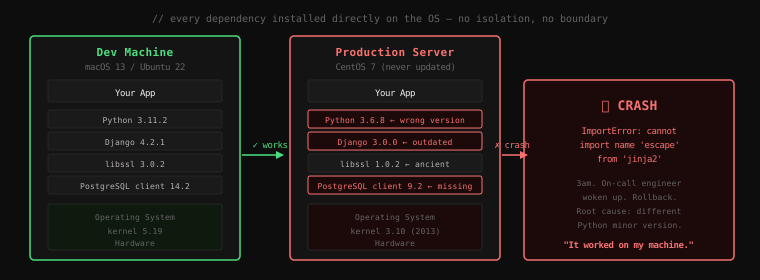
And it gets worse. Dependencies have dependencies. Django depends on jinja2. jinja2 3.0 removed the escape function that Django 3.2 expected. If you had Django 3.2 on prod and jinja2 3.0 got upgraded by something else — another app on the same server, a system package update, an over-eager sysadmin — your app would crash with:
ImportError: cannot import name 'escape' from 'jinja2'That error doesn't tell you why. It certainly doesn't tell you that a dependency of a dependency was upgraded on the shared server three days ago. You'd spend hours tracing it.
#The Multi-Server Problem
Running one server was hard enough. But real applications didn't run on one server — they ran on many. A web tier, an API tier, a worker tier. Each tier with multiple instances for redundancy and load distribution.
Now multiply the dependency problem by the number of servers.
prod-web-01   ← Python 3.6.8,  libssl 1.0.2
prod-web-02   ← Python 3.6.8,  libssl 1.0.2
prod-web-03   ← Python 3.6.9,  libssl 1.1.0  ← patched last Tuesday
prod-api-01   ← Python 3.8.10, libssl 1.1.1
prod-api-02   ← Python 3.7.3,  libssl 1.0.2  ← never updated
prod-worker-01 ← Python 3.6.8, libssl 1.1.1
Six servers. Six slightly different environments. All supposedly running the same application.
You didn't create this mess intentionally. It accumulated. A security patch got applied to some servers but not others during a maintenance window. One server was provisioned six months later than the rest. A sysadmin installed a newer Python on one host to test something and forgot to revert it. The drift was organic and invisible — until the day it manifested as a bug that only reproduced on prod-api-02 but not prod-api-01.
#Environment Drift
This gradual divergence of environments that start identical but become increasingly different over time is called configuration drift or environment drift.
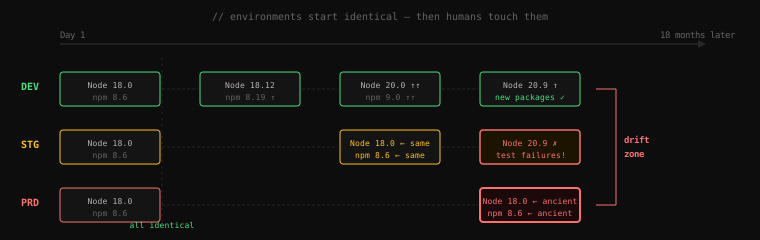
It's not just library versions. It's:
- Configuration files — a
nginx.confthat was manually edited on one server to fix a production incident and the change was never propagated - Environment variables — a
DATABASE_URLset differently across hosts because the servers were provisioned at different times with different scripts - Installed system packages —
libpq-devpresent on the dev machine because a developer installed it once, absent on the fresh production instance - Locale and timezone settings — a date parsing bug that only appeared in production because the server was in UTC and the developer's machine was in EST
The frustrating part: all of these differences were invisible. There was no dashboard showing "here are all the ways your environments differ." You only discovered the differences when they caused failures.
#The "Solved" It Attempts
The industry didn't just accept this. Generations of engineers tried to fix it.
Bash provisioning scripts were the first attempt. Write a setup.sh that installs everything from scratch. Works great — until the script itself drifts from what's actually on the server because someone ran a manual command and didn't update the script.
Configuration management tools — Chef, Puppet, Ansible — were the next generation. These are powerful systems that describe your server's desired state as code, and continuously enforce it. Run Ansible, and it ensures the right Python version, the right packages, the right config files are all present.
# Ansible playbook — declarative server configuration
- name: Install Python 3.11
  apt:
    name: python3.11
    state: present

- name: Install application dependencies
  pip:
    requirements: /var/www/myapp/requirements.txt
    executable: pip3.11
This was a genuine improvement. Configuration-as-code, version-controlled, reproducible. But it had limits.
The tools described what should be on the server — they didn't describe what was. If someone SSH'd into the server and manually installed a conflicting package, Ansible wouldn't know. If a library pulled in an unexpected transitive dependency, Puppet wouldn't catch it. The tools enforced your declared state, but your declared state was never the complete picture.
More fundamentally: these tools managed servers. But the problem wasn't that servers were hard to configure — the problem was that the environment was still shared. Two applications on the same server could still step on each other. Moving your app to a different server still required verifying that all the dependencies were present and compatible. The boundary between application and environment was still non-existent.
What the industry needed wasn't better ways to configure shared environments. It needed a way to make each application carry its own environment — consistently, portably, and without the overhead of running a full virtual machine.
That's what containers would eventually provide. But first, the industry tried virtual machines — and that attempt introduced its own set of problems.
Key Takeaway: Bare metal deployment meant your application ran directly on the OS with no isolation from other applications or from environment drift. Dependencies were installed globally on shared machines, environments diverged organically over time, and bugs at the boundary — "it works on my machine" — were the inevitable result. Configuration management tools helped, but they managed servers rather than environments. The root problem — shared, unisolated, mutable environments — remained unsolved.