The Fat JAR and Embedded Server
Understand how Spring Boot embeds Tomcat directly into your application, what a fat JAR is and how it's structured, why this changed deployment forever, and how it made Docker and microservices natural.
#The Final Piece
We've covered frameworks, dependency injection, IoC, the ApplicationContext, XML hell, and auto-configuration. There's one more piece of the Spring Boot story that changed everything operationally: the embedded server and the fat JAR.
This is the change that made java -jar myapp.jar possible. And it's more profound than it looks.
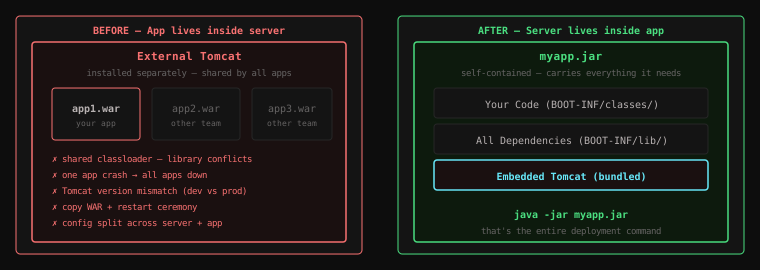
#The Old Model: Your App Lives Inside the Server
Recall from lesson 7: in the pre-Spring Boot world, your application was a guest inside an external server.
Server (Tomcat)
└── webapps/
    ├── app1.war     ← your application
    ├── app2.war     ← another team's application
    └── app3.war     ← yet another
The server was a shared platform. It ran independently. It had its own configuration, its own lifecycle, its own thread pools. Your application was deployed into it, not the other way around.
This created the problems we discussed: version conflicts between apps, shared classloaders causing library incompatibilities, configuration split between the server and the application, one app's failure potentially affecting all others.
#The New Model: The Server Lives Inside Your App
Spring Boot inverts this relationship.
Your Application (JAR)
└── embedded Tomcat
    └── handles all HTTP for your application
Tomcat — the servlet container that used to be an external server you installed separately — is now a library that lives inside your JAR. Your application doesn't deploy into Tomcat. Tomcat starts up inside your application.
@SpringBootApplication
public class MyApp {
    public static void main(String[] args) {
        SpringApplication.run(MyApp.class, args);
        // This starts Tomcat internally, on port 8080
    }
}
When SpringApplication.run() is called:
- Spring Boot detects that
spring-webmvcis on the classpath - Auto-configuration creates an embedded
TomcatServletWebServerFactory - This factory starts a Tomcat instance inside the JVM process
- Registers the Spring
DispatcherServletwith it - Tomcat starts listening on port 8080
Your application is the server. The JVM process that runs your code is also the process that handles HTTP connections.
#What Is a Fat JAR?
A regular JAR file contains compiled .class files and metadata. If it depends on other JARs (Spring, Jackson, etc.), those JARs need to be present on the classpath separately. You can't just run a regular JAR with java -jar without setting up the entire classpath first.
A fat JAR (also called an uber JAR or executable JAR) packages everything together:
- Your compiled classes
- All your dependency JARs
- A custom class loader that knows how to load classes from JARs nested inside a JAR
- A manifest that declares the entry point
The result: one self-contained file. One command to run it. No classpath setup required.
#Fat JAR Structure
myapp.jar
├── META-INF/
│   └── MANIFEST.MF             ← declares Main-Class and Start-Class
├── BOOT-INF/
│   ├── classes/                ← your compiled code
│   │   └── com/example/
│   │       ├── MyApp.class
│   │       ├── UserService.class
│   │       └── UserRepository.class
│   └── lib/                    ← all dependency JARs (nested)
│       ├── spring-webmvc-6.1.jar
│       ├── spring-context-6.1.jar
│       ├── jackson-databind-2.15.jar
│       ├── tomcat-embed-core-10.1.jar   ← Tomcat, bundled
│       ├── hibernate-core-6.2.jar
│       └── ... (typically 50-100 JARs)
└── org/springframework/boot/loader/
    └── JarLauncher.class       ← Spring Boot's custom class loader
The MANIFEST.MF declares two classes:
Main-Class: org.springframework.boot.loader.JarLauncher
Start-Class: com.example.MyApp
When you run java -jar myapp.jar:
- The JVM runs
JarLauncher(Spring Boot's custom launcher) JarLaunchersets up the class loader to handle nested JARsJarLauncherthen calls yourMyApp.main()as theStart-Class- Your application starts — including embedded Tomcat
The custom launcher is necessary because standard Java class loaders can't load classes from JARs nested inside JARs. Spring Boot's JarLauncher solves this.
#Building and Running
# Build the fat JAR
mvn clean package

# The output
ls -lh target/
# myapp-0.0.1-SNAPSHOT.jar     85 MB   ← fat JAR (deployable)
# myapp-0.0.1-SNAPSHOT.jar.original   ← thin JAR (your code only, for debugging)

# Run it
java -jar target/myapp-0.0.1-SNAPSHOT.jar
That's the complete deployment process. One file. One command.
#Changing the Embedded Server
Tomcat is the default, but you can switch.
Switch to Jetty:
<dependency>
    <groupId>org.springframework.boot</groupId>
    <artifactId>spring-boot-starter-web</artifactId>
    <exclusions>
        <exclusion>
            <groupId>org.springframework.boot</groupId>
            <artifactId>spring-boot-starter-tomcat</artifactId>
        </exclusion>
    </exclusions>
</dependency>

<dependency>
    <groupId>org.springframework.boot</groupId>
    <artifactId>spring-boot-starter-jetty</artifactId>
</dependency>
Exclude Tomcat, add Jetty. No code changes. Spring Boot's auto-configuration detects Jetty on the classpath instead of Tomcat and wires it up automatically.
Available embedded servers:
- Tomcat — default, most widely used, mature
- Jetty — lighter footprint, well-suited for long-lived connections (WebSocket)
- Undertow — high performance, low resource usage, no servlet API dependency by default
For the vast majority of applications, the default Tomcat is the right choice. Change it only if you have measured, specific reasons.
#Configuring the Embedded Server
All server configuration lives in application.properties:
# Port
server.port=8080

# Context path (your app will be at http://localhost:8080/api/...)
server.servlet.context-path=/api

# SSL
server.ssl.enabled=true
server.ssl.key-store=classpath:keystore.p12
server.ssl.key-store-password=changeit
server.ssl.key-store-type=PKCS12

# Compression
server.compression.enabled=true
server.compression.mime-types=application/json,text/html

# Thread pool
server.tomcat.threads.max=200
server.tomcat.threads.min-spare=10
server.tomcat.accept-count=100
All of these flow into the embedded Tomcat configuration automatically. No server.xml. No context.xml. No separate admin interface.
#Why This Changed Deployment Forever
#Before: Environment Disparity
Your laptop ran Tomcat 9. Staging ran Tomcat 8. Production ran Tomcat 7. Each had subtle differences. "Works on my machine" was a real, recurring problem.
#After: The App Is the Environment
The server is inside the JAR. Wherever the JAR runs, it uses the exact same Tomcat version, with the exact same configuration. The deployment artefact — one JAR file — carries its environment with it.
#Before: Multi-App Tomcat Conflicts
Multiple apps sharing one Tomcat meant classloader isolation issues, library version conflicts, and one app's crash taking down all the others.
#After: Process Isolation
Each Spring Boot application is its own process. It uses its own JVM, its own classloader, its own memory. Applications cannot interfere with each other at the library level.
#Before: Infrastructure Required
To run your app, you needed a correctly configured Tomcat installation on the target machine.
#After: Just a JVM
To run your app, you need Java. That's it. Any machine with Java can run your application. This includes cloud VMs, on-premise servers, your colleague's laptop, and CI pipelines.
#Why This Made Docker Natural
Containerisation with Docker became the dominant deployment model for web services. The fat JAR is perfectly suited for it.
A Dockerfile for a Spring Boot application:
FROM eclipse-temurin:21-jre-alpine
WORKDIR /app
COPY target/myapp.jar app.jar
EXPOSE 8080
ENTRYPOINT ["java", "-jar", "app.jar"]
Four lines. The container has one job: run Java with the JAR. No Tomcat installation. No configuration ceremony. No environment setup beyond a JVM.
Build the image, push to a registry, deploy to Kubernetes. The container is fully self-contained.
Compare this to the pre-Spring Boot Docker approach, which would require you to install and configure Tomcat inside the container, copy your WAR, configure JNDI — essentially re-creating the deployment ceremony inside a container, defeating much of Docker's value.
#Why This Made Microservices Tractable
In a microservices architecture, you might have 20, 50, or 200 services. Each service needs to be:
- Independently deployable
- Independently scalable
- Independently runnable in development
With the WAR + external Tomcat model, each service would need its own configured application server. 200 services × complex deployment ceremony = an operational nightmare.
With Spring Boot fat JARs, each service is one JAR. Start it with java -jar. Scale it by running more instances. Deploy it by replacing the JAR. The operational simplicity of the fat JAR scales gracefully across a large service mesh.
This is not a coincidence. Spring Boot's release in 2014 coincided with the rise of microservices, and the two trends reinforced each other. Spring Boot made microservices tractable in Java. Spring Cloud (built on top of Spring Boot) provided the service discovery, load balancing, and circuit breakers that microservices need.
#Still Need WAR? You Can Do That Too
Convention over configuration, remember. The default is JAR. You can opt into WAR deployment by:
- Changing
<packaging>war</packaging>inpom.xml - Extending
SpringBootServletInitializerin your main class
Spring Boot will package as a WAR, still include the embedded server (so you can also run it with java -jar), and be deployable to an external Tomcat for organisations that require it.
Key Takeaway: Spring Boot embeds Tomcat (or Jetty, or Undertow) directly into a fat JAR — a self-contained executable that packages your code, all dependencies, and an HTTP server into one file.
java -jar myapp.jaris the entire deployment. No external server installation. No classpath setup. No environment disparity. This made Docker trivial, microservices tractable, and eliminated an entire category of deployment ceremony that had burdened Java web development for a decade.
#Where You Are Now
You've completed the foundation of this course. Trace the full arc:
- Frameworks call your code — you write the business logic, the framework handles the infrastructure
- Java EE / EJBs tried to solve enterprise problems but created suffocating complexity
- Dependency Injection decoupled classes and made them testable
- Inversion of Control gave the framework ownership of the object lifecycle
- The ApplicationContext scans, creates, wires, and manages every bean
- XML configuration was the first approach — powerful, but disconnected from code and runtime-error-prone
- WAR + external Tomcat was the deployment model — functional, but fragile and slow
- Spring Boot's Convention over Configuration eliminated the bootstrapping problem
- Auto-configuration reads the classpath and configures the application intelligently
- The fat JAR + embedded server made deployment a single command
In upcoming lessons, we'll build real Spring Boot applications — REST APIs, database integration, authentication, testing — applying everything you've just learned.