Spring Boot — Convention Over Configuration
Understand what problem Spring Boot actually solves, what 'opinionated' and 'convention over configuration' mean in practice, and how @SpringBootApplication bootstraps an entire application.
#Spring Became Its Own Problem
By 2013, Spring had solved Java EE's complexity. It had a thriving ecosystem — Spring MVC, Spring Data, Spring Security, Spring Batch, Spring Integration. For every infrastructure concern, there was a Spring module.
But that success created a new problem.
Spring was so flexible, so configurable, so capable of running in so many different combinations — that starting a new project became genuinely difficult. There was no obvious starting point.
Which Spring JARs do I need? Spring MVC, Spring Core, Spring Context, Spring Beans, Spring Web, Spring AOP, Spring Tx... and that's before you add Spring Data, Spring Security, or anything else. Each had its own version. Versions had to be compatible with each other. A wrong combination caused ClassNotFoundExceptions or subtle runtime failures.
How do I configure them? You needed to know which beans to define, in what order, with what configuration. The Spring documentation was extensive — because there were so many options.
Where do I start? An empty Maven project with Spring had nothing runnable until you wired it all by hand.
The framework that had liberated developers from EJB complexity had accumulated its own complexity tax.
#The Bootstrapping Problem
Consider what you needed just to start a Spring MVC web application from scratch:
<!-- pom.xml — just the dependencies -->
<dependency>
    <groupId>org.springframework</groupId>
    <artifactId>spring-webmvc</artifactId>
    <version>4.3.20.RELEASE</version>
</dependency>
<dependency>
    <groupId>org.springframework</groupId>
    <artifactId>spring-context</artifactId>
    <version>4.3.20.RELEASE</version>
</dependency>
<dependency>
    <groupId>com.fasterxml.jackson.core</groupId>
    <artifactId>jackson-databind</artifactId>
    <version>2.9.8</version>
</dependency>
<!-- + Tomcat, + logging, + validation, + ... -->
Then web.xml. Then applicationContext.xml. Then dispatcher-servlet.xml. Then the Tomcat setup. Then configure the DispatcherServlet. Then enable Jackson for JSON. Then configure the resource handlers for static files.
None of this was business logic. All of it was boilerplate that every Spring web app needed. Every single time.
#Convention Over Configuration
Spring Boot's answer to all of this is a principle called Convention over Configuration.
The idea: instead of requiring you to configure every detail, the framework makes sensible default choices for the most common scenarios. You only configure the things that differ from the defaults.
The name comes from the contrast:
- Configuration-heavy: "Tell me everything explicitly. Nothing is assumed."
- Convention-based: "I'll assume the common case. Tell me only what's different."
Ruby on Rails popularised this principle in the web world. Spring Boot brought it to Java.
What does "the common case" look like for a Spring Boot web app?
- You want an HTTP server running on port 8080
- You want JSON serialisation/deserialisation (with Jackson)
- You want proper error handling
- You want request logging
- You want a health check endpoint
- If you added a database driver, you want a connection pool
- If you added Spring Security, you want basic auth enabled by default
Spring Boot makes all of these decisions for you. You can override any of them. But if you don't, you get a sensible production-ready application with zero configuration.
#@SpringBootApplication: Three Annotations in One
Here's a complete, runnable Spring Boot application:
@SpringBootApplication
public class MyApp {
    public static void main(String[] args) {
        SpringApplication.run(MyApp.class, args);
    }
}
Two lines in main(). No XML. No Tomcat setup. No bean definitions. Yet this starts a production-capable HTTP server.
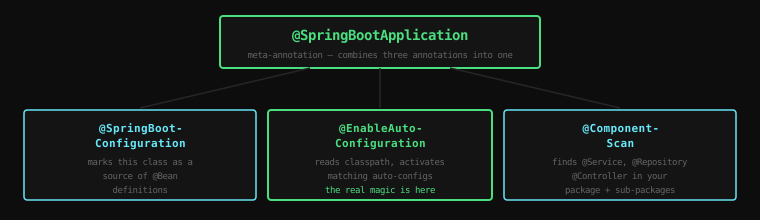
@SpringBootApplication is a meta-annotation — it combines three separate annotations:
#1. @SpringBootConfiguration
A specialised form of @Configuration. Marks this class as a source of bean definitions. Tells Spring: "This class can contain @Bean methods."
#2. @EnableAutoConfiguration
This is the one doing the real work. It tells Spring Boot: "Read the classpath. Based on what libraries are present, automatically configure the application."
If Spring MVC is on the classpath, configure a DispatcherServlet. If Jackson is on the classpath, configure JSON message converters. If a DataSource implementation is on the classpath (and you've provided connection details), configure a connection pool.
We'll go much deeper on how this works in the next lesson.
#3. @ComponentScan
Tells Spring to scan the package where this class lives — and all sub-packages — for @Component, @Service, @Repository, and @Controller classes.
This is why your annotated classes are automatically discovered. You don't list them anywhere. Spring finds them.
#SpringApplication.run()
SpringApplication.run(MyApp.class, args);This one line does an enormous amount of work:
- Creates a
SpringApplicationinstance - Determines the type of application (web vs non-web)
- Creates the
ApplicationContext - Loads all
@Configurationclasses - Triggers auto-configuration
- Performs component scanning
- Creates and wires all beans
- Starts the embedded Tomcat server (if it's a web app)
- Calls any
CommandLineRunnerorApplicationRunnerbeans - Logs startup time
All of that in one call. What used to require web.xml, Tomcat installation, and manual server startup is now a single method call.
#application.properties: Your Configuration File
Convention over configuration doesn't mean no configuration — it means only configuring what you actually need to change.
Spring Boot reads src/main/resources/application.properties (or application.yml) for your configuration values.
# Change the server port (default is 8080)
server.port=9090

# Database connection
spring.datasource.url=jdbc:postgresql://localhost:5432/mydb
spring.datasource.username=postgres
spring.datasource.password=secret

# JPA settings
spring.jpa.hibernate.ddl-auto=validate
spring.jpa.show-sql=false

# Application name (used in logs, monitoring)
spring.application.name=my-service

# Log level
logging.level.com.example=DEBUG
These properties follow a well-defined naming convention. Spring Boot reads them and passes them to the appropriate auto-configuration classes. You're not writing XML. You're not calling Java methods. You're setting key-value pairs, and Spring Boot figures out what to do with them.
Every Spring Boot property has a documented default. You only include a property when you need a different value.
#Spring Initializr: Your Project Starting Point
For starting a brand new project, Spring Boot provides Spring Initializr at start.spring.io.
You choose:
- Project (Maven or Gradle)
- Language (Java, Kotlin, Groovy)
- Spring Boot version
- Project metadata (group, artifact, package)
- Dependencies — check the boxes for what you need
Click "Generate" and download a ZIP with a fully working project: pom.xml already configured, main class already created, test class already there, application.properties in the right place.
Open it in your IDE, run main(), and you have a running HTTP server. From zero to running in under a minute.
#What "Opinionated" Actually Means
Spring Boot is often described as "opinionated." This word gets used without explanation. Let's be precise.
Opinionated means: when there are multiple valid choices, Spring Boot makes a choice for you.
Examples:
- For JSON, Spring Boot chooses Jackson (not Gson, not Moshi)
- For connection pooling, Spring Boot chooses HikariCP (not C3P0, not DBCP)
- For testing, Spring Boot includes JUnit 5 (not JUnit 4)
- For logging, Spring Boot uses SLF4J + Logback (not Log4j, not java.util.logging)
These are all good choices. They're the choices most production applications would make. If you disagree — if you specifically need Gson instead of Jackson, or Log4j instead of Logback — you can override the defaults. You add your preferred library, exclude the default, and Spring Boot backs off.
Opinionated doesn't mean inflexible. It means: sensible defaults, with escape hatches.
#The Transformation in Numbers
Before Spring Boot — to start a web application that connects to a database:
- 5+ XML configuration files
- 20+ manually selected Maven dependencies
- External Tomcat installation
- JNDI datasource configuration in Tomcat
- Separate web.xml for servlet bootstrapping
- Estimated setup time for an experienced developer: 2-4 hours
With Spring Boot — to start a web application that connects to a database:
application.propertieswith 3 lines (url, username, password)pom.xmlwith 2 starters:spring-boot-starter-web,spring-boot-starter-data-jpa- One
main()method with@SpringBootApplication - Estimated setup time: 5 minutes
The reduction isn't just in time. It's in cognitive load, in room for error, and in the number of things that can go wrong before you've written a single line of business logic.
Key Takeaway: Spring Boot solves the bootstrapping problem that Spring itself created. "Convention over configuration" and "opinionated defaults" mean Spring Boot makes the common choices for you, so you configure only the exceptions.
@SpringBootApplicationcombines component scanning, bean configuration, and auto-configuration into one annotation.application.propertiesis where you override defaults — and if you don't touch a default, you get a battle-tested production choice for free.
Next: how auto-configuration actually works under the hood — what Spring Boot reads, what decisions it makes, and how you can see exactly what it's doing.