WAR Files and the External Tomcat Ceremony
Understand what servlets are, how WAR files work, and what the external Tomcat deployment process looked like before Spring Boot made it obsolete.
#Before We Can Talk About WAR Files
To understand WAR files and Tomcat, we need to understand what a servlet is. This is foundational — Spring MVC's entire web layer is built on top of the Java Servlet API.
#What Is a Servlet?
A servlet is a Java class that handles HTTP requests.
It's not a Spring concept. It's a Java EE standard, defined in the javax.servlet package. Any Java web application — Spring or otherwise — ultimately reduces to servlets handling requests.
A bare servlet looks like this:
import javax.servlet.http.HttpServlet;
import javax.servlet.http.HttpServletRequest;
import javax.servlet.http.HttpServletResponse;
import java.io.IOException;

public class HelloServlet extends HttpServlet {

    @Override
    protected void doGet(HttpServletRequest request, HttpServletResponse response)
            throws IOException {
        response.setContentType("text/html");
        response.getWriter().println("<h1>Hello, World!</h1>");
    }
}
HttpServletRequest gives you everything about the incoming request: URL, query parameters, headers, body.
HttpServletResponse lets you write the response: status code, headers, body.
You extend HttpServlet, override the method for the HTTP verb you care about (doGet, doPost, doPut, doDelete), and write to the response.
#The Servlet Container
Servlets don't run on their own. They need a servlet container — a server that:
- Listens on a port (typically 8080 or 8443)
- Accepts TCP connections
- Parses raw HTTP bytes into
HttpServletRequestobjects - Routes the request to the correct servlet
- Hands the response back to the client
The most popular servlet container is Apache Tomcat. Others include Jetty and Undertow. Enterprise-grade application servers like JBoss/WildFly and WebSphere include a servlet container alongside Java EE features like EJBs and JTA.
#Spring MVC on Top of Servlets
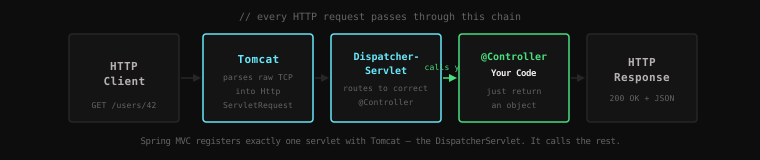
Spring MVC doesn't replace servlets — it uses them. At its core, Spring MVC registers exactly one servlet with the container: the DispatcherServlet.
Every HTTP request to a Spring MVC application goes to this one servlet. The DispatcherServlet then consults your @RequestMapping annotations to find the right @Controller method, calls it, and writes the response. The DispatcherServlet is the framework calling your code.
#What Is a WAR File?
A WAR file — Web Application Archive — is the packaging format for Java web applications meant to run inside a servlet container.
It's a ZIP file with a specific internal structure that the servlet container understands:
myapp.war
├── WEB-INF/
│   ├── web.xml                     ← deployment descriptor (configures servlets)
│   ├── applicationContext.xml      ← Spring bean configuration
│   ├── dispatcher-servlet.xml      ← Spring MVC configuration
│   ├── classes/                    ← compiled .class files
│   │   ├── com/
│   │   │   └── example/
│   │   │       ├── UserService.class
│   │   │       ├── UserRepository.class
│   │   │       └── UserController.class
│   └── lib/                        ← all JAR dependencies
│       ├── spring-webmvc-4.3.jar
│       ├── spring-core-4.3.jar
│       ├── jackson-databind-2.8.jar
│       └── ... (potentially 50+ JARs)
├── index.html                      ← static files (accessible directly)
├── styles/
│   └── main.css
└── images/
    └── logo.png
The WEB-INF/ directory is special — its contents are never served directly by the container. Only your application code can access things in WEB-INF/. Static files placed outside WEB-INF/ (like index.html, CSS, images) are served directly.
Your application — all your compiled code plus all its dependencies — is bundled into this one file.
#The Deployment Process, Step by Step
Here's what it took to deploy and run a Spring web application before Spring Boot.
#Step 1: Install Tomcat
Download Tomcat from the Apache website. Extract it. Set environment variables:
export CATALINA_HOME=/opt/tomcat
export JAVA_HOME=/usr/lib/jvm/java-8#Step 2: Configure Tomcat
Tomcat has its own configuration files in $CATALINA_HOME/conf/:
conf/
├── server.xml          ← connector ports, thread pool size, SSL config
├── context.xml         ← default context settings for all apps
├── web.xml             ← default servlet configuration
└── tomcat-users.xml    ← admin console users
If your application needed a database connection pool, you'd configure it here, in Tomcat's context.xml:
<Context>
    <Resource name="jdbc/MyDB"
              type="javax.sql.DataSource"
              driverClassName="com.mysql.jdbc.Driver"
              url="jdbc:mysql://localhost:3306/mydb"
              username="root"
              password="secret"
              maxActive="20"
              maxIdle="5"/>
</Context>
This is a JNDI resource — your Spring application would look it up by name: java:comp/env/jdbc/MyDB. Two separate pieces of configuration (Tomcat's XML and Spring's XML) had to refer to the same JNDI name for the wiring to work.
#Step 3: Build the WAR
mvn clean packageMaven compiles your code, packages everything into target/myapp.war.
#Step 4: Deploy
Copy the WAR to Tomcat's webapps/ directory:
cp target/myapp.war /opt/tomcat/webapps/#Step 5: Start Tomcat
/opt/tomcat/bin/startup.shTomcat starts, detects the WAR file, "explodes" it (unzips it), reads web.xml, initialises your Spring context, and begins serving requests.
This could take 30 seconds to several minutes depending on how many beans Spring was initialising.
#Step 6: Check That It Worked
tail -f /opt/tomcat/logs/catalina.outWatch the logs scroll by. Look for either:
INFO: Server startup in 12345 ms(success)SEVERE: Error starting...followed by a stack trace (failure)
If it failed, fix the problem, rebuild the WAR, stop Tomcat, copy the new WAR, start Tomcat again. Each iteration: several minutes.
#Step 7: Redeploy
When you change your code:
mvn clean package
/opt/tomcat/bin/shutdown.sh
cp target/myapp.war /opt/tomcat/webapps/
/opt/tomcat/bin/startup.sh
Or use Tomcat Manager — a web UI that let you undeploy and redeploy WARs without a full server restart. But it had its own auth configuration (back to tomcat-users.xml) and was often disabled for security reasons.
#The Problems With This Model
#Problem 1: Environment Disparity
Your laptop had Tomcat 6. Staging had Tomcat 7. Production had Tomcat 8. Each had different default configurations. Bugs that only appeared in one environment were common and hard to reproduce.
#Problem 2: Multiple Apps, Shared Container
Many teams ran multiple applications on one Tomcat instance (to share hardware costs). This created classloader isolation nightmares.
App A used Jackson 2.9. App B used Jackson 2.13. Both were loaded in the same JVM. Which version did shared code use? Depending on the classloader configuration, you'd get unpredictable results — or explicit classloader conflicts that were notoriously difficult to debug.
One app crashing could take down the entire Tomcat instance and all the other apps running in it.
#Problem 3: Configuration Duplication
Database credentials appeared in Tomcat's context.xml AND Spring's applicationContext.xml. They had to match. When they didn't — runtime error. This kind of configuration duplication was a source of constant, hard-to-trace bugs.
#Problem 4: Slow Feedback Loop
The compile → package → copy → restart → wait cycle meant a slow development loop. Every change — even a one-line fix — required a full redeployment. Hot-reload tools existed but were unreliable with Spring's complex context initialisation.
#The Complete Picture
By the mid-2000s, a typical Spring enterprise application involved:
applicationContext.xml— root Spring beansdispatcher-servlet.xml— Spring MVC beansweb.xml— servlet container bootstrapcontext.xml(Tomcat) — JNDI datasource- Vendor-specific deployment descriptors
- A separate Tomcat installation with its own configuration
- A WAR packaging and deployment ceremony on every change
Each of these files was hand-maintained XML. Each could go out of sync with the others. Each produced runtime errors when it did.
It worked. Teams built and shipped real software this way. But no one would describe the experience as joyful.
Key Takeaway: Java web applications before Spring Boot were hosted inside externally managed servlet containers. Deploying meant packaging a WAR, configuring the container, copying the file, and restarting — a slow, error-prone ceremony with multiple disconnected configuration files. Understanding this process makes it viscerally clear why "just run
java -jar" felt revolutionary. That's next lesson.