Spring XML Configuration Hell
Walk through the XML configuration era of Spring — what it looked like to wire a real application in XML, why it was so painful, and how annotations eventually replaced it.
#A Different Time
You now understand beans, component scanning, and the ApplicationContext. You declare your components with annotations and Spring figures out the rest.
But this wasn't always how Spring worked.
Spring was released in 2003. Annotations in Java didn't meaningfully arrive until Java 5 in 2004, and Spring didn't add annotation-based configuration until version 2.5 in 2007. For the first four years of Spring's existence — and for years after that in legacy codebases — all configuration was done in XML.
Understanding this era matters because:
- You will encounter it in older codebases
- It directly explains why Spring Boot and annotations feel so liberating
- Some edge cases still require XML-style explicit bean definitions
#The applicationContext.xml File
In the annotation world, you tell Spring "scan this package and find my components." In the XML world, you had to explicitly declare every single bean by hand.
The central configuration file was applicationContext.xml, placed in src/main/resources/.
Here's what a minimal XML configuration for a web application looked like:
<?xml version="1.0" encoding="UTF-8"?>
<beans xmlns="http://www.springframework.org/schema/beans"
       xmlns:xsi="http://www.w3.org/2001/XMLSchema-instance"
       xsi:schemaLocation="
           http://www.springframework.org/schema/beans
           http://www.springframework.org/schema/beans/spring-beans.xsd">

    <!-- DataSource bean -->
    <bean id="dataSource"
          class="org.springframework.jdbc.datasource.DriverManagerDataSource">
        <property name="driverClassName" value="com.mysql.jdbc.Driver"/>
        <property name="url" value="jdbc:mysql://localhost:3306/mydb"/>
        <property name="username" value="root"/>
        <property name="password" value="password"/>
    </bean>

    <!-- Repository bean — depends on dataSource -->
    <bean id="userRepository"
          class="com.example.repository.UserRepository">
        <constructor-arg ref="dataSource"/>
    </bean>

    <!-- Service bean — depends on userRepository -->
    <bean id="userService"
          class="com.example.service.UserService">
        <constructor-arg ref="userRepository"/>
    </bean>

    <!-- Controller bean — depends on userService -->
    <bean id="userController"
          class="com.example.controller.UserController">
        <constructor-arg ref="userService"/>
    </bean>

</beans>
This is a tiny application — four beans. Read it carefully and notice:
- Every class is declared with its fully qualified class name (
com.example.service.UserService) - Every dependency is declared explicitly —
<constructor-arg ref="userRepository"/>means "pass the bean nameduserRepositoryto the constructor" refis used for references to other beans;valueis used for literal strings and primitives
#Property Injection in XML
In the annotation world, you choose between constructor and setter injection by where you put @Autowired. In XML, these were explicit tags.
Constructor injection — <constructor-arg>:
<bean id="userService" class="com.example.UserService">
    <constructor-arg ref="userRepository"/>
    <constructor-arg ref="emailService"/>
</bean>
Setter injection — <property>:
<bean id="userService" class="com.example.UserService">
    <property name="repository" ref="userRepository"/>
    <property name="emailService" ref="emailService"/>
    <property name="maxRetries" value="3"/>
</bean>
The name attribute in <property> must exactly match a setter method: name="repository" calls setRepository(). If the setter didn't exist, you got a runtime error. Not a compile error. A runtime error.
#Real Complexity: A Database Configuration
The XML configuration for connecting to a database with a proper connection pool looked like this:
<!-- C3P0 connection pool datasource -->
<bean id="dataSource" class="com.mchange.v2.c3p0.ComboPooledDataSource"
      destroy-method="close">
    <property name="driverClass" value="com.mysql.jdbc.Driver"/>
    <property name="jdbcUrl" value="jdbc:mysql://localhost:3306/mydb"/>
    <property name="user" value="root"/>
    <property name="password" value="secret"/>
    <property name="minPoolSize" value="5"/>
    <property name="maxPoolSize" value="30"/>
    <property name="maxIdleTime" value="1800"/>
    <property name="acquireIncrement" value="5"/>
    <property name="maxStatements" value="150"/>
</bean>

<!-- Transaction manager -->
<bean id="transactionManager"
      class="org.springframework.jdbc.datasource.DataSourceTransactionManager">
    <property name="dataSource" ref="dataSource"/>
</bean>

<!-- JdbcTemplate -->
<bean id="jdbcTemplate"
      class="org.springframework.jdbc.core.JdbcTemplate">
    <property name="dataSource" ref="dataSource"/>
</bean>
Then if you wanted to enable transaction management:
<tx:annotation-driven transaction-manager="transactionManager"/>But wait — to use <tx:...> tags, you had to add the namespace declaration at the top of the file:
<beans xmlns="http://www.springframework.org/schema/beans"
       xmlns:tx="http://www.springframework.org/schema/tx"
       xmlns:xsi="http://www.w3.org/2001/XMLSchema-instance"
       xsi:schemaLocation="
           http://www.springframework.org/schema/beans
           http://www.springframework.org/schema/beans/spring-beans.xsd
           http://www.springframework.org/schema/tx
           http://www.springframework.org/schema/tx/spring-tx.xsd">
And you also needed a namespace for component scanning:
xmlns:context="http://www.springframework.org/schema/context"And another for MVC:
xmlns:mvc="http://www.springframework.org/schema/mvc"A real applicationContext.xml header could easily stretch 15-20 lines before a single bean was declared.
#The web.xml File
To run a web application, you also needed a web.xml deployment descriptor in WEB-INF/. This told the servlet container (Tomcat) how to bootstrap Spring.
<?xml version="1.0" encoding="UTF-8"?>
<web-app xmlns="http://java.sun.com/xml/ns/javaee" version="3.0">

    <!-- Bootstrap the root ApplicationContext -->
    <context-param>
        <param-name>contextConfigLocation</param-name>
        <param-value>/WEB-INF/applicationContext.xml</param-value>
    </context-param>

    <listener>
        <listener-class>
            org.springframework.web.context.ContextLoaderListener
        </listener-class>
    </listener>

    <!-- Spring MVC DispatcherServlet -->
    <servlet>
        <servlet-name>dispatcher</servlet-name>
        <servlet-class>
            org.springframework.web.servlet.DispatcherServlet
        </servlet-class>
        <init-param>
            <param-name>contextConfigLocation</param-name>
            <param-value>/WEB-INF/dispatcher-servlet.xml</param-value>
        </init-param>
        <load-on-startup>1</load-on-startup>
    </servlet>

    <servlet-mapping>
        <servlet-name>dispatcher</servlet-name>
        <url-pattern>/</url-pattern>
    </servlet-mapping>

</web-app>
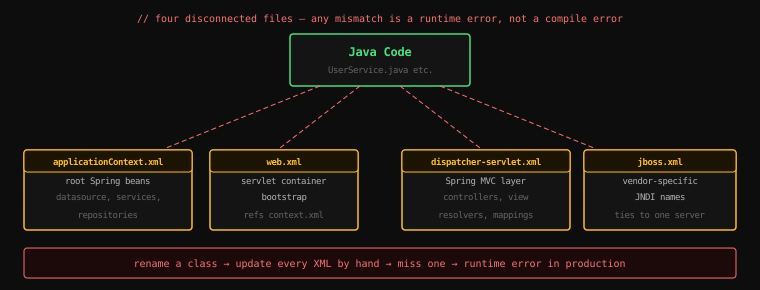
And yes — dispatcher-servlet.xml was a second XML configuration file, just for the web layer.
#Why It Was So Painful
By now you can feel the friction. But let's articulate exactly what made XML configuration a productivity killer.
#The Disconnection Problem
XML is completely disconnected from your Java code. Spring reads the XML and tries to instantiate your classes. If anything in the XML doesn't match your Java — wrong class name, wrong method name, wrong property name — Spring fails at runtime.
Rename com.example.UserService to com.example.user.UserService? Every XML reference to the old name breaks. Your IDE's refactoring tool doesn't know about XML strings. You'll find out when you deploy.
Compare this to annotations: @Service on a class is part of the class. Rename the class, the annotation moves with it.
#The Volume Problem
A medium-sized application might have 200 beans. That's potentially thousands of lines of XML just to wire them together — before you've written a single line of business logic.
As teams added features, the XML files grew. Multiple XML files were split by concern and imported into each other. Keeping them consistent became a task in itself.
#The Runtime Error Problem
Almost every mistake in XML configuration produces a runtime error:
- Wrong class name →
ClassNotFoundExceptionat startup - Wrong property name →
NoSuchMethodExceptionat startup - Wrong ref →
NoSuchBeanDefinitionExceptionat startup - Missing ref →
NullPointerExceptionin production
These could have been compile-time errors with a language-level solution, but they were pushed into a text file where no compiler could help you.
#The Migration Path: Annotations Take Over
Spring 2.5 (2007) introduced annotation-based configuration. Classes could now be marked with @Component, @Service, @Repository, @Controller. Dependencies could be declared with @Autowired.
Suddenly, you could replace hundreds of lines of XML:
<!-- XML: 5 lines per bean -->
<bean id="userService" class="com.example.UserService">
    <constructor-arg ref="userRepository"/>
</bean>
With two annotations:
@Service
public class UserService {
    public UserService(UserRepository repository) { ... }
}
Spring 3.0 (2009) went further — you could now write configuration in Java instead of XML:
@Configuration
public class AppConfig {
    @Bean
    public UserService userService(UserRepository repository) {
        return new UserService(repository);
    }
}
Same semantics as XML, but now in Java. Type-safe. Refactorable. Compile-time checked. IDEs could navigate from a @Bean definition to its usages.
By Spring 4 (2013), annotation and Java-based configuration had fully replaced XML for all but the most specialised use cases. Developers who lived through the XML era called it the "XML-free Spring."
#What Remains of XML Today
In modern Spring Boot applications, you will almost never write XML configuration. Spring Boot's auto-configuration handles most setup automatically.
The only places you might encounter XML:
- Legacy codebases that have never been migrated
- Very specific framework integrations that only provide XML namespace support
- Enterprise projects with extremely customised configuration requirements
If you join a team with a Spring XML codebase, the pattern is always the same: <bean> elements map directly to class instantiations; <property> and <constructor-arg> map to setter and constructor injection. You can read it like a verbose Java code equivalent.
Key Takeaway: XML configuration gave Spring enormous flexibility but buried developers in verbose, runtime-error-prone boilerplate that was completely disconnected from the Java code it described. Annotations solved the disconnection problem — configuration moved into the code itself, making it type-safe and refactorable. This migration from XML to annotations is the direct predecessor to Spring Boot's "no configuration needed" auto-configuration approach.
Next: the deployment ritual that matched the XML complexity — packaging WAR files and managing external Tomcat servers.