The Spring ApplicationContext Deep Dive
Go inside Spring's IoC container — how component scanning works, what the @Component hierarchy means, how Spring resolves the dependency graph, and how @Configuration classes define beans explicitly.
#The Container Has a Name
In the previous lesson we talked about the "IoC container" as an abstract concept. Time to make it concrete.
Spring's IoC container is an object of type ApplicationContext. It's the brain of your Spring application — the thing that knows about every bean, every dependency, every lifecycle hook, and every configuration detail.
When you run a Spring application, the very first thing that happens is the creation of an ApplicationContext. Everything else — your controllers, services, repositories — exists inside of it.
#Component Scanning: How Spring Discovers Your Classes
You have hundreds of classes. Spring needs to find the ones it should manage. It does this through component scanning.
When Spring starts, it scans a set of packages looking for classes annotated with @Component or any annotation that is derived from @Component (more on that shortly). Every class it finds becomes a candidate to be a Spring-managed bean.
@SpringBootApplication
public class MyApp {
    public static void main(String[] args) {
        SpringApplication.run(MyApp.class, args);
    }
}
@SpringBootApplication includes @ComponentScan, which tells Spring: scan the package this class lives in, and all sub-packages, for components.
If your main class is in com.example.myapp, Spring scans:
com.example.myappcom.example.myapp.controllerscom.example.myapp.servicescom.example.myapp.repositories- ... and every other sub-package
Any class annotated with @Component in those packages is registered as a bean.
#The @Component Hierarchy
@Component is the root annotation. It means: "Spring, manage this class."
But Spring provides specialised versions of @Component for different architectural layers. These are called stereotype annotations, and they carry the same fundamental meaning — "this is a Spring bean" — while also conveying intent.
#@Component
The generic base. Use it for anything that doesn't fit the more specific categories.
@Component
public class PasswordEncoder {
    public String encode(String raw) {
        return BCrypt.hash(raw);
    }
}#@Service
Marks a class as a business logic component. No technical difference from @Component — the distinction is semantic and for human readers.
@Service
public class UserService {
    private final UserRepository repository;

    public UserService(UserRepository repository) {
        this.repository = repository;
    }

    public User createUser(String name, String email) {
        // business logic here
    }
}#@Repository
Marks a class as a data access component. Same as @Component at the annotation level, but Spring adds one behaviour: it translates database-specific exceptions (like SQLException) into Spring's generic DataAccessException. This means your service layer doesn't have to catch JDBC-specific exceptions.
@Repository
public class UserRepository {
    private final JdbcTemplate jdbc;

    public UserRepository(JdbcTemplate jdbc) {
        this.jdbc = jdbc;
    }

    public User findById(Long id) {
        return jdbc.queryForObject(
            "SELECT * FROM users WHERE id = ?",
            userRowMapper,
            id
        );
    }
}#@Controller / @RestController
Marks a class as a web layer component. @RestController is @Controller + @ResponseBody — every method return value is automatically serialised to the HTTP response body.
@RestController
public class UserController {
    private final UserService service;

    public UserController(UserService service) {
        this.service = service;
    }

    @GetMapping("/users/{id}")
    public User getUser(@PathVariable Long id) {
        return service.findById(id);
    }
}
The right annotation communicates intent. Use @Service for business logic, @Repository for data access, @Controller for web handlers. A new developer reading the code immediately understands the role of each class.
#How Spring Resolves the Dependency Graph
Once Spring has found all your components, it needs to wire them together. Here's how it thinks about this:
- Collect all beans and their required dependencies (from constructor parameters)
- Build a dependency graph — A needs B, B needs C, C needs D
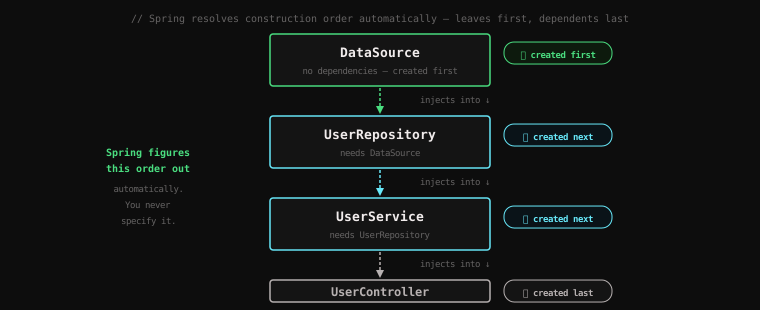
- Perform a topological sort — create the leaves first (things with no dependencies), then work up the tree
- Instantiate each bean and inject its dependencies
For a typical application:
DataSource   (no dependencies — created first)
     ↓
UserRepository (needs DataSource)
     ↓
UserService (needs UserRepository)
     ↓
UserController (needs UserService — created last)
Spring figures this order out automatically. You never specify it.
#What Happens When a Dependency Is Missing?
Say UserService requires a PaymentGateway but you forgot to annotate PaymentGateway with @Component:
***************************
APPLICATION FAILED TO START
***************************

Description:
Parameter 0 of constructor in com.example.UserService required a bean
of type 'com.example.PaymentGateway' that could not be found.

Action:
Consider defining a bean of type 'com.example.PaymentGateway' in your
configuration.
This is a feature, not a bug. Spring tells you exactly what's missing and where, at startup. Not at 3am in production when someone places an order. The application refuses to start until its wiring is complete.
#What Happens When There Are Multiple Candidates?
Say you have two implementations of UserRepository and Spring doesn't know which one to inject:
@Repository
public class JdbcUserRepository implements UserRepository { ... }

@Repository
public class MongoUserRepository implements UserRepository { ... }
Spring will throw:
NoUniqueBeanDefinitionException: expected single matching bean but found 2:
jbdcUserRepository, mongoUserRepository
Solutions:
@Primary — mark one implementation as the default:
@Repository
@Primary
public class JdbcUserRepository implements UserRepository { ... }
@Qualifier — specify which implementation you want at the injection point:
@Service
public class UserService {
    public UserService(@Qualifier("jdbcUserRepository") UserRepository repository) {
        this.repository = repository;
    }
}#@Configuration Classes: Defining Beans Explicitly
@Component scanning works great for your own classes. But what about third-party classes you can't annotate? What about beans that require complex setup logic?
This is where @Configuration classes come in.
A @Configuration class is a Java class that you own, where you define beans explicitly using @Bean methods. The method return value becomes a bean registered in the ApplicationContext.
@Configuration
public class AppConfig {

    @Bean
    public DataSource dataSource() {
        HikariConfig config = new HikariConfig();
        config.setJdbcUrl("jdbc:postgresql://localhost:5432/mydb");
        config.setUsername("postgres");
        config.setPassword("secret");
        config.setMaximumPoolSize(10);
        return new HikariDataSource(config);
    }

    @Bean
    public JdbcTemplate jdbcTemplate(DataSource dataSource) {
        return new JdbcTemplate(dataSource);
    }
}
Notice jdbcTemplate takes DataSource as a parameter. Spring sees this and automatically injects the DataSource bean defined above. You can use this same DI pattern inside @Configuration classes.
@Bean is useful when:
- The class belongs to a third-party library (you can't add
@Componentto it) - The bean requires non-trivial setup logic that doesn't belong in a constructor
- You need multiple beans of the same type with different configuration
#Bean Naming
Every bean in the ApplicationContext has a name. By default, the name is the class name with the first letter lowercased:
UserService→"userService"JdbcUserRepository→"jdbcUserRepository"@Bean public DataSource dataSource()→"dataSource"(method name)
You can override this:
@Service("accountManager")
public class UserService { ... }

@Bean("primaryDataSource")
public DataSource dataSource() { ... }
You usually don't need to think about bean names — Spring resolves dependencies by type, not name. But names matter when you have multiple beans of the same type and need to distinguish between them with @Qualifier.
#Eager vs Lazy Initialisation
By default, Spring creates all singleton beans at startup — eager initialisation. This is why startup-time failures happen immediately rather than later. The moment Spring starts, it creates every bean and verifies every dependency.
You can override this with @Lazy:
@Service
@Lazy
public class HeavyReportService {
    // Not created until first requested
}
@Lazy means the bean is created on first use, not at startup. Use this sparingly — you lose the startup-time safety check, and the first request that triggers creation pays the creation cost.
#Circular Dependencies
Circular dependencies happen when A depends on B and B depends on A.
@Service
public class ServiceA {
    public ServiceA(ServiceB b) { ... }
}

@Service
public class ServiceB {
    public ServiceB(ServiceA a) { ... }
}
With constructor injection, Spring will throw:
The dependencies of some of the beans in the application context form a cycle:
serviceA → serviceB → serviceA
This is almost always a design problem. If A and B depend on each other, they probably share responsibility that should be extracted into a third class C, which both can depend on without the cycle.
Spring Boot 2.6+ fails hard on circular dependencies by default. Don't try to work around it — fix the design.
Key Takeaway: The ApplicationContext is the central registry for all Spring-managed objects. It discovers beans through component scanning, registers explicit beans via
@Configuration/@Bean, builds and resolves the full dependency graph at startup, and fails loudly if anything is missing or ambiguous. The stereotype annotations (@Service,@Repository,@Controller) communicate intent while all functioning as@Componentunder the hood.
In the next lesson, we look at what managing all this configuration looked like before annotations existed — the XML configuration era.