Auto-Configuration — Reading the Classpath
Go inside Spring Boot's auto-configuration engine — how it reads the classpath, the @Conditional family of annotations, how starters work, and how to see exactly what Spring Boot is configuring for you.
#The Magic Needs an Explanation
You add spring-boot-starter-web to your pom.xml. You run the app. An HTTP server starts on port 8080. You didn't configure a server. You didn't define a DispatcherServlet bean. You didn't register Jackson message converters.
How does Spring Boot know to set all of this up?
The answer is auto-configuration — and it's not magic. It's a well-designed system you can read, understand, and influence. Let's take it apart.
#The Core Idea: Presence Implies Intent
Auto-configuration is built on one foundational assumption:
If a library is on your classpath, you probably want to use it.
If spring-webmvc is on the classpath, you're building a web application. Configure the web layer.
If HikariCP is on the classpath and you provided a datasource.url, configure a connection pool.
If spring-security is on the classpath, you probably want your endpoints protected.
Spring Boot reads your classpath and infers your intent from what's there. You only need to provide values that the library can't guess — like the database URL.
#@Conditional Annotations: The Decision Engine
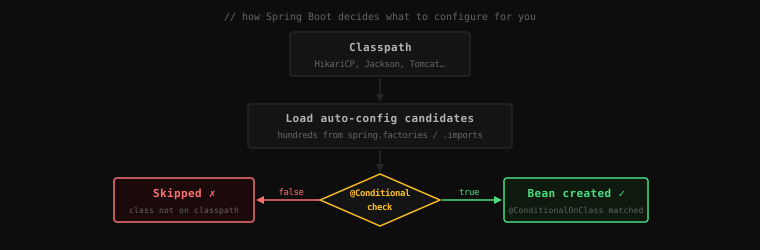
Every auto-configuration decision in Spring Boot is made by a @Conditional annotation. These annotations tell Spring: "only register this bean if this condition is true."
#@ConditionalOnClass
"Only activate this configuration if this class is on the classpath."
@Configuration
@ConditionalOnClass(DataSource.class)
public class DataSourceAutoConfiguration {
    // Only runs if DataSource.class exists on the classpath
    // i.e., only if you've added a database driver dependency
}
If you haven't added any database dependency, DataSource.class doesn't exist, the condition is false, and the entire DataSourceAutoConfiguration is skipped. No partial setup. No "configured a connection pool with no database driver" error.
#@ConditionalOnMissingBean
"Only register this bean if no bean of this type already exists."
@Bean
@ConditionalOnMissingBean(DataSource.class)
public DataSource dataSource(DataSourceProperties props) {
    return props.initializeDataSourceBuilder().build();
}
This is the escape hatch. If you've already defined a DataSource bean in your @Configuration class, Spring Boot sees it, the condition is false, and the auto-configured DataSource is not created. Your bean wins.
This is how "opinionated defaults with override capability" is implemented. Spring Boot offers a default. You can replace it by defining your own bean of the same type.
#@ConditionalOnProperty
"Only activate if a specific property is present (and optionally has a specific value)."
@Configuration
@ConditionalOnProperty(name = "spring.security.enabled", havingValue = "true", matchIfMissing = true)
public class SecurityAutoConfiguration {
    // Active by default (matchIfMissing = true)
    // Can be disabled by setting spring.security.enabled=false
}#@ConditionalOnMissingClass
The inverse of @ConditionalOnClass — only activate if a class is not present.
@Configuration
@ConditionalOnMissingClass("com.example.CustomJsonLibrary")
public class DefaultJacksonAutoConfiguration {
    // Use Jackson by default, unless a custom JSON library is present
}#The Full Family
Spring Boot provides many more: @ConditionalOnBean, @ConditionalOnWebApplication, @ConditionalOnExpression, @ConditionalOnJava, @ConditionalOnResource. Each gives you a precise way to describe the conditions under which a configuration should apply.
#How Spring Boot Discovers Auto-Configurations
You've seen that auto-configuration classes exist. But how does Spring Boot know which ones to look at?
Historically, Spring Boot used a file called spring.factories (in META-INF/ inside each Spring Boot JAR):
# META-INF/spring.factories
org.springframework.boot.autoconfigure.EnableAutoConfiguration=\
  org.springframework.boot.autoconfigure.web.servlet.WebMvcAutoConfiguration,\
  org.springframework.boot.autoconfigure.data.jpa.JpaRepositoriesAutoConfiguration,\
  org.springframework.boot.autoconfigure.jackson.JacksonAutoConfiguration,\
  org.springframework.boot.autoconfigure.jdbc.DataSourceAutoConfiguration,\
  ... (hundreds more)
Spring Boot 2.7+ moved to META-INF/spring/org.springframework.boot.autoconfigure.AutoConfiguration.imports — same idea, cleaner format.
When Spring Boot starts with @EnableAutoConfiguration, it reads this file, loads all listed configuration classes, and evaluates each one's @Conditional annotations. Classes whose conditions are met contribute beans. The rest are silently skipped.
#Starters: Curated Dependency Bundles
You've seen references to spring-boot-starter-web and spring-boot-starter-data-jpa. These are starters — a Spring Boot concept that solves the "which JARs do I add?" problem.
A starter is a Maven/Gradle dependency that pulls in a curated set of libraries known to work well together, at compatible versions.
<!-- This one dependency pulls in: -->
<!-- spring-webmvc, spring-web, spring-context, jackson-databind, -->
<!-- tomcat-embed-core, tomcat-embed-websocket, hibernate-validator, -->
<!-- spring-boot-starter (logging, spring-core, etc.) -->
<dependency>
    <groupId>org.springframework.boot</groupId>
    <artifactId>spring-boot-starter-web</artifactId>
</dependency>
Without starters, you'd manually search for compatible versions of each library. With starters, you say "I want web" and Spring Boot provides the whole curated stack.
Common starters:
| Starter | What it includes |
|---|---|
spring-boot-starter-web | Spring MVC, embedded Tomcat, Jackson |
spring-boot-starter-data-jpa | Hibernate, Spring Data JPA, HikariCP |
spring-boot-starter-security | Spring Security |
spring-boot-starter-test | JUnit 5, Mockito, AssertJ, Spring Test |
spring-boot-starter-data-redis | Spring Data Redis, Lettuce (Redis client) |
spring-boot-starter-actuator | Health checks, metrics, monitoring endpoints |
Each starter also acts as the classpath trigger for the corresponding auto-configuration. Adding spring-boot-starter-data-jpa puts EntityManagerFactory.class on the classpath, which triggers JpaRepositoriesAutoConfiguration, which sets up your Spring Data repositories.
#DataSource Auto-Configuration: A Full Example
Let's trace exactly what happens when you add spring-boot-starter-data-jpa and a PostgreSQL driver:
Step 1: Dependencies added
<dependency>
    <groupId>org.springframework.boot</groupId>
    <artifactId>spring-boot-starter-data-jpa</artifactId>
</dependency>
<dependency>
    <groupId>org.postgresql</groupId>
    <artifactId>postgresql</artifactId>
</dependency>
Step 2: application.properties
spring.datasource.url=jdbc:postgresql://localhost:5432/mydb
spring.datasource.username=postgres
spring.datasource.password=secret
Step 3: Spring Boot starts
@EnableAutoConfigurationloads all auto-configuration candidatesDataSourceAutoConfigurationis evaluated:@ConditionalOnClass(DataSource.class)→ true (postgresql driver is on classpath)@ConditionalOnMissingBean(DataSource.class)→ true (you haven't defined one)- Result: Spring Boot creates a
HikariDataSourcebean, reads thespring.datasource.*properties, configures the pool
JpaRepositoriesAutoConfigurationis evaluated:- Depends on
DataSourcebean existing → true (just created) - Creates
EntityManagerFactory(Hibernate) - Creates
JpaTransactionManager - Scans for
@Repositoryinterfaces extendingJpaRepository - Creates proxy implementations for each one
- Depends on
You wrote zero configuration. Spring Boot read the classpath, read your properties, and assembled a fully working database layer.
#Seeing What Spring Boot Is Actually Doing
Auto-configuration can feel opaque. Spring Boot provides a way to make it transparent.
#The --debug Flag
Start your application with --debug:
java -jar myapp.jar --debugOr in application.properties:
debug=trueSpring Boot prints an auto-configuration report in the startup logs:
============================
CONDITIONS EVALUATION REPORT
============================

Positive matches:
-----------------
   DataSourceAutoConfiguration matched:
      - @ConditionalOnClass found required class 'javax.sql.DataSource' (OnClassCondition)

   JacksonAutoConfiguration matched:
      - @ConditionalOnClass found required classes 'com.fasterxml.jackson.databind.ObjectMapper'

Negative matches:
-----------------
   ActiveMQAutoConfiguration:
      - @ConditionalOnClass did not find required class
        'javax.jms.ConnectionFactory' (OnClassCondition)

   MongoAutoConfiguration:
      - @ConditionalOnClass did not find required class
        'com.mongodb.MongoClient' (OnClassCondition)
Positive matches are auto-configurations that activated. Negative matches are ones that didn't (and why). This report is your definitive answer to "what is Spring Boot setting up for me?"
#Spring Boot Actuator
If you add spring-boot-starter-actuator, the /actuator/conditions endpoint gives you the same report over HTTP — useful in running applications:
{
  "positiveMatches": {
    "DataSourceAutoConfiguration": [
      {
        "condition": "OnClassCondition",
        "message": "@ConditionalOnClass found required class 'javax.sql.DataSource'"
      }
    ]
  }
}#Overriding Auto-Configuration
The whole system is designed to step aside when you know better.
Override with your own bean:
@Configuration
public class AppConfig {
    @Bean
    public ObjectMapper objectMapper() {
        // Spring Boot's Jackson auto-config backs off — your ObjectMapper wins
        return new ObjectMapper()
            .configure(DeserializationFeature.FAIL_ON_UNKNOWN_PROPERTIES, false)
            .registerModule(new JavaTimeModule());
    }
}
Override with properties:
# Change connection pool size (overrides HikariCP default of 10)
spring.datasource.hikari.maximum-pool-size=50

# Change server port
server.port=9090

# Disable a specific auto-configuration entirely
spring.autoconfigure.exclude=org.springframework.boot.autoconfigure.security.servlet.SecurityAutoConfiguration
Exclude from the annotation:
@SpringBootApplication(exclude = {SecurityAutoConfiguration.class})
public class MyApp { ... }
Key Takeaway: Auto-configuration is not magic — it's a conditional bean registration system.
@ConditionalOnClasssays "activate if this library is present."@ConditionalOnMissingBeansays "back off if the developer defined their own." Starters are curated dependency bundles that both provide libraries and trigger the corresponding auto-configurations. The--debugflag makes the entire system transparent. Auto-configuration gives you a complete, working application by default; every default is an escape hatch you can override with your own bean or a property.
Next: the last piece of the Spring Boot revolution — the embedded server and the fat JAR.