Number Representation
Unsigned integers, two's complement, and IEEE 754 floating point. Why 0.1 + 0.2 is not 0.3.
Before we begin — I hope you did the exercises on paper. Exercise 0.2(c) is exactly the kind of bug that separates engineers who ship reliable systems from ones who don't. If you didn't work it out, stop and do it now. Future lessons will assume this muscle memory.
Now, gird yourself. This is the long one.
Last lesson I taught you that two machines can disagree on what number a sequence of bytes represents, based on byte order. That was one kind of disagreement — mechanical, resolvable by convention.
Today is different. Today I'm going to teach you that the same machine, reading the same bits, can give you two completely different numbers depending on how the code interprets them. And worse: that for certain values, the "same arithmetic operation" can produce mathematically impossible results. Results that would make a fourth-grader point and laugh. Results that production systems silently produce millions of times a day, and that billions of dollars of infrastructure is built around working around.
By the end of this lesson, you will understand why 0xFF is both 255 and −1, why -Integer.MIN_VALUE == Integer.MIN_VALUE in Java, why 0.1 + 0.2 != 0.3 on every computer on Earth, and what that costs you in practice.
Open your notebook. Pour coffee.
#First: Reading Hex Notation
Before diving into numbers, I owe you an explanation I skipped in the last lesson. You saw 0x12, 0x35, 0xDEADBEEF. Let me make that notation explicit.
Hexadecimal is base-16 notation. Digits run from 0–9, then A–F for 10–15. The prefix 0x (or 0X) is how programming languages signal "this is a hexadecimal literal." So 0xFF does not mean "zero times x times F times F" — it means the hexadecimal number FF.
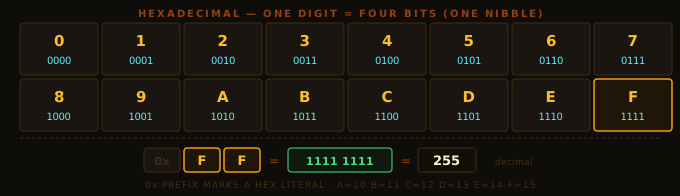
Why is hex everywhere in computing? Because each hex digit maps to exactly 4 bits — one nibble. Two hex digits map to one byte. A 32-bit integer needs exactly 8 hex digits (0xDEADBEEF). A 64-bit address needs 16. This makes hex the natural shorthand for binary data: compact, unambiguous, and directly decodable.
When you see 0xFF:
Fin the high nibble =1111Fin the low nibble =1111- Combined:
1111 1111 - In decimal: 128 + 64 + 32 + 16 + 8 + 4 + 2 + 1 = 255
When you see 0x35:
3=0011,5=0101→0011 0101→ 53 in decimal (the DNS port from last lesson)
Commit the hex table to muscle memory. It will save you minutes per debugging session for the rest of your career.
#The Fundamental Problem
Here is the setup. Memory stores bits. We've grouped them into bytes and agreed on byte order. Now we want to represent numbers. Not just non-negative integers — real numbers, negative numbers, fractions, physical constants.
The fundamental problem: we have a finite number of bits, and we want to represent an infinite set of numbers. This is mathematically impossible. Every numeric representation in computing is a compromise. Every one. There is no such thing as a numeric type that represents all numbers correctly. There are only trade-offs:
- Finite range, exact precision, fast operations — how integers work
- Enormous range, approximate precision, fast operations — how floating point works
- Arbitrary range, arbitrary precision, slow operations — how
BigIntegerandBigDecimalwork
Pick two. That's the universe.
Write this at the top of a fresh notebook page:
Every numeric type in every programming language is a compromise. There is no "real" number type in a computer.
Internalise this. It is the source of more subtle bugs than any other single fact in computing.
#Unsigned Integers: The Clean Case
Let's start with the simplest representation: non-negative integers.
Given n bits, you can represent 2ⁿ distinct values. If you dedicate all of them to non-negative integers, you get the range 0 to 2ⁿ − 1. The value of a bit pattern b(n-1) b(n-2) ... b(1) b(0) is:
value = b(n-1)·2^(n-1) + b(n-2)·2^(n-2) + ... + b(1)·2¹ + b(0)·2⁰Base-2 positional notation. Identical mental model to decimal, with place values being powers of 2 instead of powers of 10.
| Bits | Range | Max in hex |
|---|---|---|
| 8 | 0 to 255 | 0xFF |
| 16 | 0 to 65,535 | 0xFFFF |
| 32 | 0 to 4,294,967,295 | 0xFFFFFFFF |
| 64 | 0 to ~1.8 × 10¹⁹ | 0xFFFFFFFFFFFFFFFF |
Arithmetic wraps modulo 2ⁿ. If the result of adding two n-bit numbers doesn't fit in n bits, the high bits are silently discarded:
  200  =  1100 1000
+ 100  =  0110 0100
─────────────────────
         1 0010 1100   ← 9 bits; top bit discarded
           0010 1100   = 44, not 300
Mathematically, 200 + 100 = 300. But 300 mod 256 = 44. The CPU does not complain. The arithmetic silently produces a wrong answer. This is called overflow, and it is not an error — it is documented behavior, and it has destroyed things.
#The Ariane 5 Story
In 1996, the European Space Agency launched the Ariane 5 rocket on its maiden voyage. It was carrying hundreds of millions of dollars of scientific payload. Thirty-seven seconds after liftoff, the rocket veered off course and self-destructed.
The cause: a 64-bit floating-point value representing horizontal velocity was converted to a 16-bit signed integer. On the Ariane 4, that velocity was always small enough to fit in 16 bits. Ariane 5's more powerful engines produced a velocity exceeding 32,767 — the 16-bit signed maximum. The conversion overflowed. The guidance computer threw an exception. The backup guidance computer, running identical software, threw the same exception. Both shut down. The rocket, now unguided, tore itself apart.
Cost: approximately $370 million in 1996 dollars. Because someone wrote a type conversion that could overflow and didn't check.
Integer overflow is not a theoretical concern. It destroys rockets.
#The Problem with Negative Numbers: Three Attempts
Unsigned integers can't represent negative numbers. We need a signed scheme.
Engineers tried at least three approaches before finding the right one. You need to see all three — not because you'll use the failed ones, but because understanding why they failed is the only way to appreciate why the winner won.
#Attempt 1: Sign-Magnitude
Intuitive: use the leftmost bit as a sign (0 = positive, 1 = negative), and encode the magnitude in the remaining n−1 bits.
For 8 bits: 00000101 = +5, 10000101 = −5.
Two problems. First: two representations of zero (00000000 = +0, 10000000 = −0). Equality checks become complicated; you waste a bit pattern. Second: addition requires case analysis. Adding a positive and negative number isn't just "add the bits" — you have to compare magnitudes, determine the sign of the result, subtract. More logic in hardware. More transistors. More latency. In the 1950s, transistors were expensive. This killed sign-magnitude.
#Attempt 2: One's Complement
Represent −x by flipping all the bits of +x.
For 8 bits: 00000101 = +5, 11111010 = −5 (every bit flipped).
Addition is simpler, but one's complement still has two representations of zero: 00000000 = +0, 11111111 = −0. And it has a quirky "end-around carry" rule for addition. Some early computers (UNIVAC, PDP-1) used it. It lost.
#Attempt 3: Two's Complement — The Winner
This is what every modern CPU uses. Java's int, long, short, byte all use two's complement. Understanding it deeply is non-negotiable.
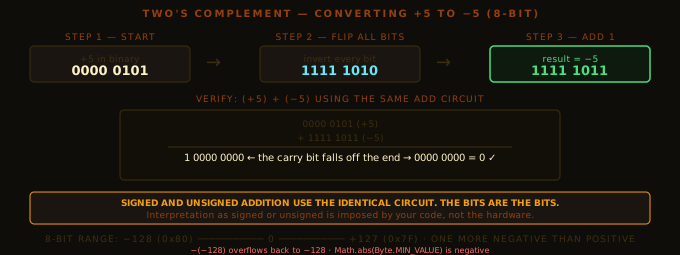
Rule: to negate a number, flip all bits, then add 1.
+5 =  0000 0101
       flip: 1111 1010
       +1:   1111 1011
−5 =  1111 1011
Check −1:
+1 =  0000 0001
       flip: 1111 1110
       +1:   1111 1111
−1 =  1111 1111     ← all ones. Remember this.
Check −0:
+0 =  0000 0000
       flip: 1111 1111
       +1:   0000 0000   ← carry falls off the end
−0 =  0000 0000 = +0
One representation of zero. That's the first win.
#Why Two's Complement Won
Watch what happens when you add +5 and −5 using the same plain binary addition circuit:
  0000 0101   (+5)
+ 1111 1011   (−5)
─────────────────
1 0000 0000   ← the 9th bit (carry) falls off the end
  0000 0000   = 0  ✓
Correct. And we used no special signed-addition circuit — just the same bitwise addition that works for unsigned integers. The carry overflow was silently discarded, and the result was correct.
Key insight: in two's complement, signed and unsigned addition use the exact same hardware circuit. The CPU doesn't need to know whether the operands are signed or unsigned. It adds the bits. The interpretation of the result is up to the programmer.
This is the killer feature. One addition circuit serves both signed and unsigned arithmetic. Fewer transistors, faster chips, cheaper hardware. This is why two's complement won.
Two's complement: the bits are the bits. Interpretation is imposed by your program, not the hardware.
This is the principle from Lesson 0.1 — meaning lives in the code — at a slightly larger scale.
#How to Interpret a Two's Complement Pattern
For an n-bit two's complement pattern b(n-1) b(n-2) ... b(1) b(0), the value is:
value = −b(n-1)·2^(n-1) + b(n-2)·2^(n-2) + ... + b(1)·2¹ + b(0)·2⁰The only difference from unsigned: the MSB has a negative place value. Everything else is positive.
Verify with 1111 1111 (which we said is −1):
value = −1·128 + 1·64 + 1·32 + 1·16 + 1·8 + 1·4 + 1·2 + 1·1
      = −128 + 127
      = −1  ✓
Verify with 1000 0000 (which should be −128):
value = −1·128 + 0 + 0 + ... + 0
= −128 ✓#The Range of Two's Complement
For n bits:
from −2^(n-1) to +2^(n-1) − 1| Java type | Bits | Min | Max |
|---|---|---|---|
byte | 8 | −128 | +127 |
short | 16 | −32,768 | +32,767 |
int | 32 | −2,147,483,648 | +2,147,483,647 |
long | 64 | −9,223,372,036,854,775,808 | +9,223,372,036,854,775,807 |
These are exactly Java's declared ranges. Don't memorise them — derive them. 2³¹ = 2,147,483,648. Minimum is −2³¹, maximum is 2³¹ − 1.
The range is asymmetric. One more negative than positive. Because zero lives on the positive side, the negative side gets one extra slot. That slot is −2^(n-1), the most negative value. This asymmetry causes the ugliest wart in two's complement, and you need to confront it directly.
Given the 8-bit pattern 10110010, what integer does it represent as unsigned? What does it represent as two's complement signed? Show the calculation for both.
#The Abomination: −Integer.MIN_VALUE
Take 8-bit two's complement. The minimum value is −128, represented as 1000 0000.
What is −(−128)?
Mathematically: +128. Obvious.
But +128 cannot be represented in 8-bit two's complement. Maximum is +127. So let's apply the mechanical rule — flip bits, add 1:
−128 =  1000 0000
        flip: 0111 1111
        +1:   1000 0000
We get 1000 0000 back. Which is −128.
In two's complement: −(−128) == −128.
In Java, for int:
System.out.println(Integer.MIN_VALUE);          // -2147483648
System.out.println(-Integer.MIN_VALUE);         // -2147483648  !!!
System.out.println(Math.abs(Integer.MIN_VALUE)); // -2147483648  !!!
Math.abs of an integer can return a negative number. This is not a Java bug. It is a mathematical consequence of the asymmetric range — +2,147,483,648 has no representation in 32-bit two's complement, so the negation wraps back to MIN_VALUE. The hardware doesn't know anything is wrong.
This is not a curiosity. Consider:
int absDistance = Math.abs(a - b);
// Fine unless a - b overflows to MIN_VALUE, in which case absDistance is negative.
// All downstream code assuming absDistance >= 0 silently produces garbage.
Math.subtractExact(a, b) and Math.absExact(int) exist specifically to throw ArithmeticException instead of silently wrapping. Use them in code where correctness matters.
Math.abs(Integer.MIN_VALUE)is negative.-Integer.MIN_VALUEis also negative. Two's complement is asymmetric, and this is the cost.
#Sign Extension: Why byte & 0xFF Is Everywhere
One more two's complement subtlety before floating point.
Suppose you have the 8-bit signed value −5 (1111 1011) and want to store it in a 32-bit int. How do you fill the extra 24 bits?
Not with zeros. Zero-extending 1111 1011 gives 0000 0000 0000 0000 0000 0000 1111 1011, which is +251, not −5.
With the sign bit. Sign extension copies the MSB leftward: 1111 1011 becomes 1111 1111 1111 1111 1111 1111 1111 1011. Under 32-bit two's complement:
value = −1·2³¹ + 1·2³⁰ + ... + 1·2³ + 0·2² + 1·2¹ + 1·2⁰
      = −2147483648 + 2147483643
      = −5  ✓
Correct. The hardware has a dedicated instruction for this (MOVSX on x86, versus MOVZX for zero-extension). When you write (int) someByte in Java, the JVM emits a sign-extension instruction because byte is a signed type.
This surprises people:
byte b = (byte) 0xFF;  // 0xFF stored as a byte = -1 (all bits set, MSB = 1)
int x = b;             // sign-extended: -1
int y = b & 0xFF;      // mask off the sign extension: 255

System.out.println(x); // -1
System.out.println(y); // 255
The idiom b & 0xFF appears millions of times in Java codebases. It strips the sign-extension bits and gives you the unsigned interpretation of the byte. Every time you read a byte from a socket, a file, or a byte array and you want values 0–255, you need this mask. Without it, bytes with bit 7 set silently become negative integers.
#Integer Overflow: The C vs Java Schism
A digression worth taking, because it reveals a deep engineering philosophy.
When you add two 32-bit signed integers in C and the mathematical result would exceed INT_MAX, what happens?
The C standard says: undefined behavior.
Not "wraps around." Not "throws an exception." Undefined — meaning the compiler is free to assume it never happens, and optimise accordingly.
Consider:
// C code — trying to detect overflow
if (x + 100 < x) { /* handle overflow */ }
On a machine with wrap-around arithmetic, this works: if x is near INT_MAX, x + 100 wraps negative, which is less than x. Overflow caught.
But the C compiler, seeing "signed overflow is undefined behavior," concludes "x + 100 cannot overflow, therefore it is always greater than x." The compiler deletes the entire check. Your overflow-detection code is optimised out of existence. The overflow still occurs at runtime — silently, undetected.
This class of vulnerability has a name: signed integer overflow optimisation bug. Major CVEs have been filed for it. The Linux kernel has had to fix hundreds of instances. The -fwrapv compiler flag exists specifically to disable this optimisation and force wrap-around behaviour.
Java took a different stance. The Java Language Specification mandates that integer overflow wraps, always, on every platform. No undefined behaviour. No platform variance. A Java program that overflows int will behave identically on every JVM on every CPU. It gives a wrong answer — but a predictable wrong answer you can reason about.
The trade-off: Java gives up some arithmetic optimisation opportunities. In practice, the performance difference is negligible. The safety difference is enormous.
Determinism is a feature. Non-determinism is a cost. Languages that choose determinism buy safety at the price of some performance. That trade is usually worth it.
We'll see this principle again in the lessons on concurrency and the JVM memory model.
#Floating Point: Representing Real Numbers
All right. Take a breath. We're leaving integers.
Integers let us count. But the world has quantities that aren't integers — lengths, weights, probabilities, physical constants. We need a representation for real numbers.
The fundamental problem is more brutal here: there are uncountably many real numbers in any interval. We have at most 2⁶⁴ bit patterns. So we're going to represent a tiny, discrete subset of real numbers and approximate everything else.
#Fixed Point: The Wrong Answer First
The first obvious approach: fixed-point representation. Pick a position for the binary point, and store the digits on either side as an integer.
For example, with 16 bits, reserve the low 8 for the fractional part and the high 8 for the integer part. The number 0000 0101.1000 0000 represents 5 + 0.5 = 5.5.
Fixed-point works well in a narrow domain — embedded systems, old 3D games (the original PlayStation's GPU was fixed-point), financial systems that only need cent-level precision. But it has a fatal flaw: uniform precision across the entire range. Your smallest step is always 1/256. Your largest value is around 128. You cannot represent Avogadro's number (6 × 10²³) and the mass of an electron (9 × 10⁻³¹) in the same type.
We need precision that scales with magnitude. Big numbers can afford to be coarse; small numbers need to be fine. This is exactly what scientific notation does on paper:
6.022 × 10²³   (Avogadro's number)
9.109 × 10⁻³¹  (electron mass)
Same notation, vastly different magnitudes. This is what floating point does, in binary.
#IEEE 754: The Universal Standard
In 1985, the IEEE standardised floating point in IEEE 754. Before this, every CPU vendor had their own format, and transferring floating-point data between machines was a nightmare. William Kahan (Intel, later Turing Award) led the effort. Every modern CPU implements IEEE 754. It is one of the great engineering standards of the 20th century.
Primary formats:
- 32-bit single precision — Java's
float - 64-bit double precision — Java's
double - 16-bit half precision — GPU and machine learning workloads (
float16)
Let me walk through each field.
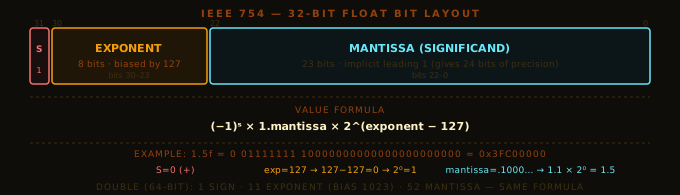
Sign (bit 31, 1 bit). 0 = positive, 1 = negative. Simple. Note that IEEE 754 has both +0 and −0 — numerically equal but bitwise different. Most of the time you don't care, but certain operations (1.0 / +0.0 vs 1.0 / -0.0) produce different infinities.
Exponent (bits 30–23, 8 bits). Stored as an unsigned integer with a bias of 127. An exponent field of 01111111 (127) means 127 − 127 = 0, so the power of 2 is 2⁰ = 1. An exponent field of 10000001 (129) means 129 − 127 = 2, so 2² = 4. Why biased instead of two's complement? So that floating-point values can be compared using integer comparison on their raw bits — larger bits-as-integer means larger float (for positives). The hardware can reuse its integer comparison circuit.
Mantissa (bits 22–0, 23 bits). Stores the fractional bits after the implied binary point. Here's the trick: IEEE 754 has an implicit leading 1. In binary scientific notation, the leading digit is always 1 (it can't be 0 for nonzero values, and binary only has 0 and 1). So the format never stores it — it's always assumed. This gives you 24 bits of effective precision from a 23-bit field.
The value represented is:
value = (−1)ˢ × 1.mantissa × 2^(exponent − 127)Worked example — encoding 1.5:
1.5 in binary scientific notation: 1.1 × 2⁰ (one, plus one-half).
- Sign: positive → S = 0
- Exponent: 0, biased → 0 + 127 = 127 →
0111 1111 - Mantissa: the bits after the implicit
1.→1, then 22 zeros →10000000000000000000000
Full 32-bit pattern: 0 01111111 10000000000000000000000 = 0x3FC00000.
float f = 1.5f;
System.out.printf("0x%08X%n", Float.floatToRawIntBits(f));
// Output: 0x3FC00000 ← exactly what we calculated#The Notorious Catastrophe: 0.1 + 0.2 != 0.3
Now encoding 0.1. This is where it breaks.
0.1 = 1/10. To convert to binary, repeatedly multiply the fractional part by 2 and collect the integer part:
0.1 × 2 = 0.2  → 0
0.2 × 2 = 0.4  → 0
0.4 × 2 = 0.8  → 0
0.8 × 2 = 1.6  → 1  (remainder 0.6)
0.6 × 2 = 1.2  → 1  (remainder 0.2)
0.2 × 2 = 0.4  → 0
0.4 × 2 = 0.8  → 0
0.8 × 2 = 1.6  → 1
0.6 × 2 = 1.2  → 1
...            (0011 repeats forever)
0.1 in binary is 0.0001100110011001100110011... — a repeating binary fraction, infinite in length. It cannot be represented exactly in any finite number of bits. Ever. On any hardware.
When you write double d = 0.1;, the compiler rounds the infinite expansion to 53 significant bits (52 mantissa + 1 implicit). The stored value differs from 0.1 by about 5.5 × 10⁻¹⁸. Tiny — but not zero.
0.2 has the same problem. So does 0.3 — except it rounds to a slightly different side.
When you add the double approximations of 0.1 and 0.2:
System.out.println(0.1 + 0.2);          // 0.30000000000000004
System.out.println(0.1 + 0.2 == 0.3);   // false
The double approximation of (0.1 + 0.2) is slightly larger than the double approximation of 0.3. The gap is about 4 × 10⁻¹⁷. When Java converts the result to a decimal string, it uses enough digits to uniquely identify the double — and those extra digits are what you see.
This is not a bug in Java. Not a bug in IEEE 754. Not a bug in your CPU. It is a direct mathematical consequence of representing decimal fractions in binary. Python, C, Rust, Go, JavaScript — every language that uses IEEE 754 double produces exactly the same result, because they all use the same standard. The "wrong" answer is the correct wrong answer.
0.1 + 0.2 != 0.3is not a bug. It is a mathematical consequence of binary being unable to represent most decimal fractions exactly. Every IEEE 754 implementation on Earth produces this result.
Why can 0.1 not be represented exactly in IEEE 754 floating point? What would need to be true about a decimal fraction for it to have an exact binary representation?
#Why Financial Systems Use BigDecimal
You now understand why banks don't use double for monetary values. If you store $0.10 as a double, you're storing something like $0.10000000000000000555. Perform a million transactions, and the errors accumulate into real money that doesn't balance. Audit trails diverge.
BigDecimal stores numbers as (unscaled value, scale): the integer 1 paired with scale −1 means 1 × 10⁻¹ = 0.1, exactly. No binary approximation. Every arithmetic operation on BigDecimal is exact in decimal arithmetic.
The cost: BigDecimal operations are roughly 200× slower than double. Every operation allocates a new heap object. For financial code doing thousands of operations per transaction — fine. For game physics or machine learning doing billions per second — catastrophic.
#Why Game Engines Use double, Not BigDecimal
A 3D game running at 60 fps, rendering 100,000 triangles per frame, executes roughly 600 million floating-point operations per second. double performs this in one CPU cycle per operation, sometimes more with SIMD vectorisation. BigDecimal would be 200× slower and would trigger the GC every few milliseconds. Impossible.
Games accept that the physics simulation accumulates small floating-point errors over time. Rounding a character's position by a micrometre every frame is invisible. Nobody cares.
Different domains, different trade-offs. Engineering is the management of trade-offs, forever.
#Special Values: The Floating-Point Underworld
IEEE 754 defines several values that aren't normal numbers. You need to know they exist.
#Infinity
When a floating-point operation produces a result larger than the maximum representable value, the result is infinity (+∞ or −∞) — not an exception. An actual value.
System.out.println(1.0 / 0.0);    // Infinity
System.out.println(-1.0 / 0.0);   // -Infinity
System.out.println(Double.POSITIVE_INFINITY + 1); // Infinity
System.out.println(Double.POSITIVE_INFINITY - Double.POSITIVE_INFINITY); // NaN
Yes — floating-point division by zero does not throw. It returns infinity. Integer division by zero throws ArithmeticException; float division by zero doesn't. This is a common source of "why isn't this crashing?" confusion.
In 32-bit float: +∞ is the bit pattern 0 11111111 00000000000000000000000 = 0x7F800000. The exponent is all-ones; the mantissa is all-zeros. Any other all-ones exponent with nonzero mantissa is a NaN.
#NaN: Not a Number
NaN is the result of operations that are mathematically undefined: 0.0 / 0.0, ∞ − ∞, Math.sqrt(-1), Math.log(-1).
NaN has the most disturbing property in all of computing:
double x = 0.0 / 0.0;
System.out.println(x == x);   // false
System.out.println(x != x);   // true
NaN is not equal to itself. This is the only value in IEEE 754 with this property. It's a deliberate design choice: it signals "the result is undefined and you cannot reason about it."
Every comparison with NaN is false, except != which is true. The consequences are severe:
Double.NaN == Double.NaN          // false
Double.NaN > 0                    // false
Double.NaN < 0                    // false
Double.NaN >= 0                   // false — not comparable

// Data structure disasters:
TreeSet<Double> set = new TreeSet<>();
set.add(Double.NaN);
System.out.println(set.contains(Double.NaN)); // false — NaN cannot be located
NaN breaks every algorithm that relies on reflexivity of equality. Sorting arrays containing NaN produces nonsensical orderings. HashMap with Double.NaN as a key produces a key that can be put but never retrieved.
NaN is not equal to itself. This breaks every data structure and algorithm that assumes reflexivity of equality. Guard against it explicitly.
Use Double.isNaN(x) to check for NaN — never x == Double.NaN.
#Denormals (Subnormals)
The smallest normal float is about 1.18 × 10⁻³⁸. For values smaller than this, IEEE 754 uses denormal (subnormal) numbers by removing the implicit leading 1, allowing the exponent to go even smaller. Denormals let you represent values down to about 1.4 × 10⁻⁴⁵ in 32-bit float, at the cost of reduced precision.
Denormals are mathematically useful — they enable gradual underflow, where tiny values approach zero smoothly. But many CPUs handle denormal arithmetic in microcode rather than hardware, making those operations 10–100× slower than normal floating-point. This has caused production problems in audio processing: a silent input channel fills a buffer with tiny denormal values, and the CPU grinds. "Denormals-are-zero" (DAZ) and "flush-to-zero" (FTZ) are CPU flags that snap denormals to zero and avoid the penalty. You probably won't encounter denormals often, but if you ever profile code that mysteriously slows when values approach zero, denormals are a likely culprit.
You put Double.NaN into a HashMap as a key, then immediately call get() with Double.NaN. You get null back. The key is definitely in the map — you just put it there. What happened?
#The Three Strategies in Java
Let me bring this back to the ground.
Integer types (byte, short, int, long). Two's complement. Fixed size. Wrap on overflow (deterministically). One cycle on modern CPUs. Use these for counting, indexing, bit manipulation, and any quantity that can't be fractional. int for most things, long when you need more than ~2 billion. Never for money if you need decimal precision.
Floating-point types (float, double). IEEE 754. Fixed size. Approximate. Fast. Use for physics, graphics, statistics, machine learning, scientific computing — any domain where values are inherently approximate and speed matters. double is the default; float for GPU workloads or when you have millions of values in memory. Never for money.
Arbitrary precision (BigInteger, BigDecimal). Heap-allocated. Variable size. Exact. ~200× slower than floating point, allocates garbage. Use for financial calculations, cryptography, anything where exactness is non-negotiable. BigDecimal.divide() requires explicit RoundingMode — omitting it throws ArithmeticException on non-terminating results.
// Integer — fast, wraps on overflow
int i = Integer.MAX_VALUE;
System.out.println(i + 1);  // -2147483648 (wraps)
System.out.println(Math.addExact(i, 1));  // throws ArithmeticException (safe version)

// Double — fast, approximate
System.out.println(0.1 + 0.2);  // 0.30000000000000004
System.out.println(0.1 + 0.2 == 0.3);  // false

// BigDecimal — slow, exact
BigDecimal a = new BigDecimal("0.1");   // use String constructor, not double!
BigDecimal b = new BigDecimal("0.2");
System.out.println(a.add(b));           // 0.3 (exact)
System.out.println(a.add(b).compareTo(new BigDecimal("0.3"))); // 0 (equal)

// WARNING: never do this
BigDecimal wrong = new BigDecimal(0.1); // passes the double approximation to BigDecimal
System.out.println(wrong);             // 0.1000000000000000055511151231257827021181583404541015625
The BigDecimal(double) constructor is almost always the wrong choice. It captures the floating-point approximation, not the decimal value you intended. Always use BigDecimal(String) or BigDecimal.valueOf(double) (which converts via the string representation).
Pick the simplest type that meets your correctness requirements. Don't use
doublewhereintsuffices. Don't useBigDecimalwheredoublesuffices. Don't usedoublewhereBigDecimalis required.
Every numeric type declaration is a trade-off decision between range, precision, and speed. Make it consciously.
#What You Now Own
You can now read a bit pattern and tell anyone what number it represents — and more importantly, explain why the answer depends on the interpretation. You understand why two's complement won (one zero, shared hardware circuit), why its range is asymmetric (and the exact production bug that asymmetry produces), and why b & 0xFF is not a quirk but a direct consequence of sign extension. You understand that 0.1 + 0.2 != 0.3 is not a rounding bug but an arithmetic fact of binary representation, and you can derive why — not just quote it. And you can choose between int, double, and BigDecimal based on the actual trade-offs, not intuition. The next time a colleague proposes storing money in a double, you have a precise, technical reason to stop them.
#Exercises
Work all three on paper first.
Exercise 1 — Encode and verify. Encode the integer −12 in 8-bit two's complement, showing each step: (a) positive representation, (b) bit flip, (c) add 1. Then verify your result by applying the place-value formula value = −b(7)·128 + ... to confirm it gives −12.
Exercise 2 — Trace the bits. In Java, what does the following print? Work it out from the bit rules before running anything:
byte b = (byte) 200;
int x = b;
int y = b & 0xFF;
System.out.println(x + " " + y);
200 in binary is 1100 1000. 200 doesn't fit in a signed byte (max 127), so casting truncates to the 8-bit pattern. What does sign extension do to it? What does masking with 0xFF recover?
Exercise 3 — Engineering memo. You're building a graphics engine. You need to store a colour channel intensity from 0.0 (black) to 1.0 (full intensity) with 256 distinct levels. One colleague proposes float. Another proposes a scaled integer: store the value as a byte in range 0–255 and divide by 255.0 only when needed for computation. Write a short engineering memo (four to five sentences) arguing for one of them for a specific scenario. Your memo must state: which you choose, for what scenario, what you gain, and what you give up.