Bytes, Words, and Endianness
Why a byte is 8 bits, how memory lays out multi-byte integers, and the bug hiding in every network stack.
Last lesson I made you believe something uncomfortable: that a bit has no meaning. It's just voltage. Meaning lives in the code that reads it.
Today I'm going to make you believe something even more uncomfortable: even when you agree on the meaning of each bit, two computers can still disagree on the meaning of a number.
Not because one is broken. Not because of a bug. Because they were engineered by different people in different decades who made different, equally defensible choices. And because those choices were never unified, every network packet you send — every single one — pays a tax in CPU cycles to paper over the disagreement. That tax is paid trillions of times per second, globally, right now, as you read this. Forty-five years after the problem was formally articulated, we still haven't fixed it. We've just learned to live with it.
This is the lesson where the clean abstraction of "a number in a computer" first breaks. Once you see the crack, you'll see it everywhere.
#Why We Group Bits — And Why Eight
One bit is nearly useless. Two states — on/off, true/false — is the minimum unit of information, but it's not enough to represent text, numbers, or anything complex. So we group bits into larger units.
But here's the question nobody asks: why do we group them into eights? Why not sevens, or nines, or twelves?
There is no mathematical reason. None. A byte could have been any size. It's worth sitting with that fact before moving on.
In the 1950s and early 1960s, there was no consensus. IBM's early machines used 6-bit bytes — enough for uppercase letters, the ten digits, and a handful of punctuation. The PDP-10, which ran much of early computer science research at MIT's AI Lab and Stanford, used a 36-bit word that could be divided six ways. Some Honeywell systems used 9-bit bytes. ASCII itself, standardised in 1963, was a 7-bit encoding.
Then in 1964, IBM shipped the System/360. This was not a computer; it was the computer. It dominated business computing for a generation. System/360 used 8-bit bytes. Every competitor eventually aligned, because IBM had the customers and the software ecosystem, and interoperability meant adopting their conventions.
IBM chose 8 for three reasons that compound on each other:
One: power of two. If your byte size is a power of two, then dividing a memory address by the byte size becomes a bit shift. A bit shift costs one clock cycle. General integer division costs dozens. On a machine running a billion operations per second, this is not a micro-optimisation — it's a design constraint that determines whether your address arithmetic is fast. 6-bit and 9-bit bytes don't have this property. 4, 8, and 16 do. At the time, 4 was too small (not enough to encode a character), 16 was too large (wasteful for simple data), 8 was the intersection.
Two: ASCII fits with room to spare. 7 bits covers ASCII. 8 bits gives you ASCII plus one extra bit for parity — error detection on noisy communication lines. Later that spare bit was used for Latin-1 (Western European accented characters), and eventually abandoned for multi-byte UTF-8. But the original decision bought compatibility and safety at the same price.
Three: two hexadecimal digits per byte. A byte spans 0x00 to 0xFF — exactly two hex characters. Reading 0x3A is easier than reading 58 in decimal or 00111010 in binary when you're staring at a memory dump at 2 AM. The 8-bit byte makes hexadecimal a natural notation for human inspection.
So 8 is not sacred. It's IBM-in-1964 plus forty years of network effects.
One nomenclature note you'll hit constantly in networking. When you read RFCs — RFC 791 for IP, RFC 793 for TCP — you will not see the word "byte." You will see octet. The reason is historical pedantry: "byte" originally meant "smallest addressable unit on this machine," which was not always 8 bits. "Octet" means exactly 8 bits, unambiguously. Today they are synonyms in practice. Now you know why networking engineers say "octet."
What are the three reasons IBM chose 8 bits for a byte in the System/360? Reconstruct all three without looking back.
#The Anatomy of a Byte
A byte is 8 bits arranged by their place value.
Bit k contributes 2ᵏ to the total value of the byte. Bit 0 contributes 2⁰ = 1, bit 1 contributes 2¹ = 2, bit 7 contributes 2⁷ = 128. This is identical to how decimal works — the rightmost digit is the ones place, then tens, then hundreds, going left. We number from the right because the rightmost bit has the lowest place value.
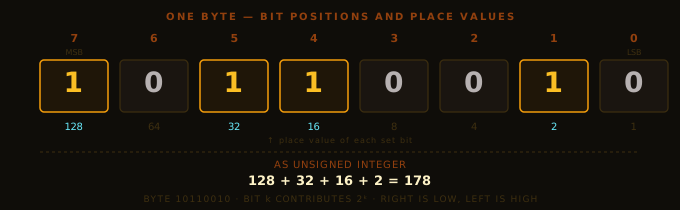
Two terms you'll encounter constantly:
- MSB — Most Significant Bit. Bit 7. Contributes the most to the value (128 of a possible 255). In signed integers, the MSB doubles as the sign bit — a convention we cover in the next lesson.
- LSB — Least Significant Bit. Bit 0. Contributes 1.
These terms extend to bytes too: in a multi-byte number, the most significant byte is worth the most, and the least significant byte is worth the least. That distinction is exactly what endianness is about.
#Memory Is a Gigantic Array of Bytes
Before talking about storing a multi-byte number, we need the right picture of memory.
RAM is, for our purposes, a single enormous array of bytes. Every byte has an address — a numerical label, like an array index. On a 64-bit machine, addresses are 64 bits wide, giving you 2⁶⁴ addressable bytes — roughly 18 billion gigabytes. We don't have that much RAM. But the address space is that large.
Four facts to internalise:
Memory is byte-addressable, not bit-addressable. There is no hardware instruction to fetch "bit 37." You fetch a byte and extract the bit yourself with (value >> 3) & 1. This is why BitSet from the last lesson does manual bit arithmetic — the hardware forces your hand.
Adjacent addresses are physically adjacent. The byte at 0x1001 is next to the byte at 0x1000. This adjacency is what makes arrays fast and linked lists slow — a point that will dominate Sub-course 2 when we build every data structure from scratch.
Addresses are themselves data. A pointer is a number stored in memory whose value is the address of some other memory. A 64-bit pointer is 8 bytes. When you write Node next in Java, next is 4 or 8 bytes (4 with compressed OOPs, 8 without — covered in Sub-course 1) containing the address of another Node. It's addresses all the way down.
Memory stores bytes, not types. An int is not a thing memory knows about. Memory knows about four consecutive bytes. Your program decides to call those four bytes "an int." That decision is a convention — and conventions differ between machines.
Which brings us to the problem.
#The Uncomfortable Question
Take the 32-bit integer 0x12345678. Four bytes: 0x12, 0x34, 0x56, 0x78. The 0x12 is the most significant byte — multiplied by 2²⁴ in the final value. The 0x78 is the least significant — multiplied by 2⁰.
I want to store this integer starting at address 0x1000. I have four consecutive slots: 0x1000, 0x1001, 0x1002, 0x1003. Four bytes need to go into four slots.
Which byte do I put at address 0x1000?
Stop. Think about this for ten seconds before reading on.
There is no obvious answer. You might say: "Put the most significant byte first — that's how we write numbers, biggest place value on the left." Fine. That's one convention.
You might equally say: "Put the least significant byte first at the lowest address." Also fine. That's another convention.
Both work. Both are self-consistent. Both are implementable. Neither is correct in any deep sense. And different CPU manufacturers chose differently, and nobody ever unified them.
#Big-Endian and Little-Endian
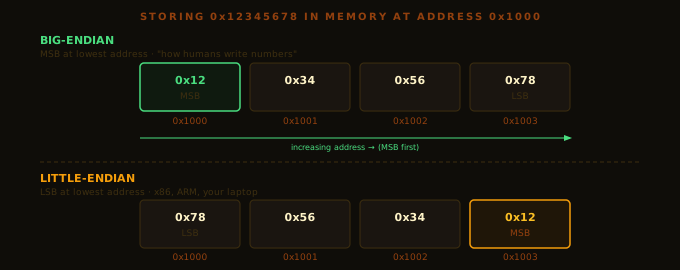
Big-endian: the most significant byte (0x12) goes at the lowest address (0x1000). Bytes decrease in significance as address increases: 0x12 → 0x34 → 0x56 → 0x78. This matches how humans write numbers — the millions place on the left. When you dump big-endian memory and read it left-to-right, the number reads exactly as you'd write it on paper.
Who uses big-endian: the Internet (every TCP, UDP, IP packet header — RFCs call this "network byte order"), IBM mainframes (z/Architecture, still running a large fraction of global financial transactions), and Java's wire format (DataOutputStream.writeInt() is always big-endian regardless of host CPU — a deliberate JVM portability choice).
Little-endian: the least significant byte (0x78) goes at the lowest address. Bytes increase in significance as address increases: 0x78 → 0x56 → 0x34 → 0x12. This looks backwards to humans — the first time you see a raw x86 memory dump you will think your debugger is broken — but it has a valuable property.
When the value is small — say 0x00000042 — the little-endian layout puts 0x42 at the lowest address. If you incorrectly read only 1 byte at that address instead of 4, you get 0x42, which is the numerically correct low byte. In big-endian, the same mistake gives you 0x00. Little-endian's property: reading the first N bytes of a K-byte integer (N < K) gives you the correct low-N bytes, zero-extended. In the 1970s, when type-punning was a common optimisation, this property was the difference between correct and incorrect programs. Intel chose little-endian for the 8080 in 1974 and never looked back.
Who uses little-endian: x86 and x86-64 (your laptop, almost certainly), ARM in its default mode (your phone, almost certainly), RISC-V (the rising open architecture).
Here is the reality of computing in 2026: your CPU is little-endian, your network is big-endian, and every network-facing piece of code you ever write has to bridge between them.
Your laptop is little-endian. A TCP packet arrives with 4 bytes in transmission order: 0x00, 0x00, 0x04, 0xD2. You read them into an int with no byte-order conversion, treating them as little-endian. What value do you get? What value was intended?
#The Concrete Bug
Let me show you exactly how this breaks production code. Thousands of engineers have shipped this exact bug, independently.
A UDP packet arrives. At a known offset is a 4-byte integer: port 53 (DNS), written by the sender in network byte order (big-endian). The 4 bytes on the wire: 0x00 0x00 0x00 0x35.
You read it on your little-endian laptop:
// The broken version people actually write
int port = ((packet[offset+3] & 0xFF) << 24)
         | ((packet[offset+2] & 0xFF) << 16)
         | ((packet[offset+1] & 0xFF) <<  8)
         |  (packet[offset+0] & 0xFF);
This manually assembles a little-endian integer. For bytes 0x00, 0x00, 0x00, 0x35 in transmission order:
packet[offset+0] = 0x00, shifted 0  bits → 0x00000000
packet[offset+1] = 0x00, shifted 8  bits → 0x00000000
packet[offset+2] = 0x00, shifted 16 bits → 0x00000000
packet[offset+3] = 0x35, shifted 24 bits → 0x35000000
                                           ──────────
                                   total = 0x35000000 = 889,192,448
Port 53, misinterpreted.
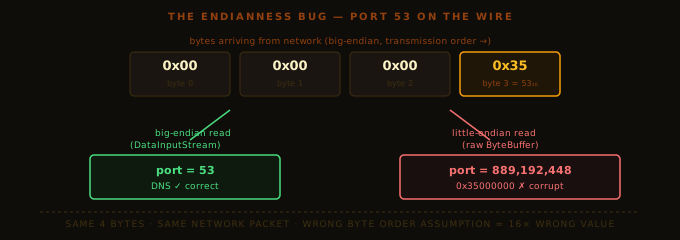
Why did local tests pass? Because the engineer tested with packets generated by their own Java code, under the same byte-order assumption. Send with one convention, read with the same convention — consistent, locally invisible, wrong on contact with the outside world.
This is the signature of an endianness bug: it passes every local test and shatters on contact with reality.
When data crosses a boundary — machine to machine, memory to wire, process to file — byte order matters. Every boundary is a potential endianness bug.
#Fixing It in Java
import java.io.*;
import java.nio.*;

public class EndianDemo {
    public static void main(String[] args) throws Exception {
        // DataOutputStream is always big-endian (network byte order) — use this for network data
        ByteArrayOutputStream baos = new ByteArrayOutputStream();
        DataOutputStream out = new DataOutputStream(baos);
        out.writeInt(53);
        byte[] wire = baos.toByteArray();

        System.out.printf("Port 53 on the wire: %02X %02X %02X %02X%n",
            wire[0], wire[1], wire[2], wire[3]);

        // DataInputStream for reading — also always big-endian
        DataInputStream in = new DataInputStream(new ByteArrayInputStream(wire));
        System.out.println("Port read back: " + in.readInt());

        // ByteBuffer: always set byte order explicitly
        ByteBuffer buf = ByteBuffer.wrap(wire);
        buf.order(ByteOrder.BIG_ENDIAN);
        System.out.println("Via ByteBuffer: " + buf.getInt());

        // Correcting a misread: Integer.reverseBytes swaps the byte order
        int misread = 0x35000000;
        System.out.println("After reverseBytes: " + Integer.reverseBytes(misread));
    }
}Port 53 on the wire: 00 00 00 35
Port read back: 53
Via ByteBuffer: 53
After reverseBytes: 53The rule: always declare byte order at the point you read or write multi-byte values. Never leave it implicit. DataInputStream/DataOutputStream are safest for network data — specified as big-endian in the JDK. For ByteBuffer, call .order() before the first getInt(). For manual bit assembly, label which byte goes in which position so the intent is visible in the code.
#The Fog of Terminology: Words and DWORDs
One quick detour, because vendor documentation will confuse you here for years.
A byte is 8 bits. Fixed. Universal.
A word is whatever the CPU designers said it was. The "natural register size" of the machine — and this definition was never standardised across vendors.
Intel's 8086 (1978) had 16-bit registers: a "word" was 16 bits. Intel froze that definition. Every Intel manual since — including docs for 64-bit chips today — uses "word" for 16 bits. 32 bits is a double word (DWORD). 64 bits is a quadword (QWORD).
ARM documentation uses "halfword" for 16 bits and "word" for 32 bits. Same vocabulary, different referents.
Java sidesteps this by naming types by semantics:
| Java type | Bits | Intel name | ARM name |
|---|---|---|---|
byte | 8 | byte | byte |
short | 16 | word | halfword |
int | 32 | dword | word |
long | 64 | qword | doubleword |
When someone says "word" in documentation without a bit count — ask them how many bits they mean. Half the time they don't know. Make them figure it out. Ambiguity in communication breeds bugs in code.
#The Four Places Endianness Bites You
Here is the practical catalog. These are the four boundaries, in Java code, where endianness will eventually burn you.
Place one — network protocols. The moment you read or write a multi-byte integer from a socket, you are crossing between host byte order and network byte order. DataInputStream/DataOutputStream handle this correctly. Raw ByteBuffer operations without .order() are a trap. Manual byte array assembly is a minefield.
Place two — binary file formats. Every binary format specifies a byte order. JPEGs are big-endian (historical). PNGs are explicitly big-endian in the spec. Windows BMP files are little-endian. WAV files are little-endian. Java class files are big-endian. Every new format you parse, check the spec's byte order section first.
Place three — cross-process shared memory and memory-mapped files. Two processes on the same machine agree on byte order — same CPU. But if you mmap a file created on a big-endian machine and read it on a little-endian machine, you have a problem. Hand-rolled binary serialisation formats that don't declare byte order are the most common source of this bug.
Place four — hash functions over binary data. MurmurHash, CityHash, xxHash, CRC32 — most hash functions are defined for a particular byte order. Run MurmurHash over the same int on a little-endian and big-endian machine and you get two different hashes. In a distributed system, two nodes partition the same key into different shards. This has caused multi-hour outages in production distributed caches. It is not theoretical.
A distributed cache uses MurmurHash3 to partition keys across 32 shards. A new node is provisioned on a big-endian CPU. The cluster misbehaves: keys land in wrong shards. What went wrong, and what is the minimal correct fix?
#Why We Never Fixed This
In 1980, Danny Cohen at USC wrote a paper called "On Holy Wars and a Plea for Peace" — a riff on Gulliver's Travels, where two nations fought a devastating war over which end of a boiled egg to open first. Cohen was writing about endianness. He named the conventions "big-endian" and "little-endian" deliberately, as a joke about the absurdity of the argument. He proposed standardising on big-endian. The IETF agreed: network byte order is big-endian, and that decision held.
For CPU-internal byte order, there was never a unified answer. Intel had built a massive ecosystem around little-endian x86. Motorola had built an equally massive one around big-endian 68000. IBM mainframes were big-endian. Switching any of them would have cost billions to accomplish nothing except aesthetic consistency. So the engineers whose CPU didn't match the wire format — eventually, x86 engineers, which means almost everyone — pay the byte-swap tax forever.
The philosophical lesson belongs in your notebook:
Incompatible standards, once entrenched, are never removed. They are only papered over with conversion layers.
Byte order. Character encodings. Line endings. Date formats. ID formats. Engineering is the perpetual management of irreconcilable conventions. You will spend a non-trivial fraction of your career at these boundaries.
#What You Now Own
You know why a byte is 8 bits — not because of mathematics, but because of IBM in 1964 and three compounding engineering properties. You understand why bits are numbered right-to-left (place value), what MSB and LSB mean at both bit and byte level, and how memory is a flat array of addressed bytes where type is a convention imposed by code, not hardware. Most importantly, you can reason precisely about endianness: draw the big-endian and little-endian layout for any multi-byte value from memory, identify the four boundary conditions where byte order produces bugs, and fix them using Java's standard library without guessing. The next time an endianness bug surfaces in a code review, you will catch it before it ships.
#Exercises
Do all three. Exercise 3 requires written reasoning before you touch a keyboard.
Exercise 1 — Draw the layouts. In your notebook, draw 0xDEADBEEF as it sits in memory at address 0x2000. Once under big-endian. Once under little-endian. Label each slot with its address and its hex value. Take your time — this is the muscle memory that will save you in a debugger.
Exercise 2 — Decode a network field. A 4-byte sequence arrives in a TCP packet in transmission order: 0x00 0x00 0x04 0xD2. What integer value is being transmitted? Show byte-by-byte calculation treating the bytes as big-endian. Verify by writing a small Java program that puts these bytes into a ByteBuffer with ByteOrder.BIG_ENDIAN and calls getInt().
Exercise 3 — The code review. A junior engineer writes:
int port = ByteBuffer.wrap(packet, offset, 4).getInt();They test it locally against a test server they wrote themselves in Java. All tests pass. They deploy, and half the packets report ports like 13,568 when they should be 53. What happened? Why did the local test pass? What one change fixes this correctly? What does that change tell you about where the bug actually lived?